Wallboard doesn't show any data

Status
Not open for further replies.

Intrilogy

Bronze Partner
Joined
Sep 9, 2021
Messages
2
Reaction score
0
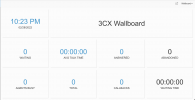
I require some guidance on setting up the wallboard. I've followed the standard process however my wallboard isn't showing any results.
Is there any specific tick boxes or settings to consider?

Screenshot 2022-02-28 at 22.23.21.png
 
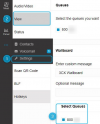
Provided you do have Call Queues with logged in agents that are receiving calls, do also make sure that the Webclient/Desktop app you're using is configured to include that Queue's statistics on it's Wallboard.

Go to Settings >> View >> Wallboard >> Select Queues:
1646131131044.png
 
Hi ChrisC_3CX,

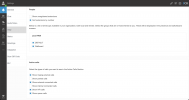
I don't seem to have the options you list above.
Where on the management console to do I add/select the queues?
Thank you in advance.

Regards
Aadil
 

Attachments

  • Screenshot 2022-03-02 at 11.02.31.png
    Screenshot 2022-03-02 at 11.02.31.png
    283.4 KB · Views: 57
If you do not see this option it means the extension you're logged in with is not a member or manager of a Call Queue. You will have to log in to the Management Console, go to Call Queues, create a Call Queue (if you don't have one already) and add this extension as an agent or a manager.

Do bear in mind that the Wallboard displays call statistics only for Call Queues and that is why it is empty if you do not have any call queues created or selected.
 
Status
Not open for further replies.

Forum statistics

Threads
112,349
Messages
592,027
Members
165,514
Latest member
megalmazan