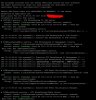
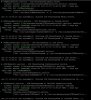
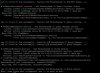
WARNING.WEB_SERVER_NOT_RESPONDING error

Status
Not open for further replies.

alexey_cheb

Joined
Oct 15, 2017
Messages
4
Reaction score
0
Dear Support,

Please help me to solve the problem below.
I have 3CX V.15.5 with the latest updates on Debian OS.
Every two days my server gives an error message (see below). I can not inter to the web-interface also.

looklie3.JPG looklie2.JPG


Calls do not pass through the server until Debian OS reboot or stopping and starting services from the command line of Debian OS.
Could you help me to solve this problem?
 
When this does happen, which services are stopped? You should get most 3CX services using: service 3CX* status

Also check that the machine has enough RAM, as Debian when it runs low on RAM can terminate services. You can check this using: free -h

You may want to also check the Linux syslog files to see if there is some log from the OS telling you why the service was stopped.
 
Dear Nick,

Thank you for answer.
All services still running, except HotelModul. I don't use it at all.

looklie.JPG looklie2.JPG looklie3.JPG

OK. I use Lenovo ThinkCentre M600 Tiny [10GBS00B00] nettop with 4 GB ram. I will check RAM next time.

Could you clarify which logs I shold to check? I have expiriense of work with Windows sytems. I don't have a lot information about bottlenecks of Debian OS. All basic function still working on Debian during 3CX hanging.

3CX logs do not shows any critical problems which shows that system do not respond.

When this does happen, which services are stopped? You should get most 3CX services using: service 3CX* status

Also check that the machine has enough RAM, as Debian when it runs low on RAM can terminate services. You can check this using: free -h

You may want to also check the Linux syslog files to see if there is some log from the OS telling you why the service was stopped.
 
Dear Nick,

I can't login to web interface again.

RAM report is here:
3cx.JPG

Аlthough now calls are being received.
 
Last edited:
OK, so if all 3CX services are running, calls are working, the next thing I would suggest while you are at the Management Console login page with the error, go to the Chrome Developer Tools page, the on "Console" and check if there is some exception there. This will show you any client side exceptions that might give a pointer.

If nothing stands out there, you could also check the logs in /var/lib/3cxpbx/Instance1/Data/Logs/ and specifically the ManagementConsole, the SystemService and the ConfService log.

The above might give you a clue as to what is causing the error.
 
There is information about present day only. I will check Management Console log right after next web-server error

3cx.JPG
 
Status
Not open for further replies.

Forum statistics

Threads
111,878
Messages
589,525
Members
164,728
Latest member
Depo Dore