Wav file to change in FR and EN directives

Status
Not open for further replies.

AWS2P

Silver Partner
Basic Certified
Joined
Jan 9, 2014
Messages
5,076
Reaction score
1,096
Hi,
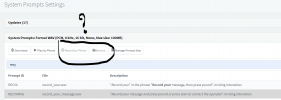
on a cloud pbx V18 on AWS lightsail, I use FR and EN directives, I need to change wav file asking to " press star to record a message or pound for operator" (3CX could this message be one day removed from release ? really useless) .

So first point is to be sure concerned file to update is really this one :

1643823667898.png
Then how do I need to process to change wav content? default prompt set directive is in French, how do I need to do to access same file for English?

I don't want to go in Debian folders if it's possible to process through 3CX console (what I hope)
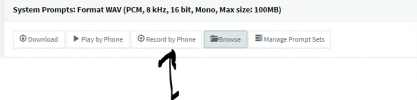
Is this usable to change the file from system prompt page
1643824092408.png
 
Well, I found file is the good one but now I encountered a problem with EN prompt set , in French (default set) I search for "recy" and found the wav to change , as I have prepared one, I just click on browse , select replacement file and then reboot services and done.
After that I selected EN prompt set and same file, but there browse button is greyed and no way to push my EN replacement file.
1643828879578.png

What do I need to do as in French it works and same in English no?
 
Last edited:
You won't be able to change the English Prompt set if it is the system's default prompt set. What you can do, is create a copy of the English Prompt set, edit the file you need and use that copied prompt set wherever you wish.
 
Hi Chris
no default prompt set is French and I did change on it, but switching to English and trying the same , buttons are greyed

Do you mean Prompt set is always by design defaulted to English ? even if you add a prompt set for another language?
 
Last edited:
Do you mean Prompt set is always by design defaulted to English ? even if you add a prompt set for another language?
Yes, the English Default prompt set cannot be edited, any other language is an addition to the prompts so those can.

Have you tried copying the English prompt?

Try:
1. Go to "Settings >> System Prompts >> Manage Prompts"
2. Select the "English System Prompt" and click on "Copy Prompt Set".
3. Name it and click on OK.
4. In "Manage Prompts" make sure that the new copied prompt is selected and click on OK.
5. Find the .wav file you want to edit (record_your_message.wav)
6. Click on Browse and upload your new file or record by phone.
7. Once done, use the "Play by Phone" to confirm the audio is correct.
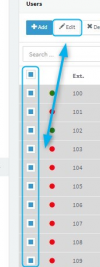
8. Go to Users/Extensions, edit an extension, click on Voicemail and set the new copied prompt set as the language.
9. Go to "Dashboard >> Services" and restart the 3CX IVR Service. I recommend you do this during a time the 3CX PBX is not being used as it will unregister system extensions and potentially drop calls.
10. Call that extension's voicemail to check with *4EXT# where EXT# is the extension number (e.g *4101)

Let me know how it goes.
 
Ok understood, next question is , when English prompt set is duplicated and customised, where I need to set this new prompt set to set is as default for english in replacement of the original one?
 
You would have to set the new duplicate prompt wherever you currently have the default one set.

For instance:

• If English is set as the PBX's global language the you should set the duplicate in "Settings >> System Prompts".
• Specifically for extensions set it in "Extensions >> Edit >> Voicemail >> Voicemail Language".
• For Call Queues it's in "Call Queues >> Edit >> Options >> Queue Language".
• For IVR's "Digital Receptionist >> Digital Receptionist Language".
 
This is exactly my fear and what i wanted to avoid trying to edit native promptset , now I need to manually set everywhere in 3CX to change from original EN to new name of prompt set duplicated
Customer is using both FR and EN on its PBX

An option to default it for system or a replacement tool to change in one time all settings in PBX could be an improvement
 
Last edited:
There is only one global setting for the system prompt and that is in the "Settings >> System Prompts" section. For the others you do have to set they language set manually but do bear in mind that extensions you can bulk edit to save time:
1643898292948.png
 
Other reason I wanted to edit native English is once prompt set is duplicated set is no more updated when 3CX give a new version, my idea was to keep ready customised wav file and then when prompset is updated then I just re apply my set of wav to keep customised audios
 
Other reason I wanted to edit native English is once prompt set is duplicated set is no more updated when 3CX give a new version, my idea was to keep ready customised wav file and then when prompset is updated then I just re apply my set of wav to keep customised audios
I see your point, but, in a scenario where you have created custom prompts for everything, you would lose everything due to the update overwriting all prompts as opposed to being able to keep them if you have created a duplicate system prompt.

In any case, if you have a mix of both custom and default prompts, you would have to, update the default one, create a new copy, add your custom prompts to the copy and reassign the new copy to all extensions/queues/IVRs, etc.
 
  • Like
Reactions: AWS2P
In any case, if you have a mix of both custom and default prompts, you would have to, update the default one, create a new copy, add you custom prompts to the copy and reassign the new copy to all extensions/queues/IVRs, etc.
Good idea didn't thought about this one:)
 
  • Like
Reactions: ChrisC_3CX
Status
Not open for further replies.

Forum statistics

Threads
111,974
Messages
590,083
Members
164,901
Latest member
Silent_Guru