Solved We have 3CX outbound routes starting with *7, *8, etc, but they fail on Teams. Could someone help me with the Teams dial plan?

Status
Not open for further replies.

notanuewuer

Free User
Joined
Sep 24, 2021
Messages
12
Reaction score
1
We use a bunch of outbound routes on 3CX, and on 3 of them they are prefixed with *7, *8, and *9 which is used to change the outbound caller ID. So, a user would dial *814162321100 for example, and the outbound route strips 2 digits, and sends 14162321100 to the designated route. On the Call Log, it shows it as the same, *814162321100. That's when using the 3CX application or softphone.

We have been using 3CX with Teams DirectRouting for a month now (AMAZING, like for real, SO good), but the main issue we have is any calls starting with a * always fail when dialed from the Teams client. I believe it's because of the Teams dial plans, as in the Teams call history it never shows the *. For example, if I dial the same *814162321100 on the Teams client that I do on the 3CX app, it fails, but the Call Log on 3CX shows it as +1814162321100 and the history on Teams client shows it as +1814162321100. I believe Teams adds +1 to all numbers before sending them to 3CX, as even if I 10 digit dial a number it shows on the Teams history as +1 before the number. So, it seems like it just drops or ignores the * which is my main issue.

Is there any way to possibly fix that on the Teams dial plan so that it supports sending * as well? Even dialing a 3CX dial code like *3 from the Teams client shows it on the 3CX Call Log as +13.

Thanks so much!
 
Check if you don't have a dial code beginning with those. If so, 3CX generates the dial plan accordingly so it may cause conflicts since Teams is the worst phone system and doesn't know how to handle most non-E164 numbers.
 
Hi,

the default rules generated by 3CX will not cover your use case. When you examine the first script you run in PowerShell for Teams, this script ensures that common users dialling patterns will end up in an e164 number (eg user dials US 10 digit number and it will be converted to +1{10 digit number}.

In your case, *6 and *8 will therefore not be sent to 3CX to match your outbound rules.
Notes:
1. *6 is by default a dial code in 3CX for office hours override and I recommend not using it in an overlap mapping.
2. you need to update your dial plan rules in Teams. I notice that some number patterns in teams are reserved and you cannot see them but they don't work, such as *11 will never be sent over to 3CX for whatever reason. So there is be a level we cannot control at all. The below change requires knowledge in regex and is not covered by our 3CX support, as we will only deal with the "default setup" of the scripts. Therefore I strongly advise changing the outbound rules in 3CX. If you like to try what I would try, then:

2.a
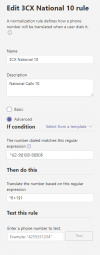
Go to https://admin.teams.microsoft.com/policies/teamsdialplan open "3CX Dial Plan" and open the matching outbound rule(s) for your country and add in the "Then do this" your *8
1632741291696.png

2b
Besides this we need to tell the SBC config in teams to allow this also.
https://admin.teams.microsoft.com/direct-routing/v2/voice-routes
Locate in the long string (\+\d+) and change it to --> (\*8\+\d+)
 
Hi,

the default rules generated by 3CX will not cover your use case. When you examine the first script you run in PowerShell for Teams, this script ensures that common users dialling patterns will end up in an e164 number (eg user dials US 10 digit number and it will be converted to +1{10 digit number}.

In your case, *6 and *8 will therefore not be sent to 3CX to match your outbound rules.
Notes:
1. *6 is by default a dial code in 3CX for office hours override and I recommend not using it in an overlap mapping.
2. you need to update your dial plan rules in Teams. I notice that some number patterns in teams are reserved and you cannot see them but they don't work, such as *11 will never be sent over to 3CX for whatever reason. So there is be a level we cannot control at all. The below change requires knowledge in regex and is not covered by our 3CX support, as we will only deal with the "default setup" of the scripts. Therefore I strongly advise changing the outbound rules in 3CX. If you like to try what I would try, then:

2.a
Go to https://admin.teams.microsoft.com/policies/teamsdialplan open "3CX Dial Plan" and open the matching outbound rule(s) for your country and add in the "Then do this" your *8
View attachment 24716

2b
Besides this we need to tell the SBC config in teams to allow this also.
https://admin.teams.microsoft.com/direct-routing/v2/voice-routes
Locate in the long string (\+\d+) and change it to --> (\*8\+\d+)

Thank you, the only problem I see here though is how does it know the user dialed *8? I don't want to change the normal 10 digit rule since users still will dial out normal 10 or 11 digit numbers, but they may optionally dial *8 or *9 before the number to pick the outbound route.

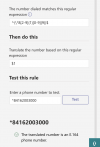
If I do it the way you did and I test dialing *84162003000 it says not valid E.164, but if I do just 4162003000 it translates to *8+14162003000. Shouldn't there be the *8 in the "if number dialed matches expression"?

Basically, there's 3 scenarios a user could do and for simplicity sake, 3 outbound routes:

1) User dials a 10 or 11 digit call normally - This uses the standard outbound route and is basically normal calls which works fine. Outbound name is the users Full Name, and outbound number is the users number under "Outbound caller ID."

2) User dials *8 before a 10 or 11 digit call - This uses a different outbound SIP Trunk which has the company name permanently set as the outbound Name display, and outbound number is the users number under "Outbound caller ID."

3) User dials *9 before a 10 or 11 digit call - This uses a different outbound SIP Trunk which has the company name permanently set as the outbound Name display, but the company main line set as the outbound number display.

This all works using 3CX apps but not Teams due to the dial plan issue. I tried for a bit getting rid of * and making it just 8 or 9 first but it gets confusing since numbers could actually start with those, so I prefer *. And thanks for the tip on *6, I don't actually use that one it was just an example! :)

Edit: Just wanted to add, I tried this last night which seemed to be correct based on the test, but it fails on calls and never dials out. I'm wondering if it's because I need to tell the SBC config about it like you mentioned? The below seems to work, I just wish it would send the call to 3CX as *84162003000 but it doesn't unfortunately.

1632751179805.png
 
Last edited:
it depends if you like to make out any 10 digits number an *8[number] or you require the user to dial the *8, then you need to change the dialplan, general your posted rule looks okay. Remember, the changes you make there can take up some hours until they become active. Also, don't forget to restart the teams client regularly to update the rules.
 
it depends if you like to make out any 10 digits number an *8[number] or you require the user to dial the *8, then you need to change the dialplan, general your posted rule looks okay. Remember, the changes you make there can take up some hours until they become active. Also, don't forget to restart the teams client regularly to update the rules.
Great thanks, would I need to update the SBC config setting as well for the voice route thing mentioned a couple posts above or not necessary? I had only given it maybe an hour before giving up so maybe I'll add it and try to wait 24 hours.
 
you need to adjust this also, as this is the validator to which SBC which types of Numbers can be sent.
If the format is not present, it will reject it.
 
  • Like
Reactions: Evolute IT
you need to adjust this also, as this is the validator to which SBC which types of Numbers can be sent.
If the format is not present, it will reject it.
Thank you, I will try posting on a Teams help forum to see if someone can let me know what to change this to. Have a great day.
 
Status
Not open for further replies.

Members Online Now

Forum statistics

Threads
111,831
Messages
589,277
Members
164,660
Latest member
RJenkinsROCK