Webmeeting erstellen geht nicht

Status
Not open for further replies.

F.Haeberle

Free User
Joined
Jul 1, 2019
Messages
5
Reaction score
0
Seit Anfang des Jahres geht das ERstellen eines Webmeetings offensichtlich nicht mehr:

https://192.168.xxx.xxx:5001/join/DzCEgErmZb5APn35NNmSj93A
Bei diesem Link bleibt die Webseite im Browser weiss.

Davor kommt eine Sicherheitsabfrage - die aber wohl bisher auch kam:
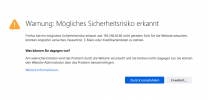
1641908496808.png

1641908666005.png

Noch eine kurze Info - es hat jahrelang gut funktioniert - und es gab an der hardware keine Änderung.

If you go to Settings --> Parameters and search for "WEBMEETING_INDEX", does a parameter come up?
If yes, can you copy-paste the content of it here?

Hier habe ich keinen Parameter mit WEBMEETING_INDEX
 
Hi!

I can't be sure, but I believe that you are not on V18. Can you please tell us what version your 3CX is on?
Also, please update V18 and try again. There have been many improvements for WebMeeting.
 
Aktuell kann ich nicht auf 18 umstellen, da wir Hardware-technisch uns nicht sicher sind, dass es funktioniert.
ProductProfessional Annual
Version Number16.0.16
 
Guten Morgen,
wir haben das Problem seit dem letzten V16 Update im Dezember.
Das Problem ist, das der Link auf den der Button im Client "Start a 3cx Video..." auf den FQDN zeigt und nicht auf den Webmeeting FQDN.
Erstaunlich das es dafür keine Lösung gibt und das dies nur wenigen aufgefallen ist.
Das Webmmeting Planen geht und ist der einzige Workaround bisher.
 
Hi Albi - super, dass Du dich meldest, danke für dein Feedback!
 
@F.Haeberle if I understand correctly, you are pressing the "Join" button from the 'old' Windows Client.
What this client does is, detects if it is local to the 3CX Server and if it is, uses the IP instead of the FQDN.

Instead, you can use the WebClient to schedule and access your WebMeetings.
Even better, upgrade to V18 and use the new Desktop App that offers a very similar experience as the WebClient, but does not require a browser to be open, it is installed on your PC.

Also on V18 you will take advantage of the new improvement to the WM platform.
 
if you press the "start a 3cx video conference now" button on the "old" client, the browser opens with the wrong address. namely the fqdn of the system, not with the webmeeting fqdn. all options are set correctly but the hardlink of the client seems to be wrong. planning the web meeting works.
 
if you press the "start a 3cx video conference now" button on the "old" client, the browser opens with the wrong address. namely the fqdn of the system, not with the webmeeting fqdn. all options are set correctly but the hardlink of the client seems to be wrong. planning the web meeting works.
What version is your 3CX Server? Are you sure you are not on V18?
 
We have Cloud-hosted Pro-Version : 16.0.16
The Client-Version is: 16.3.0.264
we have also single users with the previous client Version 16.3.0.220, there ar no problems with the webmeeting.
 
We have Cloud-hosted Pro-Version : 16.0.16
The Client-Version is: 16.3.0.264
we have also single users with the previous client Version 16.3.0.220, there ar no problems with the webmeeting.
Now I think I understand.
If you are on V16, you need to either use the WebClient, or upgrade to V18.
 
but this problem is obviously a bug? it works fine in the previous client version. and that's why we will not switch to the V18, which is apparently still quite buggy.
 
but this problem is obviously a bug? it works fine in the previous client version. and that's why we will not switch to the V18, which is apparently still quite buggy.
By the time you are using the word "apparently", this tells me that you have not tried it yourself.
I'd suggest trying it. Anyway, you will have to at some point, maximum by Oct-Nov 2022.

Regardless, the options you have right now are those that I mentioned.
You overlooked the option of using the Webclient. If you don't want to upgrade, you can always use that for now.

Don't forget that the 'old' Windows Client is supposed to work with V18 as well, that's why I believe this is happening.
 
I think it is great to have a possiblity with the Web-client. Thanks a lot NickD.
My questions is - is the update with Debian and 3cx safe?
 
I think it is great to have a possiblity with the Web-client. Thanks a lot NickD.
My questions is - is the update with Debian and 3cx safe?
I will tell you some approximate statistics. We have seen ~60.000+ upgrades from Deb9 to Deb10 which at the same time upgrades V16 to V18 go through without problems.

Yes, as I am sure you have read on our forum, some users have faced issues and the number of "issues" were probably less than 1000. In most of the cases where upgrades failed, the system didn't 'break', it just rolled back to V16 and the main causes were additional packages having been installed manually by the admins, or the hardware and/or hosting provider that it was installed on was not tested/supported, or the 3CX ISO wasn't used for the initial install.

To keep it short, if you have done everything as we have suggested in the past, then the % of you having a problem is quite low.

The advice I always give is:
  1. Make sure your V16 is on U8A
  2. Schedule a time when you will do the upgrade
  3. Take a backup and download it to your local machine
  4. Try the automatic way through the Management Console
  5. In the off-chance of an error, be prepared to have to re-install 3CX and restore the backup
I should also note that this upgrade is the perfect opportunity if you wanted to make a move from on-prem to hosted, or even hosted by 3CX.
 
Status
Not open for further replies.

Forum statistics

Threads
111,973
Messages
590,076
Members
164,895
Latest member
jasonkkrause