Webmeeting Options Issues

Status
Not open for further replies.

saadM

Titanium Partner
Joined
Apr 2, 2020
Messages
3
Reaction score
0
Hi,

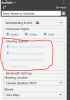
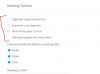
When you create/Schedule a webmeeting using WebClient or Windows Softphone:
  1. Everyone joins as an Organizer and the option to change that during creation is Gayed out.
  2. Allow or disallow participant control is also Grayed-out for the organizer, and everyone joins with full control.
  3. Everyone having Control over their Audio Video is fine but everyone being Organizer is an absolute NO GO.
  4. We have had cases where people joined a bit earlier and then they wanted to leave and come back later, but when they wanted to close their meeting, they ended up ending the meeting altogether for everyone.
  5. Also, the option for the organizer to connect first is disabled.

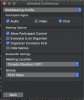
Creating the same meeting from MAC Softphone:
  1. All options are available and the meeting can be created as desired.

Joining Before Organizer Arrives:
  1. If someone tries to join before the Organizer starts the meeting, there is only a Fine Print message stating Meeting has not started yet
  2. On top of that message not being very prominent, it tells you to retry later rather than parking you in some sort of a waiting room and automatically starting the meeting for you
  3. You have to keep clicking the Login button Periodically in hope of Organiser showing up, or basically your are left to your own device to figure it out, which is not very practical when the organizer has to deal with 90% of non-technical participants.
  4. Screen Shot Attached
 

Attachments

  • Webmmeeting creation via MAC Softphone.jpeg
    Webmmeeting creation via MAC Softphone.jpeg
    77.2 KB · Views: 19
  • webmeeting creation via Windows Softphone.PNG
    webmeeting creation via Windows Softphone.PNG
    24.2 KB · Views: 19
  • webmeeting creation via WebClient.PNG
    webmeeting creation via WebClient.PNG
    10.3 KB · Views: 14
  • Joining Before Organizer arrives.jpeg
    Joining Before Organizer arrives.jpeg
    24.9 KB · Views: 12
I can answer your first question, you need to change the profile-selection dropdown to 'Webinar' and then you'll be able to change some other options and some other option will then be greyed out.
I do agree with you that it is silly and I don't think it works as intended. The profiles should be used to quickly set some defaults, but you should always be able to manually change the options you want.

But I always create a webinar and have cam and mic enabled by default and uncheck 'hide visitors from each other', and uncheck 'organizer must connect first'. Then I end up with a webmeeting in fact, where not everyone is an organizer by default :-)
 
There is a difference between Webinar and Webmeeting.

With Webinar drop down yes some of the options I discussed above become available, however, in the webinar mode participants get partial control of audio and video they can Mute then won't be able to unmute the same for Video.

When proper webmeeting can be created through MAC softphone, thenits beyond me to block it for all other platforms.

I think in some areas 3CX needs to give more control to the actual UX designers and consultants who can bring market best practices on the table, rather than Technical team or developers trying to wear multiple hats, at least that's what it feels like most of the time.
 
You get no argument there, I agree with you.
3CX is great and has great features, but the UI is also designed by developers and not by actual UI designers. And many features work the way those developers want them to work, and not in the way actual end-users would use them :)

You can fix the unmute issue by making someone a presenter though. But you have to do that manually for each participant.
 
Status
Not open for further replies.

Forum statistics

Threads
111,973
Messages
590,078
Members
164,896
Latest member
sameage