Solved What causes this to happen?

Status
Not open for further replies.

ElementalWindX

Bronze Partner
Advanced Certified
Joined
Oct 24, 2018
Messages
367
Reaction score
40
I'm testing twilio now and I've got it setup where I can send sms messages through the 3cx windows desktop app. If I try to reply to those sms messages on my phone, nothing comes back. When I look at the twilio error logs, it says 11200 - HTTP retrieval failure.

Not sure where to go with this as I thought I followed everything to the T.
 
I'm testing twilio now and I've got it setup where I can send sms messages through the 3cx windows desktop app. If I try to reply to those sms messages on my phone, nothing comes back. When I look at the twilio error logs, it says 11200 - HTTP retrieval failure.

Not sure where to go with this as I thought I followed everything to the T.
You checked the webhook to make sure it is correct? Also, make sure that your ports are opened accordingly for the webhook to work.
 
Webhook appears to be correct. What ports do I open to make a webhook work? To my knowledge all ports are open properly and it passes the firewall test too.
 
Webhook appears to be correct. What ports do I open to make a webhook work? To my knowledge all ports are open properly and it passes the firewall test too.
The HTTPS port of your 3CX installation needs to be accessible from the Internet.

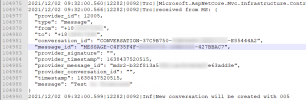
One thing you can do is put your 3CX into into Verbose logging mode, then send an SMS message from your Mobile, to your SMS DID you have configured in 3CX.
If it fails, open the 3cxManagementConsole.log file and search for the text you wrote in the message and if it was received by 3CX, you should see something like this:
1638442610293.png
 
I've turned on verbose and looked in the log.

Don't see it at all. Looks like twilio isn't even hitting 3xc.
 
I can suggest checking with Twilio to see what is received on their end and if there are any errors received when the message is sent up to the 3cx system.
 
Been waiting 2-3 days for support. Their support is god awful. So hope siptrunk gets on the ball and adds sms sooner than later. Anyone have a support # I can call? I can't find one anywhere in my portal.
 
This is the reply their support sent me:


The 11200 error you received occurs when there is a failure attempting to retrieve the contents of your webhook URL. An 11200 error is an indicator of a connection failure between Twilio and your service. When Twilio requests a page from your server, we wait a maximum of 15 seconds for a response. A connection failure will occur if no response is returned in that time.

We received the following response when we attempted to post to your webhook for inbound SMS, https://messaging.3cx.com/v3/webhook/xxxxxxxxxxxxxxxxxxxxxx/twilio/sms/k0g4w7pcam

sourceComponent"14100"
httpResponse"500"
url"https://messaging.3cx.com/v3/webhook/xxxxxxxxxxxx/twilio/sms/k0g4w7pcam"
ErrorCode"11200"
LogLevel"ERROR"
Msg"Internal Server Error"
EmailNotification"false"
The 11200 error you received occurs when there is a failure attempting to retrieve the contents of your webhook URL. An 11200 error is an indicator of a connection failure between Twilio and your service. When Twilio requests a page from your server, we wait a maximum of 15 seconds for a response. A connection failure will occur if no response is returned in that time.

We received the following response when we attempted to post to your webhook for inbound SMS, https://messaging.3cx.com/v3/webhook/xxxxxxxxxxxxxxxxxxxxxxxxx/twilio/sms/k0g4w7pcam

sourceComponent"14100"
httpResponse"500"
url"https://messaging.3cx.com/v3/webhook/xxxxxxxxxxxxxxxxxxxxxxxx/twilio/sms/k0g4w7pcam"
ErrorCode"11200"
LogLevel"ERROR"
Msg"Internal Server Error"
EmailNotification"false"
 
This is the reply their support sent me:


The 11200 error you received occurs when there is a failure attempting to retrieve the contents of your webhook URL. An 11200 error is an indicator of a connection failure between Twilio and your service. When Twilio requests a page from your server, we wait a maximum of 15 seconds for a response. A connection failure will occur if no response is returned in that time.

We received the following response when we attempted to post to your webhook for inbound SMS, https://messaging.3cx.com/v3/webhook/xxxxxxxxxxxxxxxxxxxxxx/twilio/sms/k0g4w7pcam

sourceComponent"14100"
httpResponse"500"
url"https://messaging.3cx.com/v3/webhook/xxxxxxxxxxxx/twilio/sms/k0g4w7pcam"
ErrorCode"11200"
LogLevel"ERROR"
Msg"Internal Server Error"
EmailNotification"false"
The 11200 error you received occurs when there is a failure attempting to retrieve the contents of your webhook URL. An 11200 error is an indicator of a connection failure between Twilio and your service. When Twilio requests a page from your server, we wait a maximum of 15 seconds for a response. A connection failure will occur if no response is returned in that time.

We received the following response when we attempted to post to your webhook for inbound SMS, https://messaging.3cx.com/v3/webhook/xxxxxxxxxxxxxxxxxxxxxxxxx/twilio/sms/k0g4w7pcam

sourceComponent"14100"
httpResponse"500"
url"https://messaging.3cx.com/v3/webhook/xxxxxxxxxxxxxxxxxxxxxxxx/twilio/sms/k0g4w7pcam"
ErrorCode"11200"
LogLevel"ERROR"
Msg"Internal Server Error"
EmailNotification"false"
Does this happen on every message you send, or is it intermittent?
 
@ElementalWindX One more thing, very basic bu VERY important. In your 3CX Management Console --> Messaging, open your Twilio entry you have create and press the "Test" button at the top of the page.

Does that work?
 
I get this error: The PBX is not reachable via the Internet. Ensure that all necessary ports are open and that the firewall check is successful. The error code received is: UNABLE_TO_VERIFY_LEAF_SIGNATURE
 
I get this error: The PBX is not reachable via the Internet. Ensure that all necessary ports are open and that the firewall check is successful. The error code received is: UNABLE_TO_VERIFY_LEAF_SIGNATURE
Now we know the reason why SMS aren't arriving to your 3CX Server.
You need to check what is impeding the incoming traffic to your HTTPS port from the Internet.

Once you get the "Test" button to say that everything is OK, SMS should also start flowing in.
 
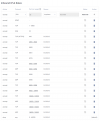
These are our firewall rules. Nothing should be impeding https traffic.
 

Attachments

  • fwrules.png
    fwrules.png
    54.6 KB · Views: 6
The FW rules look correct, however this doesn't change the fact that there is some communication problem between our Messaging Server and your 3CX server.

Can you send me your FQDN in a PM? Maybe I can help you shed some more light on this for you.

Also, does you 3CX Server happen to be installed with a custom FQDN and a non-publicly trusted SSL Certificate?
 
Just to update this thread, the issue was with the custom certificate that was being used on the 3CX Server.

As a reminder, in order for incoming Messages to work, the certificate used must be 100% trusted (if you use 3CX FQDN + 3CX cert you don't need to worry about this...).

A good online tool to check your 3CX with is this:
https://www.sslshopper.com/ssl-checker.html

Settings this as 'Solved'.
 
Status
Not open for further replies.

Forum statistics

Threads
112,065
Messages
590,578
Members
165,019
Latest member
rsaldin@advancedbrainspin