What ports and Servers do I need to allow access to?

Status
Not open for further replies.

greychain

Gold Partner
Advanced Certified
Joined
Jul 13, 2018
Messages
779
Reaction score
122
I have this chart for the ports, which no longer seems to be available. https://www.3cx.com/docs/ports/
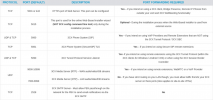
1688103723864.png


  • 'stun-au.3cx.com'
  • 'stun2.3cx.com'
  • 'stun3.3cx.com'
  • 'sip-alg-detector.3cx.com'
also what ports/protocols do these servers use?

What are the other servers I should be ensuring I have access to?
 
Last edited:
For the firewall test I am getting 5060 not available. What server does this use?
 
Can you please share a screenshot of the firewall test result?
 
1688110173569.png

The customer has very tight security and might simply being not allowing unknown sites
 
The Firewallcheck ist incoming not outgoing. They have to fix the firewall.
 
yes, they are blocking unknown incoming traffic. They've allowed the stun server but not sure which server 3cx tests against for SIP
 
You have to open the Port ingoing!! The test is ingoing.
 
They only allow incoming traffic from known IP's, do you know the IP 3CX uses to send the SIP traffic test?
 
This is explained in the guideline provided previously.

2023-06-30_10h41_53.png
 
They only allow incoming traffic from known IP's, do you know the IP 3CX uses to send the SIP traffic test?
If incoming traffic is restricted to specific known IP addresses, using the 3CX phone system will be difficult unless you have the IP addresses of all users attempting to access the system. It is highly recommended that you explore alternative hosting options to avoid any potential issues.
 
They have allowed incoming traffic from their VoIP provider only.
 
ThIf incoming traffic is restricted to specific known IP addresses, using the 3CX phone system will be difficult unless you have the IP addresses of all users attempting to access the system. It is highly recommended that you explore alternative hosting options to avoid any potential issues.
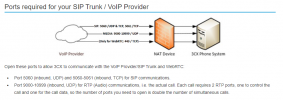
They wont be opening up 5060 to the general public, only 5090 for SBC and Mobile Apps
 
Than just open 5090, https and RTP. 5060 restricted to the sip provider is ok. but the test will allways fail than.
 
Ask then to open it up, run the test and then restrict again.
 
You may also refer to the below guideline for further clarification
https://www.3cx.com/docs/manual/firewall-router-configuration/

You may also refer to the below guideline for further clarification
https://www.3cx.com/docs/manual/firewall-router-configuration/
Good afternoon TheodorosG_3CX.

Thanks for the information, but does this answer mean that the web page will no longer work?
It's the best 3CX page to pass to the customers' Firewall team.
Easy to understand and simple.

Best Regards.
Osti Carvalho.
 
If the IP is restricted only to the VoIP provider then 3CX updates may also be problematic.
 
If the IP is restricted only to the VoIP provider then 3CX updates may also be problematic.
Not the IP, only the sip port should be restricted to the VOIP provider.
 
@greychain
You will be able to determine the IP Adresses if you run a capture on the said 3CX Server while running a Firewall test.
Please note, that the firewall test asks for one FQDN out (you can look up this IP on it´s FQDN), and it will come back with an answer from another IP. You will see this in the Wireshark trace.
The IPs we found here will not be useful in your area, so you have to find yous, yourself with the Wireshark trace. Please also note, that 3CX will use several "STUN" Servers to test up against, and the reply IP will differ from each of the "STUN" Servers that reply.

Hope this helps with the accurate situation for you.
 
Status
Not open for further replies.

Forum statistics

Threads
111,974
Messages
590,081
Members
164,899
Latest member
mazet