- Joined
- Sep 30, 2019
- Messages
- 8
- Reaction score
- 2
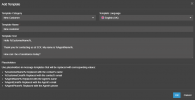
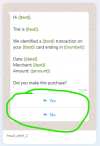
WhatsApp message buttons appear at the bottom of your messages, allowing customers to take action fast and easily.
These buttons allow customers to give responses with a single tap, removing the need for manual typing. When a customer selects a quick reply button, their response is sent, appearing as if the user had typed it themselves.
These buttons allow customers to give responses with a single tap, removing the need for manual typing. When a customer selects a quick reply button, their response is sent, appearing as if the user had typed it themselves.