


- Joined
- Mar 5, 2026
- Messages
- 2
- Reaction score
- 1
"We have been using a WhatsApp integration for some time now without any issues. Recently, our customer requested to add more numbers from different countries.
I followed the official 3CX manual (https://www.3cx.com/docs/manual/whatsapp/), but I got stuck at Step 3: Set up an Admin Role. When I try to add the 3CX admin user, I receive the following error message:
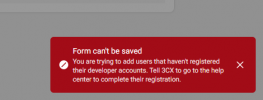
I am able to add 3CX as a test account, which works for a few hours. However, this only allows the use of a temporary Access Token, which is not a permanent solution.
Does anyone have suggestions on how to resolve this?"
I followed the official 3CX manual (https://www.3cx.com/docs/manual/whatsapp/), but I got stuck at Step 3: Set up an Admin Role. When I try to add the 3CX admin user, I receive the following error message:
I am able to add 3CX as a test account, which works for a few hours. However, this only allows the use of a temporary Access Token, which is not a permanent solution.
Does anyone have suggestions on how to resolve this?"


