Solved When using Webclient / Local App

Status
Not open for further replies.

jthornton

Free User
Joined
May 4, 2021
Messages
12
Reaction score
1
I've got machines using both the webclient, the 3CX native windows app and the Chrome version/smartapp (looks like a native app).

Is there a way to setup 3CX so that when the phone rings, all speakers ring, but when on a call, the earbuds are used?
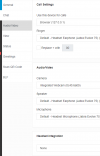
 
Yes, on your webclient you can go to Settings > Audio/Video and change the output for the ringer and for speaker/microphone. I think the Windows app also works the same.

What version of 3CX PBX Are you running? v18?
 

Attachments

  • 1642629679451.png
    1642629679451.png
    28.1 KB · Views: 3
  • Like
Reactions: ChrisC_3CX
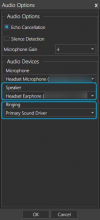
What @jpatel mentioned should also apply for the 3CX Desktop app. For the 3CX Windows App (formerly known as 3CX Phone for Windows), you have to click on "Settings >> Audio Options":
1642673640800.png
 
Thank you!

I was able to get it working if there are multiple sources for sound on a computer.
 
  • Like
Reactions: ChrisC_3CX
You're very welcome!

Glad we could help!
 
Status
Not open for further replies.

Forum statistics

Threads
111,974
Messages
590,081
Members
164,899
Latest member
mazet