Solved Where are Call Recordings?

Status
Not open for further replies.

rowebilly1

Bronze Partner
Advanced Certified
Joined
May 21, 2020
Messages
10
Reaction score
3
Several users record calls using the Desktop App 'record' button but when going into the Recordings area there is nothing there.
The same for Webclient.

Where can Users access their Call Recordings?

We have our 3CX Hosted in Amazon, Professional version, version 16.0.1078
 
They would have access in their Recordings section of the Webclient and Mobile Apps.

If the user has the permission "Show Group Recordings", they would see others as well.

If you enable automatic recording in the extension's settings, does it work as expected?
 
They would have access in their Recordings section of the Webclient and Mobile Apps.

If the user has the permission "Show Group Recordings", they would see others as well.

If you enable automatic recording in the extension's settings, does it work as expected?
Hello,
Everyone has the option to see Group Recordings checked.
In the Web Client, the menu item on the left for 'Recordings' is not there like the Web Client info article says it should be.
 
I even checked another client's phone system and the Recordings menu doesn't appear either. In the Admin web page they are there but not the Web Client.

Both licenses are Professional.
 
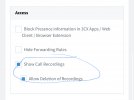
Have you enabled this under Phone Provisioning -> 3CX App?

3676CA29-1765-4330-A228-CE9C046CACF1.jpeg
 
  • Like
Reactions: Jose.R
Have you enabled this under Phone Provisioning -> 3CX App?

View attachment 20308
I did not. I was going to look for an option under the 3CX App phone provisioning but I somehow doubted it was there and just scrolled back up. I was probably an inch away from seeing that option the other day.

I enabled it and now I can access recordings everywhere.

Thank you!
 
  • Like
Reactions: Evolute IT
/resolved
 
  • Like
Reactions: NickD_3CX
Status
Not open for further replies.

Forum statistics

Threads
112,025
Messages
590,367
Members
164,978
Latest member
FringeIT-Eric