Solved Where are my MMS images?

Status
Not open for further replies.

myrich33

Customer
Joined
Jun 26, 2020
Messages
25
Reaction score
8
Hello,
I just upgraded to v18.
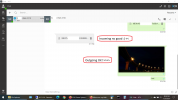
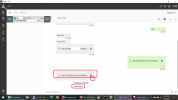
Using Twilio, I can't see the MMS messages I'm receiving. I'm getting the text portion, and I can see the link in 3CX. However, when I click, nothing happens (even after I wait until the download indicator stops spinning). Also, the download button doesn't seem to do anything. Not sure if/where they are downloaded to. Note - Incoming / outgoing SMS working fine. Outgoing MMS also working. I updated the webhooks after upgrade.
Ideas? See attached screen shot.
Thanks in advance.
Rich
>>>>>>>>>>>>>>>
3CX-Chat-Download.png
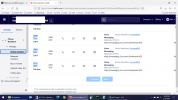
>>>>>>>>>>>>>>>3CX-Chat-Download2.png
 
Make sure that your webhook in Telnyx contains "v3" and not "v1" or "v2".
 
I'm using Twilio and yes the web hooks are V3.
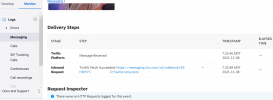
3CX-Chat-Download3.png
 
I've done a little more digging... On the pbx, in dir C:\ProgramData\3CX\Instance1\Data\Chat (running windows pbx), the link to the chat image isn't in the data\chat directory. In other words, it looks like the image was not downloaded from Twilio. I have verified that the images are in Twilio. So, I guess, something is wrong with the webhook. Maybe some config issue... I'm just not sure. Any ideas?
 
Hi!

The way this works is that when you receive an incoming Image, Twilio sends 3CX a link where they temporarily store the image.
Then 3CX downloads that image and in turn displays it in the WebClient.

What I'd suggest is, first set your 3CX system into Verbose logging from the Management Console --> Dashboard --> Settings.
Then send yourself a new image, receive it in the WebClient and make note of the random character filename, after you verify that it cannot be downloaded
Then open the 3cxManagementConsole.log file located on the 3CX Server and search for the random filename.

You should see something like this:
Code:
............
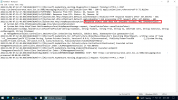
2021/11/08 10:03:58.940|4564|0059|Inf|[System.Net.Http.HttpClient.Default.LogicalHandler] Start processing HTTP request GET https://api.twilio.com/2010-04-01/Accounts/ACcxxxxxxxxxxxxxxxxxxxxxxxxxxxc0b/Messages/MMd54xxxxxxxxxxxxxx1c4473/Media/MEca4xxxxxxxxxxxxxxxxxxxxxxce7fc8
2021/11/08 10:03:58.940|4564|0059|Inf|[System.Net.Http.HttpClient.Default.ClientHandler] Sending HTTP request GET https://api.twilio.com/2010-04-01/Accounts/ACcxxxxxxxxxxxxxxxxxxxxxxxxxxxc0b/Messages/MMd54xxxxxxxxxxxxxx1c4473/Media/MEca4xxxxxxxxxxxxxxxxxxxxxxce7fc8
2021/11/08 10:03:59.499|4564|0059|Inf|[System.Net.Http.HttpClient.Default.ClientHandler] Received HTTP response headers after 558.0448ms - 200
2021/11/08 10:03:59.499|4564|0059|Inf|[System.Net.Http.HttpClient.Default.LogicalHandler] End processing HTTP request after 558.1736ms - 200
............

Checked what the end processing exit code is (200 means it downloaded successfully) and maybe also, open a browser on the 3CX server and try navigating to the link, do you see the image?

[EDIT]
One more thing I just spotted, in your screenshot, what is that "Studio Workflow"?
As a test, also please get a completely new DID, configure it for 3CX without using the Studio Workflow, then send an image there too.
 
  • Like
Reactions: ChrisC_3CX
Hi,
The "Studio Workflow" is for the voice (just forwarding any voice to Callcentric trunk on 3cx). Not using voice on Twilio due to TLS issues. Just using Twilio for 3cx message integration. But, I will do the new DID test shortly.
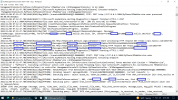
Attached is the verbose log and a screen shot of the Twilio fetch.3CX-TwilioFetch.png3CX-ConsoleLog-20211108-1.png
 
Does this show the problem? I'm kinda lost in the weeds on the log as far as telling if this is connected to the inital request...
Rich
****
3CX-ConsoleLog-20211108-2.png
 
  • Like
Reactions: Evolute IT
I was just about to say to look for that, yes, that explains why you are not seeing it in your WebClient, because when your 3CX tries to get it from Twilio, the request gets rejected.

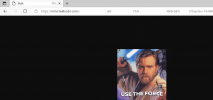
Now, take that link from the first line that you see the GET, open a browser on the server where 3CX is installed, and try to go to that link, does it open or do you get a similar message?
I don't know how long Twilio keeps this data around, so maybe I'd send a new image, and immediately go to the logs and try this.

If the browser neither opens it, I'd double-check your security settings in Twilio portal, also double-check the Account SID and Auth Token are correct in 3CX.
If that fails, I'd then also check, if you have a firewall, in case that has some sort of DPI feature enabled that is blocking this traffic.

Last solution? Contact Twilio and ask them why this is being rejected.
 
  • Like
Reactions: Evolute IT
Thanks for all the info and ideas to try.
I'll try these out and let you know.
Thanks again, Rich
 
Hi,
I double checked the account SID and Auth token in twilio vs 3cx.
Makes sense that they are correct since SMS in/out is working and outgoing MMS working.
Only getting the auth error on incoming MMS. I am able to open the image in the browser.
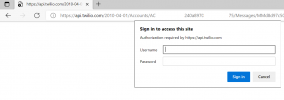
Note - When testing link from log the browser asks for userid / password. If get the image if I enter the sid/auth.
So, it seems like the 3cx get request isn't sending the userid/password, or maybe is not receiving the message from twilio asking for userid/password.
Could this be a firewall issue? Seems like https ports ok.
Rich
 

Attachments

  • 3CX-browser2.png
    3CX-browser2.png
    329.5 KB · Views: 6
  • 3CX-browser1.png
    3CX-browser1.png
    23.9 KB · Views: 4
Now I am a bit confused.

Twilio should not ask for credentials to download media. I double-checked on a system of mine and it just loads the media.
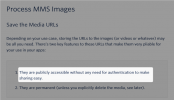
The I went diving into the Twilio MMS API to check if there was some option that you could have enabled that is off by default and found this:
https://www.twilio.com/docs/sms/tut...images-incoming-mms-csharp#process-mms-images
1636445200136.png

So, I'm not sure why you re getting prompted for credentials, and even more so, why when you insert the SID and Auth Token, they are accepted.
 
Hi,
Thanks for the research. I've opened a support ticket with Twilio. I'm thinking the basic api security is enabled but I can't see how I can turn it off. Once I hear back from Twilio I'll update this.
Thanks again,
Rich
 
  • Like
Reactions: NickD_3CX
Whew! From Twilio:
<<<<<<<<<<<<<<<
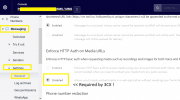
Typically, when we see this it means that Enforce auth for media URLs is on.
You can read more about that on our support page.
Typically, you can turn that off by going to General MMS settings, and
selecting disabled for "Enforce HTTP Auth on media URLs".
<<<<<<<<<<<<<<

All set now.

3CX may want to consider, as an enhancement / change, automatically checking for auth error and supplying credentials or having a setting to support it when required.

Thanks to everyone who helped!
Rich
 

Attachments

  • 3CX-MMS-Fix.png
    3CX-MMS-Fix.png
    87.9 KB · Views: 22
  • Like
Reactions: Evolute IT
That's great!

Thanks for pointing this out.
We are considering this for a future update of the Messaging service, but for the time being indeed those requests must be without authentication.

I'll flag this as 'Solved'.
 
  • Like
Reactions: Evolute IT
Status
Not open for further replies.

Forum statistics

Threads
112,065
Messages
590,578
Members
165,019
Latest member
rsaldin@advancedbrainspin