X210 acting strange after switch status schedule runs

Status
Not open for further replies.

AMistich

Forum User
Basic Certified
Joined
Nov 25, 2020
Messages
27
Reaction score
1
I have a X210 (firmware v2.4.12) that if I have the Schedule set to automatically switch status after running overnight begins to mess up. The main screen and buttons stop working and at one point when the user tried to transfer a call, it looks like it transferred but the person calling could still hear the user. The issues are random on what happens. If I reboot the phone it runs fine until the schedule for the status switch runs again. If I turn off the automatic switch status, there is no issue with the phone. This is the section I am referring too.
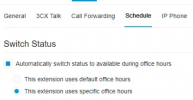
1692129264874.png

The system is on-prem Enterprise Perpetual v10.0 Update 7(Build 312). This is a recent issue as we have had this schedule running for months with no issues. Has anyone else seen this issue or is there newer firmware for the X210? I have only seen newer firmware for the X210 v2.
 
@AMistich the switch status is only used to change the extension profile according the office hours.

So within the office hours the profile is set to Available, Break Hours to Away and out of office hours the status will be DND.

Forwarding rules will be used depending the status profile.

So this should not impact on the phone, just with the extension profile.

May I know how is the phone provisioned? is it using the default template?

Do you have the same issue with the 3CX Apps or using a different IP Phone?

Is this with one specific extension or with any user extension?
 
@AMistich the switch status is only used to change the extension profile according the office hours.

So within the office hours the profile is set to Available, Break Hours to Away and out of office hours the status will be DND.

Forwarding rules will be used depending the status profile.

So this should not impact on the phone, just with the extension profile.

May I know how is the phone provisioned? is it using the default template?

Do you have the same issue with the 3CX Apps or using a different IP Phone?

Is this with one specific extension or with any user extension?
Correct, that is how we have been using it so when the receptionist either leaves for the day or goes to lunch it automatically sets it to DND for her.

"May I know how is the phone provisioned? is it using the default template?"
The phone is using the default template and was provisioned following the steps in 3cx. This extension has been set up since we moved to 3cx. The switch status was set up in April and started acting up in Aug.

"Do you have the same issue with the 3CX Apps or using a different IP Phone?"
No, the issue is only with the X210. I have my X3U set up using the switch status and have no issues. Others who have the X3U and use the switch status have not reported any issues.

"Is this with one specific extension or with any user extension?"
It is only this one extension/phone as this is the only X210 that is setup this way. I have another X210 at a different site that I can setup to use the switch status and see if it acts the same way.
 
The phone is using the default template and was provisioned following the steps in 3cx. This extension has been set up since we moved to 3cx. The switch status was set up in April and started acting up in Aug.
but is it provisioned locally, using the sbc or stun?

I have another X210 at a different site that I can setup to use the switch status and see if it acts the same way.
could you please give it a try and share the results.
 
but is it provisioned locally, using the sbc or stun?


could you please give it a try and share the results.
Sorry about that. It is provisioned locally.

Yes I will let the other site know about the testing and let you know.
 
  • Like
Reactions: Alejandro_3CX
@Alejandro_3CX so I figured out the issue has to do with using Bluetooth on the phone while running the schedule. About the time this started happening we added a Bluetooth headset to the phone. After that is when the phone started acting strange. On our second X210 there was no issues running the schedule.

I looked to see what was different between the two and the only thing was the Bluetooth. I had them turn it off and I retested the schedule and the phone is fine.

Is there a way to fix this?
 
I'm afraid that you will need to enter in contact with Fanvil so they can check this further on their devices, bluetooth on IP phones is not something that we test.
 
Status
Not open for further replies.

Members Online Now

Forum statistics

Threads
111,835
Messages
589,289
Members
164,666
Latest member
infinititravels