Solved Yealink Firmware Upgrade Required

Status
Not open for further replies.

timmehb

Premier Customer
Basic Certified
Joined
Mar 8, 2020
Messages
47
Reaction score
8
Hi Guys,

The latest firmware available (specifically for the Yealink T46S) contains a bug where distinctive ringtones are not applied to the phone properly.

This forces some sort of weird Ice Cream van ringtone for all external calls - and people are not happy! You cannot set the correct ringtone through 3CX and reprovision, nothing works. This was following an upgrade to version 66.86.0.5.

I have tried the latest version (late may) 66.86.0.15 - and the issue is resolved. There are also release notes along with that;
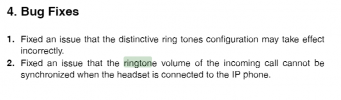
1624546621275.png

Would it be possible to expedite this Yealink firmware to 3CX so we can apply through the management console?
 
Hi @timmehb

Our latest template takes care of that, so you can keep using the supported firmware AND have the same ringtone behavior as before.

Please start by telling us your 3CX version, and whether you are using custom templates.
 
Morning,

We're using PBX Version 16.0.9.
We have a mixture of Custom and Default Templates. But the phones we are dealing with for this issue have the standard Yealink Template.
I can't see any template updates available to the PBX nor does the current standard Yealink Template seem to correct the issue.
 
Furthermore, the version number of the Yealink Template being used;

<version>109356</version>
<time>2020-09-14 14:30:00</time>
 
Hi @timmehb

Your template is indeed outdated, the latest one is 109361.

The reason I asked about custom templates is because I know there are fixes for those issues, but custom templates do not get updates, you need to maintain them yourself so here is what I would suggest:

1. Delete one of those phones from an extension and press OK
2. Factory reset it, then assign it automatically to the extension again (it will use our template by default)
3. Now go to your updates section and a template update will appear (v109361). Click to install it.
4. Now reprovision your phone and test it to confirm the ringtones issue has been resolved

Let me know how it goes!
 
Can confirm this works.

Thank you so much.
 
Glad to hear! You may now use this new template as the basis for your custom one, and add your customizations on top.

And always remember:
- when using custom templates, you need to keep them updated yourself
- the system will not show the new update if there isn't at least 1 device using that template assigned to an extension (devices using the custom template do not count). You can overcome this if you create a dummy T46S under your extension using the default template (ie with fake MAC 000000000000)
 
Status
Not open for further replies.

Members Online Now

No members online now.

Forum statistics

Threads
111,831
Messages
589,277
Members
164,660
Latest member
RJenkinsROCK