


- Joined
- Feb 7, 2025
- Messages
- 19
- Reaction score
- 1
Hi all,
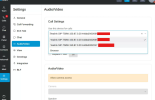
At our agency, we have a number of users with two Yealink SIP T58W desk phones, one at home and one in the office. For these users, they need to be able to easily switch between the two devices for days that they work from home. Currently, all you can see is what is visible in the screenshot along with an IP address. This is visible in 2 places, underneath the blue phone symbol "Dialer" and then via Settings-> Audio/Video as seen in the screenshot.
Our goal is to be able to rename these devices such that they are easily distinguishable -- something like "Yealink SIP T58W - Home" and "Yealink SIP T58W - Office".
At our agency, we have a number of users with two Yealink SIP T58W desk phones, one at home and one in the office. For these users, they need to be able to easily switch between the two devices for days that they work from home. Currently, all you can see is what is visible in the screenshot along with an IP address. This is visible in 2 places, underneath the blue phone symbol "Dialer" and then via Settings-> Audio/Video as seen in the screenshot.
Our goal is to be able to rename these devices such that they are easily distinguishable -- something like "Yealink SIP T58W - Home" and "Yealink SIP T58W - Office".


