Solved Yealink phones not matching CLI to 3cx contacts

Status
Not open for further replies.

PaulBC

Gold Partner
Basic Certified
Joined
Nov 26, 2019
Messages
55
Reaction score
12
Hi,

Yealink t58a - shows callers numbers but not names on external calls even if those contacts are in the 3CX contact list - is that normal please ?
 
Hi Paul,

No this not normal so let's take a look at it

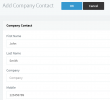
1. The caller's number must first be stored in the 3CX Company Contacts, in the "Mobile" field like this example
1621492675972.png

2. The number must be stored in the same format as the provider sends in order to match
  • Example: 07842903270 is not the same as +447842903270
3. The phone needs to update its phonebook after you make the changes, so remember to press the refresh circle in the phone screen


Please check the above and let us know how it goes
 
Thanks John,

update on this - it's outbound calls that are not matching - so inbound is fine, but dial out and it doesn't match to the name :(
 
What's actually stored on the phone? Go in the phonebook and preview the number.

Is it an exactly 1:1 match to what you were dialling on the keypad?
 
I've found the problem, all of the contacts in the 3CX directory have been entered only with company names - and those are not shown as a match on outbound calls. If I add first / second names then they are.

is there a reason that contacts that are only company names would not be matched on outbound perhaps ?
 
Hi Paul,

Glad to hear! So as I mentioned earlier (screenshot) those 3 specific fields are the ones that get populated on the phone.

If there was no "Name", basically it meant that the entries were not included in the phonebook, hence no match was ever found.
 
Strange - as it matches inbound calls based on Company name, but not outbound - we'll re-build our contacts list and put the company name in as first name I think :)
 
Actually, for inbound it's an entirely different matter: the PBX matches the name with its own contacts, and when it sends the call to the Yealink, it will include the name with the incoming call.

So this means the name will appear regardless of whether it exists in the Yealink's phonebook, because the PBX sends it as a Display Name in the SIP INVITE.

Hope this clears things up!
 
  • Like
Reactions: Evolute IT
That makes perfect sense, thanks John
 
  • Like
Reactions: JohnS_3CX
Status
Not open for further replies.

Members Online Now

Forum statistics

Threads
111,831
Messages
589,277
Members
164,660
Latest member
RJenkinsROCK