Yealink T33G BLF not working

Status
Not open for further replies.

n8tive

Silver Partner
Basic Certified
Joined
Mar 18, 2020
Messages
7
Reaction score
2
Hi

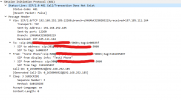
We started using the new Yealink T33G models for installations, but BLF does not appear to work on them. This is a newly supported phone on 3CX and we provision it from 3CX. I tried using two different 3CX instances, the BLF icon appears on the phone, but the status is Off (The monitored line fails to register or does not exist.)

The response from 3CX is 481 Call/Transaction does not exist.

The customers we tested on are using the Professional license.
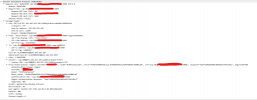
 

Attachments

  • Screenshot 1.png
    Screenshot 1.png
    70.4 KB · Views: 7
  • Screenshot 2.png
    Screenshot 2.png
    36.9 KB · Views: 8
  • Like
Reactions: TierList123

Apologies. Please find the information below.

  • 3CX Version: Professional Annual 16.0.9
  • Server OS, Debian 9.13
  • Is the 3CX Server Hosted and where? Hosted
  • IP Phone Make/Model/Firmware: Yealink T33G (124.85.0.40)
  • Provisioning Method: Local / VPN / STUN / SBC : Local provisioning
  • Trunk Provider or Gateway Make/Model: ICTGlobe
  • Has the Firewall Checker passed: YES
  • Are custom Phone Templates being used: NO
 
Hi,

You mentioned that the PBX is hosted, but the phones use local provisioning.

So where is the PBX hosted, and where are the phones located in relation to the PBX (ie. how do they reach the PBX)
 
Hi

Hosted on a VM external to the customer's network. Provisioning is set to local, but connects to the hostname of the external VM. Allowing the customer's WAN IP on nginx allows the phones to be provisioned.

The above was done a while back due to STUN issues.
 
I think you may have inadvertently caused this by running the phones in an unsupported scenario.

If you have issues with STUN, the solution is to use a 3CX SBC at the phones site.


I suggest you reverse any changes you made to nginx, and simply use an SBC to run the phones the way they were meant to be deployed and this problem should go away.
 
Save yourself alot of hassle and install a SBC server on the same network as the phones.

This can be a PC that is not used, or purchase a Raspberry PI 4
 
  • Like
Reactions: NickD_3CX
Thanks!

I'll try again and advise.
 
  • Like
Reactions: JohnS_3CX
Status
Not open for further replies.

Members Online Now

Forum statistics

Threads
111,831
Messages
589,277
Members
164,660
Latest member
RJenkinsROCK