Yealink T40 series firmware issue

Colorado VoIP

Gold Partner
Advanced Certified
Joined
Mar 10, 2014
Messages
312
Reaction score
223
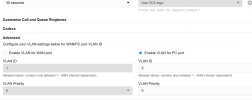
I have been upgrading customer firmware to 76.84.0.180 tonight and we have a customer that runs PC port VLAN tagged as 2 (and 3) since they don't have enough wiring at each location to run phone independent of a computer in their wall jacks.

This issue exists on the 54W phone as well, but was supposed to be fixed on the next general release for those. However, we now have 40+ phones offline for a customer after upgrading to the latest firmware to drop this week on the 4x series.

just be aware if you don't run a WAN port VLAN on the phone config, and only run a PC port VLAN, your phone will not communicate at all on the network. I'll see if I can get this taken up with yealink again.

1760660645071.png
 
Hi @Colorado VoIP

So this was a pre-existing issue you mean on T54 series, but was not an issue on the T40G/P series using the previous firmware?

The reason I ask is because I cannot replicate this behavior on our LAN. If I enable VLAN for PC port only as described above, the T40 does not go offline.

I'm wondering if this comes down to the specific LAN setup and network equipment that your customer is using in this case.
 
Morning John! (or maybe afternoon)

Yes this problem was also plaquing random T54W phones as well, we have 5-6 of them that so far had to remain on 96.86.0.81 due to the exact same issue.

It very well could be a direct result of their network configuration, but the interesting thing was when the 54w firmware went from 96.86.0.81 to 96.87.0.16 they would stop communicating, just like the T40G jumping from 76.84.0.95 to 76.84.0.180.

We might be heading onsite to factory reset and downgrade them in a few hours, just waiting for their onsite IT staff to report back what they are seeing.
 
  • Like
Reactions: JohnS_3CX
Hi @Colorado VoIP

We've also informed them about your case even though this is not something we can directly replicate here. Hopefully it's just a networking quirk that can be ironed out.

Let us know what you find and what Yealink replies back to you if get an update from them.
 
  • Love
Reactions: Colorado VoIP
will do! the key will be getting my hands on one of these affected devices.

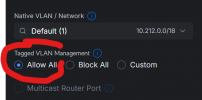
I suspect if the customer would just enable VLAN tagging on their network the problem will go away. (this was the resolution while we bench tested a 54W and confirmed by yealink as a workaround)

1760702220290.png

The default on most switches blocks the ability to have the end user pick a VLAN, keeps someone from jumping around VLANs on their laptop and end up on a network with access to resources they shouldn't see. When I enabled "allow all" we were good.
 
received this reply from yealink.

==============
For T54W,we have received similar feedback and have successfully solved this problem.

You can upgrade the 96.87.250.6 firmware. If you don't use router phone function, you can upgrade the 96.87.0.18.

For T40G,we are currently attempting to reproduce the issue locally and will get back to you as soon as possible.
==============

just out of curiosity is that T54W firmware 96.87.250.6 on the radar for general release into the 3cx systems? that would be amazing if we could get all those phones upgraded at the affected client (vs enabling custom firmware)
 
  • Like
Reactions: JohnS_3CX
Each time Yealink provides us with firmware, they usually include fixes reported to them from various customers and partners.

But as for the specific file you got above, the answer is no - it will not be released. That is a test or technical support build of the firmware (indicated by the x.x.250.x part) not meant for wide release and it has not been certified for 3CX.

Knowing Yealink though, there is a good chance the next official and 3CX certified release (whenever that may happen to be) will include these fixes too.
 
ah fair enough!! we'll just hold until then.
 

Members Online Now

Forum statistics

Threads
111,831
Messages
589,277
Members
164,660
Latest member
RJenkinsROCK