Solved Yealink T54W not provisioning any more

Status
Not open for further replies.

tenorchris

New User
Joined
Oct 25, 2021
Messages
3
Reaction score
1
I tried to privision some Yealink T54W yesterday and like mentioned in other threads I did not succeed in provisioning Yealink phones either.

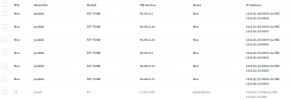
All of the phones are shown as new but nothing happens if I assign them to an extension. I also tried putting the provisioning URL in the phone but that doesn't work either. The phone doesn't get a configuration and there are no accounts visible on the phone's GUI.

As there are no problems when I reset a Fanvil X4G, I would say that my setup should be okay and the problem has to do with the Yealink phones. Neither the initial provisioning nor the reprovisioning after changing the BLF caused any problems on the X4G.
  • 3CX Version: 18.0 Update 1 (Build 237) Version
  • Server OS: Hosted by 3CX
  • Is the 3CX Server Hosted and where: Hosted by 3CX (FRA)
  • IP Phone Make/Model/Firmware version: Yealink T54W, FW 96.85.0.5, 96.86.0.18, 96.86.0.23
  • Provisioning Method: Local / VPN / STUN / SBC: SBC
  • Trunk Provider or VoIP Gateway Make/Model: Easybell SIP Trunk
  • Has the Firewall Checker passed: Hosted by 3CX -> YES
  • Are custom Phone Templates being used: Hosted by 3CX -> NO
I attached a screenshot how the list of phones looks in my admin console:

phonelist.png
 
We have similar issues on different sites.
Reprovisioning of phones not working, only way to to get it working is by resetting phones and using provisioning link.

  • 3CX Version: 18.0 Update 1 (Build 237) Version
  • Server OS: Linux
  • Is the 3CX Server Hosted and where: Amazon (FRA)
  • IP Phone Make/Model/Firmware version: Yealink T54W, 96.86.0.23, 96.86.188.1 (Lydis)
  • Provisioning Method: Local / VPN / STUN / SBC: SBC
  • Trunk Provider or VoIP Gateway Make/Model: Weepee
  • Has the Firewall Checker passed: Yes
  • Are custom Phone Templates being used: No
 
Hi @tenorchris

Let's take a v96.86.0.23 (non-Lydis) phone as an example, and let's ignore the rest for now until we get this one running. Once we succeed we can then move on to the rest.

  1. Edit its extension
  2. Delete the phone from the the Phone Provisioning tab and press OK
  3. Edit the extension again, and double-check that the phone is no longer there!
  4. On the phones page, clear all the bold phones using the reject button
  5. Now factory reset the phone and it should appear on the Phones page in bold
The phone should be ready to provision, but before you do check a couple more things

  1. Make sure the Yealink is on the same IP range as the Fanvil which already works
  2. Check the date and time of the Yealink: this is important so that the SSL connection to the PBX succeeds
  3. Ensure there is nothing on your local network that would cut the internet traffic of the Yealink
 
@OlivierD If you have quite a few, its best to start your own thread about this issue and we can assist you
 
@JohnS_3CX

Dear John, thank you for your reply. You pointed me to the right position. As the network I have to use is quite crap, there's no NTP-service present and the NTP-protocol is blocked by the firewall.

So the phones thaught taht it was July 2nd and so the phones thought that the certificates aren't valid.
 
  • Like
Reactions: JohnS_3CX
Glad to hear you found the issue! If you set the time manually they should be OK.

But note that we provision the phones to use pool.ntp.org normally, so if your network blocks that too you might have to at least allow internet NTP to pass so your dont have trouble in the future.
 
Status
Not open for further replies.

Members Online Now

No members online now.

Forum statistics

Threads
111,831
Messages
589,277
Members
164,660
Latest member
RJenkinsROCK