- Joined
- Sep 28, 2020
- Messages
- 101
- Reaction score
- 6
Hello I have an issue at a client.
I want to add a phone as a Router Phone on his 3CX but it seems that it no longer give me the Choice between Router Phone or Normal mode when i click on Add Phone when am connected on the User Extension in Add IP Phone.
Can you tell me why ? and How i ca add the Phone its quiet urgent
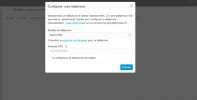
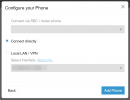
It give me this menu
When i put the model and MAC address
I can choose other SBC phone but can't create a new
Is there a Limitation.
Note that there are already 2 T57W set as Router Phone.
I want to add a phone as a Router Phone on his 3CX but it seems that it no longer give me the Choice between Router Phone or Normal mode when i click on Add Phone when am connected on the User Extension in Add IP Phone.
Can you tell me why ? and How i ca add the Phone its quiet urgent
It give me this menu
When i put the model and MAC address
I can choose other SBC phone but can't create a new
Is there a Limitation.
Note that there are already 2 T57W set as Router Phone.