Solved Yealink t58 not able for reprovision

Status
Not open for further replies.

Stef085

Customer
Joined
May 15, 2021
Messages
22
Reaction score
1
Hi!


I kicked out a Extension (120), but the IP yealink t58 phone was logged in as Hotdesking device, with this user.

Now i cant bring the phone back online, seems like it is somewhere blocked by its Mac Address.

issue could be, it was not probably deleted from the system, because the extension was still provided to the phone after deleted.

I did the following:
1) restart phone
2) factory rest phone
3) firmare update phone
4) restart 3cx
5) manual provision link in phone with new extension

all things didn’t work out well.

any ideas how i can fix this, and get the phone back online?

Thank you

Stefan
 
Hi Stefan,

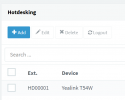
Delete the HDxxxx extension, and then factory reset the phone.

Then create a new HD extension, and assign the phone again.

1630398502922.png


If this is a SBC-connected phone, remember to configure it as such
 
I tried that..as well.
Cant bring it online.
and it doesnt show up as "new phone" on phones tab.
though its on local lan
 
Is your PBX also on the exact same LAN?
 
yes, it worked with other t58 phones without any problem.

My opinion is, the mac adress/phone is still somewhere in the 3cx system and was not probably deleted.
 
I don't think that is the case. Specifically, you said: "it doesnt show up as "new phone" on phones tab"

This reveals the following to us:

1) The phone is not on the same LAN subnet as the PBX

2) Or the PnP message cannot pass on your network


I think you should start from here first, and find out why PnP stopped working
https://www.3cx.com/docs/plug-and-play-ip-phone/
 
I did that thing with the exact the same phone (other mac) yesterday and it worked out well.

It always did. except this one, after deleting the extension it misbehaved on exact that phone.
 
I think you should check to see if the PnP message from the specific phone reaches your PBX first.

You should run a capture on your PBX, and then reset the phone and wait until it loads and goes to its idle screen.

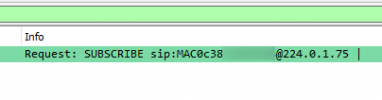
Then, stop the capture and download it. Open the capture in wireshark, and use this filter to see if the phone's MAC appears

ip.addr==224.0.1.75 and sip.Method == SUBSCRIBE


Example of what you should see:
1630400579156.png


Confirm this first, otherwise we are shooting in the dark :)
 
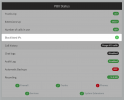
Sorry I also forgot to mention, check that the IP of the device was not blacklisted please:

1630400880136.png
 
here it is:

[removed]

But you made my day...
IP was black listed.. That was not on my radar.. I didnt know, that internal IP's get blacklisted as well.. reason too much fail login.. or somethin like that!

Thank you for solving it!
 
Last edited by a moderator:
Glad to hear! I will remove the screenshot to hide your MAC address
 
Status
Not open for further replies.

Members Online Now

No members online now.

Forum statistics

Threads
111,831
Messages
589,277
Members
164,660
Latest member
RJenkinsROCK