Solved Yealink Time Issues on V18 - Daylight Savings Time

Status
Not open for further replies.

carmen.leroux

Bronze Partner
Advanced Certified
Joined
Jan 21, 2021
Messages
69
Reaction score
15
3CX 18.0 (Build 1880)
Provisioning Method: STUN
Custom phone templates: No
IP Phone: Yealink - Various Models (all on 3CX supported firmware)
Location: South Africa

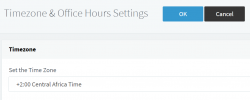
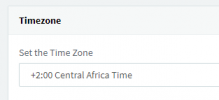
Global Timezone is set to +2
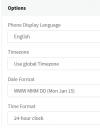
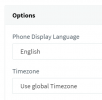
All extension settings default: Use global timezone

Problem:
When Yealink phones reprovision or update, Daylight Savings Time automatically enables on the phone thus putting the phone one hour ahead of South African time. A work around is to disable DST using the Yealink GUI, but this is not sustainable for the amount of phones in use.


Please refer to this thread, it would have been fixed in V18?
https://www.3cx.com/community/threads/yealink-time-issues-daylight-savings-time.80756/
1631007805129.png
 
Hi Carmen,

With V18 we did indeed fix and test that the phones will follow correct Central Africa Time +2 (no DST).

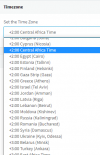
Please make sure your PBX global time settings have this option
If you change it now, you will also be asked to restart your services
1631012533286.png

And make sure that for each phone of each extension you have it set to "Use global Timezone"
The phones need to be reprovisioned after you have confirmed this.
1631012633897.png


I have tested a few models that I have here on my V18, with the latest 3CX firmware and it shows correct S.A time.

Please ensure that you have set your system and phones like I mentioned above. If you still have problems after reprovisioning, please share the following information so we can investigate

  1. What OS is the PBX Server running
  2. Which exact models you still have trouble with
  3. Which exact firmware version are those models running
  4. How are they provisioned? (LAN/SBC/STUN/Other method)
 
Hi @JohnS_3CX

Thank you for the prompt response.

My timezone has always been on +2 Central Africa Time. I do not see any (noDST) options on the list.
The phones have also always been on "Use global Timezone" as per initial screenshot

1631013248323.png

1631013315106.png
 
Please refer to my previous message: reprovision and if you still have issues provide me with the information I asked so we can investigate further.
 
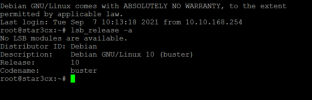
  1. What OS is the PBX Server running
    Debian
  2. Which exact models you still have trouble with
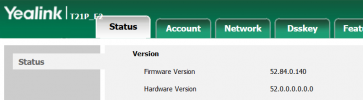
    All of them. An example would be a Yealink T21P E2
  3. Which exact firmware version are those models running
    1631014399941.png

  4. How are they provisioned? (LAN/SBC/STUN/Other method)
    In this instance it is SBC, but in other also STUN
 

Attachments

  • 1631013427183.png
    1631013427183.png
    92.7 KB · Views: 6
Hi Carmen,

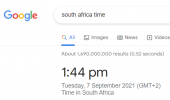
I have provisioned one T21P E2 with FW 52.84.0.140 on a V18 PBX using an SBC.

The time on the phone is the same as what I get from a google Search

1631015120951.png
1631015098326.png

Can you please try and factory reset the phone, and then reprovision it automatically from your management console?

Let's start with this one as an example and see what we can find.
 
Apologies for the delay. Been trying to test this the last 2 days but ever since I upgraded to V18 my phones no longer want to manually or automatically provision through SBC. Just making sure FW rules etc is still in place
 
No problem, take your time and let us know when you are ready!

Your PBX side firewall needs to have the Tunnel port and HTTPS ports forwarded.

At the SBC site you do not need to do anything.
 
Hi @JohnS_3CX

I struggled with the phones and had to disable "Only Accept Trusted Certificates" in Security, only afterwards they started provisioning again.

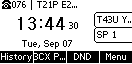
I provisioned this handset, it still has the wrong time on it after a factory reset.

It is now 16:48

1631198917560.png
 
Are using a custom FQDN with your own certificates?
 
Yes, we are using a custom FQDN with our own SSL certificate
 
But just to add, we've been using it like this and it hasn't ever been a problem before the V18 upgrade
 
Ah in that case this makes sense. If you search Yealink's website for "Built-in Certificate List" you can learn what certs they support.

We use Let's Encrypt for 3CX FQDNs which is already built into the Yealink firmware so no problems there. In your case you are probably using certs that Yealink does not include so they will never work out of the box unless you disable that first, or unless you manually install certificates in each and every phone which can be a pain if you have a lot of phones.

There is also another thing that changed with V18, and this is the fact that we now support more secure ciphers. This means that even if you have the correct certificates that the phones understand, the phone might not be able to make a TLS connection with 3CX because of the ciphers.

I'm curious though, what model and firmware is the example above?
 
Noted, thank you for the information. I will find out which certs we use and advise soon.

Here is the details of my phone:

1631203917886.png

This is however not linked to the time/date issue correct? We have loads of clients who use a 3CX cert and still has the time/date issue.
 
If this is the same model as we discussed earlier, I can confirm that it should work fine with V18, and the time should also be able to display correctly (at least from what my V18 testing shows).

Hence, I think we can safely eliminate the issue being the ciphers. The certs were almost certainly the issue in your case.

One last thing though, is there an NTP server on your network, and can you check to see what time it is sending?
 
There is no NTP server on my network. I am using the default set on 3CX which is pool.ntp.org
 
I will send you a private message shortly so we can test something further
 
  • Like
Reactions: carmen.leroux
Hi Carmen,

As per our PM, the phone has displayed the correct time on a different PBX. This pretty much rules out problems with the network, and I'm guessing your PBX is just sending the wrong configuration to the phone.

For others reading this, the solution was to:

  1. Change timezone in PBX settings, and restart services
  2. Change it back to Central Africa +2:00 and again restart services
  3. Reprovision the phones to receive the new timezone settings
 
  • Like
Reactions: carmen.leroux
Status
Not open for further replies.

Members Online Now

No members online now.

Forum statistics

Threads
111,831
Messages
589,277
Members
164,660
Latest member
RJenkinsROCK