Solved Yealink w52p cannot access webgui after provisioning

Status
Not open for further replies.

smokie

Forum User
Joined
Jun 22, 2019
Messages
54
Reaction score
2
Hello

Please advise I have successfully provisioned the w52p but now the webgui does not allow me access to it, says the admin password is incorrect, please advise thanks.
 
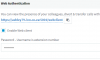
After the phone is provisioned 3cx changes the phone password, look at the extensions phone provisioning tab to view the new password.

11305
 
not this one , this is for webclient

go to phones page
11309
click on password to reveal all passwords and read the one you need in Phone pwd column
 
You get the password here

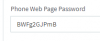
Advanced - FXS/Decct - select the device , on first screen you will see 'Device Web Page Password'. Click on the eye icon to show the password
 
  • Like
Reactions: AWS2P and JohnS_3CX
Strong like mother Ruissia, thanks appreciate it.
 
Sorry :( , just answered without noticing that it was asked password for DECT Base. so my answer applies for others phones:)
 
Status
Not open for further replies.

Latest Posts

Forum statistics

Threads
111,930
Messages
589,802
Members
164,803
Latest member
fcentral