Solved Yealink W53H and W60B not connecting with 3CX

Status
Not open for further replies.

tom-iaw

Customer
Joined
Oct 13, 2021
Messages
3
Reaction score
1
Hi,
We are currently fasing an issue, where our new YeaLink W53H together with the W60B is not connecting right.
The extensions are loaded in, these correspond with out 3CX extensions.

We can't call internal / external, only we can use the intercom function.
Also are incoming calls not coming to these phones...

The error message we see on the phones when calling is Line Invalid & Line Forbidden

Who can give us the golden tip?

  • 3CX Version, Professional Annual 16.0.8.9
  • Server OS, Windows Server 2019 Standard
  • Is the 3CX Server Hosted and where? On Promise
  • IP Phone Make/Model/Firmware version, Yealink W53H (88.85.0.35) together with YeaLink W60B (77.85.0.25)
  • Provisioning Method: STUN
  • Has the Firewall Checker passed: Yes
  • Are custom Phone Templates being used: No?
Added screenshots of:

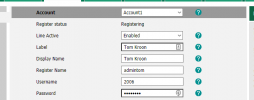
Account registration
1634117090481.png

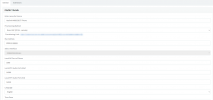
3cx config
1634117176161.png

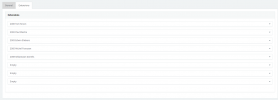
extensions in 3cx config
1634117197337.png

If i need to provide more, please let me know!

Thanks in advance :)

 

Attachments

  • 11c6a1f1-2f02-48ee-92bc-bc9a5892d2e1.jpg
    11c6a1f1-2f02-48ee-92bc-bc9a5892d2e1.jpg
    341.8 KB · Views: 10
Check that you have not restricted port 5060 to your 3CX.

You'll be able to provision on 5001 but you need that 5060 to be open.
 
Alternatively, consider installing an SBC which should bypass all those requirements and also provide you with encryption.
 
Last edited by a moderator:
Port 5060 is opened on our location. Do i also need to configure the ports on the location where the 3CX server is located?
 
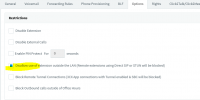
Uncheck this option of your extension too and make sure the IP isnt blacklisted.

1634121877378.png
 
Hi Tom,

Exactly. Opening only one side means you still have incomplete communication - but there's more work to be done on top of that.

Literally all the points in the guide should absolutely be treated as mandatory if you want reliable STUN operation.

Otherwise, you will come across such weird issues as described, or it might work for a while and then stop, or come calls might come through and others not, one way audio and so forth. There's just too many factors that can get in the way between your phone and your PBX, and they vary from location to location, different ISPs, different network equipment etc.


- By the way, using our SBC takes care of pretty much all the problems so that should be your preferred solution whenever possible (and can even run on something as small as a Raspberry Pi).

- STUN is fine too, but only if you are willing to put in the extra effort to make sure all those factors are kept under control - something that is not always possible or desirable even.
 
  • Like
Reactions: tom-iaw
Thanks, did the option SBC and all of the phones are working! Thanks!!
 
  • Love
Reactions: JohnS_3CX
That's great news! Just remember to do the following cleanup to wrap everything up.

On the extensions that were on the W60:

- Remove: Options >> Troubleshooting >> "PBX Delivers Audio" as this is no longer needed

- Enable : Options >> "Disallow use of extension outside the LAN (Remote extensions using Direct SIP or STUN will be blocked)" as this will increase the security of your extension credentials.

- And if you made any port forwards for the at the remote site where the W60 is installed, remove them to prevent unnecessarily exposing the device SIP port to the internet. With the SBC now installed, absolutely no port forwards are required, it is designed to work without port forwarding.
 
...and one last thing I forgot to mention in case you haven't already done so:

If the W60B was provisioned as STUN, you will need to factory reset it when switching to SBC. Some of the STUN settings do not go away unless you factory reset and then reprovision from scratch. They might cause potential problems going forward.
 
Status
Not open for further replies.

Members Online Now

No members online now.

Forum statistics

Threads
111,831
Messages
589,277
Members
164,660
Latest member
RJenkinsROCK