- Joined
- Oct 15, 2024
- Messages
- 5
- Reaction score
- 0
Hi all,
We have a Yealink W60B that we're having some trouble with. I've taken over management of this system so I don't have the full history. This base station was just working with this system, but was not showing under Voice & Chat, and was instead showing under phones, with the MAC listed as "UNPROVISIONED". There are other W60B base stations in that status that are currently working.
We wanted to reset these properly to ensure they are provisioned correctly, so we took one base station, deleted it under phones, factory reset it, and then tried to re-add it. It adds to 3CX properly. We then followed the instructions and put the provisioning link into the base station and hit auto configure, which never applies.
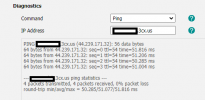
Looking at the event log, we do see that the system successfully generates a provisioning file. However, looking at the log on the phone, from what I can see the file is not available? Trying to access the link in a browser also times out, but we're able to see / download other provisioning files through the browser.
Any ideas?
We're using 3CX through Lightsail, and do have an SBC on site which is working properly with all other phones and 1 Yealink W70B base station.
EDIT: One note I forgot to add, we did manually update the firmware on the device to the latest 3CX firmware, per the provisioning instructions.
Screenshot of the pbx showing the file generated:

Relevant Log from base station (I think):
2024/10/15 16:50:44.560|0022|Trac| [_3CX.Http] [7]+223.165.104.27 GET https://xxxxxxxxxx.3cx.us:443/provisioning/*** - - -
2024/10/15 16:50:44.560|0022|Trac| [ManagementConsoleJS.Results.ProvisioningActionResult] PRV: file=/provisioning/mzp0gltjv922zl/805ec0XXXXXX.boot
2024/10/15 16:50:44.560|0022|Info| [_3CX.Provisioning.Provisioning] PRV: Requested file is not found in file system
2024/10/15 16:50:44.560|0022|Info| [ManagementConsoleJS.Results.ProvisioningActionResult] PRV: error getting /provisioning/mzp0gltjv922zl/805ec0XXXXXX.boot requested from 223.165.104.27
2024/10/15 16:50:44.560|0022|Trac| [ManagementConsoleJS.Results.ProvisioningActionResult] PRV: expired 1, remains 1
2024/10/15 16:50:44.560|0022|Info| [_3CX.Http] [6]-223.165.104.27 GET https://xxxxxxxxxxx.3cx.us:443/provisioning/*** - 404 - - 0.4819ms
We have a Yealink W60B that we're having some trouble with. I've taken over management of this system so I don't have the full history. This base station was just working with this system, but was not showing under Voice & Chat, and was instead showing under phones, with the MAC listed as "UNPROVISIONED". There are other W60B base stations in that status that are currently working.
We wanted to reset these properly to ensure they are provisioned correctly, so we took one base station, deleted it under phones, factory reset it, and then tried to re-add it. It adds to 3CX properly. We then followed the instructions and put the provisioning link into the base station and hit auto configure, which never applies.
Looking at the event log, we do see that the system successfully generates a provisioning file. However, looking at the log on the phone, from what I can see the file is not available? Trying to access the link in a browser also times out, but we're able to see / download other provisioning files through the browser.
Any ideas?
We're using 3CX through Lightsail, and do have an SBC on site which is working properly with all other phones and 1 Yealink W70B base station.
EDIT: One note I forgot to add, we did manually update the firmware on the device to the latest 3CX firmware, per the provisioning instructions.
Screenshot of the pbx showing the file generated:
Relevant Log from base station (I think):
2024/10/15 16:50:44.560|0022|Trac| [_3CX.Http] [7]+223.165.104.27 GET https://xxxxxxxxxx.3cx.us:443/provisioning/*** - - -
2024/10/15 16:50:44.560|0022|Trac| [ManagementConsoleJS.Results.ProvisioningActionResult] PRV: file=/provisioning/mzp0gltjv922zl/805ec0XXXXXX.boot
2024/10/15 16:50:44.560|0022|Info| [_3CX.Provisioning.Provisioning] PRV: Requested file is not found in file system
2024/10/15 16:50:44.560|0022|Info| [ManagementConsoleJS.Results.ProvisioningActionResult] PRV: error getting /provisioning/mzp0gltjv922zl/805ec0XXXXXX.boot requested from 223.165.104.27
2024/10/15 16:50:44.560|0022|Trac| [ManagementConsoleJS.Results.ProvisioningActionResult] PRV: expired 1, remains 1
2024/10/15 16:50:44.560|0022|Info| [_3CX.Http] [6]-223.165.104.27 GET https://xxxxxxxxxxx.3cx.us:443/provisioning/*** - 404 - - 0.4819ms
Last edited: