


- Joined
- Jul 24, 2020
- Messages
- 6
- Reaction score
- 0
Hi
I have the Zendesk Integration set up and the following options are working "Enable Call Journaling" and "Enable Contact Creation" (Both of which in production I will disable, as they are not features required)
The issue I have is that for known contacts in the Zendesk CRM and contact card id not showing on the incoming call.
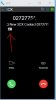
Here is an example below of Contract Creation, where a contact card is display in the browser extension and Zendesk opens up on the a new contact creation screen.
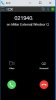
But when a known contact in Zendesk calls there is no contact card displayed (See below)
Also there is no Zendesk pop up.
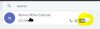
The known contact is definitely in Zendesk as the following screen shot of the contact page below shows. And when I click on "CRM" button I get directed to the known contact in Zendesk.
Can anyone help me understand why the contact card is not showing up for known contacts?
Settings:
Current 3CX version:16.0.6.655
CRM Integration Settings: Query CRM = "Always"
Client Integration Settings: "Automatically open contact URL when CRM is enabled"
Chrome Extension Version: 4.3.0.348
I have the Zendesk Integration set up and the following options are working "Enable Call Journaling" and "Enable Contact Creation" (Both of which in production I will disable, as they are not features required)
The issue I have is that for known contacts in the Zendesk CRM and contact card id not showing on the incoming call.
Here is an example below of Contract Creation, where a contact card is display in the browser extension and Zendesk opens up on the a new contact creation screen.
But when a known contact in Zendesk calls there is no contact card displayed (See below)
Also there is no Zendesk pop up.
The known contact is definitely in Zendesk as the following screen shot of the contact page below shows. And when I click on "CRM" button I get directed to the known contact in Zendesk.
Can anyone help me understand why the contact card is not showing up for known contacts?
Settings:
Current 3CX version:16.0.6.655
CRM Integration Settings: Query CRM = "Always"
Client Integration Settings: "Automatically open contact URL when CRM is enabled"
Chrome Extension Version: 4.3.0.348
Attachments
Last edited:


