Multicast Paging in V20

ACL

Platinum Partner
Advanced Certified
Joined
Sep 5, 2024
Messages
58
Reaction score
4
Hi Experts,

Is there any guideline for me to setup my Yealink phones with multicast paging in V20? Appreciate it!
 
3CX
  • You would need to have the PBX and the phones in the same LAN
  • Enable paging in the dial codes page of 3CX. (I usually use *8. If you dont add this it will give you an error when trying to create the Paging Group)
  • Go to the Call Handling page
  • Add a Ring Group.
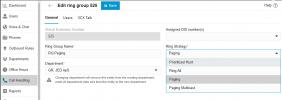
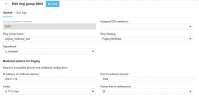
  • Select the Paging Multicast option
  • Take a note of the multicast address.
Yealink phone
  • Enter into the interface of the telephone. (You can do this easily from the IP Phone page of the user via the provided link)
  • Go to Directory > Multicast IP
  • Enter the listening address and port and save it.
Calling the multicast paging grop extension now will page all the phones configured on that address.
 
  • Like
Reactions: jed
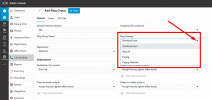
In v20, we don't have a Ring Group > Ring Strategy for Paging - only Prioritized Hunt and Ring All. We have verified the Dial Code for Paging is set to *8. How to fix? v20.0 Update 2 (Build 715) - Professional 8 SC License.

Thanks in advance!
 
In v20, we don't have a Ring Group > Ring Strategy for Paging - only Prioritized Hunt and Ring All. We have verified the Dial Code for Paging is set to *8. How to fix? v20.0 Update 2 (Build 715) - Professional 8 SC License.
It is in V20.0 Update 2 Build 715, but it is in Update 3 Beta:

1726181370747.png
 

Attachments

  • 1726181210649.png
    1726181210649.png
    31.7 KB · Views: 50
Hi Experts,

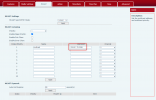
I have changed my IP phone from Yealink to Fanvil X301W. Checked that I have configured the correct multicast address by referring to the attachment below, but paging multicast is still not working from my end.

FYI, paging is working fine for me, however, paging multicast is not working for my 3CX.

Looking for some advices, appreciate it so much!

1726468647221.png
1726468670967.png
1726468697407.png
 
Please could 3CX put the "Enable Multicast Paging Ring Group provisioning" the was in V18 back into the default phone templates for V20.
Thanks.
 
@jed Have you tested the functionality in the Beta version? Any reports?

3CX... is there any time frame for Update 3 availability?
 
Configuring each phone individually is not much of a workable solution in an enterprise environment with hundreds of phone. Is this supported via templates yet?
 
Have you tested the functionality in the Beta version? Any reports?

3CX... is there any time frame for Update 3 availability?
No I havent tested just yet, and yes the Final just arrived today.. Go for it ;)
 
Is there a way to do the following without having to go into each phone one by one.
Yealink phone
  • Enter into the interface of the telephone. (You can do this easily from the IP Phone page of the user via the provided link)
  • Go to Directory > Multicast IP
  • Enter the listening address and port and save it.
 
Yes, we got the resolution already, all the IP phones including 3CX need to falls into same netowrk.

Thank you so much for the advice, all experts!
 
Did you still need to touch every phone and enter the multi cast information.

If not, please let me know how you got it to work.
 
Did you still need to touch every phone and enter the multi cast information.

If not, please let me know how you got it to work.
You have to go with custom templates if you don't want to do it manual. Not supported but not a lot of work if you know what you are doing.
 
  • Like
Reactions: Curtis C
Did you still need to touch every phone and enter the multi cast information.

If not, please let me know how you got it to work.
I go into each phone one by one, and enter the multicast information, to make sure the port is listening to the address. But, make sure your IP phones and 3CX is falls into the same network
 
I go into each phone one by one, and enter the multicast information, to make sure the port is listening to the address. But, make sure your IP phones and 3CX is falls into the same network
Will these settings persist as long as the phone is not factory reset? Reprovisions, power outages, system updates (3cx firmware), etc?

The manual entry of the multicast info on 200+ phones does not sound fun, especially if they will just get reset at some random point in time. I'm happy to burn through them if I know they're going to stay.
 
Set up about 15 phones and none of my Fanvils will work, but the Grandstreams and and Yealinks all do.

No clue what is happening here and and EXTREMELY happy that I found out this was broken and apparently not on 3CX's radar to fix. It's NOT feasible to page 50 phones spread out over numerous building, especially when your we only have the ability to have 24 active calls. This used to work extremely well and am bummed out that it's broken.
 
In order to make this work, can the pbx be in the cloud, but an SBC be located on the same LAN as the phones?
 
In order to make this work, can the pbx be in the cloud, but an SBC be located on the same LAN as the phones?
We've just setup a unicast to multicast proxy to install next to our SBC. It registers as an extension and forwards the RTP streams out to a multicast group. Also had to edit the template for the customer's phones to enable the multicast address.

A bit of a hack but it works.
 
any way you could elaborate on that?
 

Latest Posts

Forum statistics

Threads
111,962
Messages
589,993
Members
164,867
Latest member
swegner