PWA notifications

MartinAndel

Premier Customer
Joined
Mar 5, 2024
Messages
15
Reaction score
3
We have had multiple instances of the Windows (10 & 11) notification service ceasing to show notifications for the 3CX (PWA) web client. We tried on three different browser apps (Edge, Chrome & Brave) and after some time the notifications always stop working for random users. Permissions are still in place though and DND is off.
 
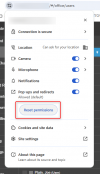
This might sometimes happen due to a browser update. You can reset the permissions and reassign them.
 
You mean to reset them for the entire browser or just the 3cx platform website? I just experimented with uninstalling the Edge based PWA client, rebooting and installing a Brave based one. Still no notifications. Even after multiple restarts.

I also tried adding the registry DWORD "Enabled" with value "1" into the following key:

Computer\HKEY_CURRENT_USER\Software\Microsoft\Windows\CurrentVersion\Notifications\Settings\Microsoft.MicrosoftEdge.Stable_8wekyb3d8bbwe!https://3cx.mydomain.com/
 
Individual browser

1737470987300.png
 
Ah, cool. Thanks. I'll try that!
 
FWIW we find if Chrome detects it has a browser update available the web client will be connected and function in many ways, but the extension for that person may appear unregistered. Also that person may not be able to see themself as unregistered (unclear yet if this shows when switching to the Team page or otherwise refreshing the view). A right click and Reload corrects the issue, or of course letting Chrome install its upload which relaunches it.
 
  • Like
Reactions: NicholasP_3CX
letting Chrome install its upload which relaunches it.
Just to correct my typo, I of course meant "let Chrome install its update."
 
  • Like
Reactions: MartinAndel

Forum statistics

Threads
111,870
Messages
589,479
Members
164,715
Latest member
jvon@essentialnetworktech