Doubt about departmental roles

Status
Not open for further replies.

Alle CTEC

Silver Partner
Advanced Certified
Joined
Sep 11, 2023
Messages
356
Reaction score
44
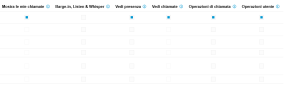
If I log in to a user, the View menu appears. It seems like this menu can be used to configure user permissions for all departments.
1779965861597.png
Call operations cite call transfer as an example, but extensions with user roles that do not have the option enabled can transfer calls...

In this menu you can customize the roles of the departments?
 
@Alle CTEC of course an agent with User role can transfer calls but option " Call Operations " provide more rights.
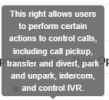
I would recommend moving the mouse to the " i " button next to the Call Operations, click it and as you see from the screenshot below these Rights provide more functionalities to the extension.


1779966876344.png
 
@Alle CTEC of course an agent with User role can transfer calls but option " Call Operations " provide more rights.
I would recommend moving the mouse to the " i " button next to the Call Operations, click it and as you see from the screenshot below these Rights provide more functionalities to the extension.


View attachment 51746
Of course, just by moving the mouse I found the transfer option indicated as per your screen. But transfer is available even if the option is not checked. You can also change options for departments that don't include the user.
 
Hello

The "Call Operations" refers to more of a receptionist/switchboard role and not direct functions of a user's active calls.

"see calls" also has to be enabled otherwise you'll have no calls to perform "Call Operations" on.

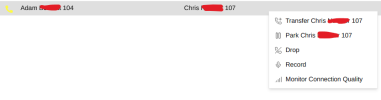
With it off

1780043932571.png

1780043583057.png

With it on

1780043617016.png
1780043700216.png

Note that both extensions have to be in the same department for the features to work.

Hope this helps.
 
Look, I have this scenario: users only use the 3CX Windows app with a Yealink headset. They're all in the same office, but they're from two different departments. So, four from Department A and four from Department B. How do you manage the PickUP? If Department A hears a Department B user ring, they should be able to answer using the appropriate user BLF button.
 
Look, I have this scenario: users only use the 3CX Windows app with a Yealink headset. They're all in the same office, but they're from two different departments. So, four from Department A and four from Department B. How do you manage the PickUP? If Department A hears a Department B user ring, they should be able to answer using the appropriate user BLF button.
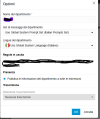
Admin > System > Options > Allow pickup in same department only

Uncheck that if enabled.
 
Look, I have this scenario: users only use the 3CX Windows app with a Yealink headset. They're all in the same office, but they're from two different departments. So, four from Department A and four from Department B. How do you manage the PickUP? If Department A hears a Department B user ring, they should be able to answer using the appropriate user BLF button.
Go to admin > system > options and uncheck "Limit call pickup to calls received within the same department".
 
I'm sorry, but selecting the option you indicated doesn't work. I currently had to create a third department that includes all the users.
 
In your departments, do all your extensions have "Show my calls" enabled? this is a requirement
 
  • Like
Reactions: Evolute IT
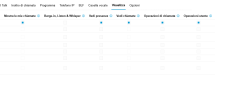
With the "Limit retrieval of calls received within the same department" option disabled, Pickup was only available between extensions in the same department. By creating a 3rd Department containing all extensions, both A and B, and enabling the "Limit retrieval of calls received within the same department" option, Pickup was always available only between extensions in the same department. By disabling the option and using the 3rd Department, Pickup works between all extensions. I'm not sure why, if I enter a user's view menu, I can set permissions for departments that they aren't part of. See attached screenshot.

1780050215289.png

These options are enableable and if enabled they will not make the user appear in the department's user list.
 
This is in a 3CX that isnt using MCM?

Simply toggling "See Presence" between the depts you'll see them within 3CX client without having to publish all at dept level.
 
1780051874949.png

Publish department information to all extensions is enabled on all departments
 
  • Like
Reactions: Evolute IT
Hi @Alle CTEC ,
Have you tried adding the users to both Departments A & B?

You can add them from the Admin Console > Departments > Department A/B > Add.
Just make sure to keep the Main Department Membership assigned under the user's page, so the schedule behaviour will not be affected.
Then re-check the rights (Users > View) for the users and try again.
 
If I add A and B together, I'll have to create additional departments for the outbound rules. However, the problem is of a different nature, because even adding users to a single department doesn't allow external calls to be picked up in the queue.
 
If I add A and B together, I'll have to create additional departments for the outbound rules. However, the problem is of a different nature, because even adding users to a single department doesn't allow external calls to be picked up in the queue.
I'm not sure I understand your problem. If you place the users in both departments and configure the main department correctly, you can set the permissions exactly how you want them. You don't need any extra departments for the outbound rules.
 
  • Like
Reactions: Evolute IT
I'm not sure I understand your problem. If you place the users in both departments and configure the main department correctly, you can set the permissions exactly how you want them. You don't need any extra departments for the outbound rules.
The problem is that Department A and Department B have different call inbound and outbound paths. Users in both Department A and Department B have the Receptionist role. Users in Department A need to be able to answer on behalf of users in Department B and vice versa. They are all 3CX App Windows users with Yealink headsets. Even disabling the restriction on call pickup from their own department, users in Department A are unable to answer on behalf of Department B and vice versa. So they see the BLF button flashing, double-clicking it doesn't pick up the call. It only works for users in their own department. Now, by creating a third department in which you include all users, the answer on behalf of feature only works if the calls are internal, external calls can only be answered for users in your own department. And even if I include users from Department B in Department A and vice versa, they don't answer external calls. Having two different outbound trunks is very convenient to use the outbound rule per department. Now the initial configuration with the separation of the Departments was perfect for incoming/outgoing calls, but is it not possible to answer on behalf of a user who is not in your primary department?
 
I still don't understand the problem. Why don't you do it as suggested? Place the users in both departments and select the respective primary department. Then, configure the permissions under "View." You can also restrict the outbound rules to specific extensions.
 
  • Like
Reactions: Evolute IT
I already explained to you that it only works with internal calls. External calls coming from a queue cannot be picked up by users of a different department.
 
If the user isnt member of the qeue this is correct.
 
  • Like
Reactions: Evolute IT
Its likely that because the user does not have "show my calls" rights to other depts, this is why BLF key cannot see/find the call (and cant have if not in the dept)

Call pickup dial code works - this must work by picking up the next call in the pbx vs trying to pickup another users extension.
 
Status
Not open for further replies.

Members Online Now

Forum statistics

Threads
111,832
Messages
589,283
Members
164,662
Latest member
DejanMDS