3CX AI as first Level Support

@mfriedm1 Great suggestions of course and it's the next step.
Stay tuned ;)
 
Hi @nikolascx,

We would love to discuss what we're working on with you, and see if we can help 3cx with a few ideas. Let me know if you'd be up for a chat.

We've built a vectorisation and semantic clustering system within Azure (using Foundry) to take call transcripts and identify repeat issues, customer trends, call quality, sales opportunities and much more. We're very happy with how it's working, but find transcription quality to be the thing holding it back. Taking the stereo audio and using a tool like Whisper, Scribe V2 and even Azure Speech Services (with some tuning) yields much better results. But this means getting the audio out of 3cx after a call has completed. Ideally, we'd like to do all this in real time.

We then also want to use Azure Communication Services to build SST agent call handling, with tools like checking for ticket updates, raising new tickets with custom question sets and more. We have demos of this, but not a clear path to integration and making this live with 3cx.

We believe that if we can solve some of these issues, we have a very compelling reason to approach more customers and bring them into 3cx.

For those looking in this thread looking to get a call transcript and submit a ticket into ConnectWise or another PSA when the call is ended, message me. This is fairly straightforward and we can likely help.
 
It would be beneficial if 3CX’s AI were to evolve in this direction, as we have received numerous requests from customers asking to redirect calls to external AI solutions—specifically those tailored to the needs of their respective industries—to answer questions or open support tickets. Naturally, however, our preference is for customers to utilize 3CX’s own solution rather than relying on external AI providers.
Handling inquiries in real time would therefore be an excellent feature and a significant step in the right direction.
 
Hi Team
You are on the right track. Great work.
Lets start from the easy one - Connecting 3CX to other services - This will be possible when 3CX releases MCP support. It needs to be client support (Outbound) to other Services (Which must also support MCP)
That will be the most straight forward thing ever to be developed. Lets not go into this now because before we release an update with this feature, there is not much to talk about - all I can tell you that It will come and very soon.

@Connor
Thanks for sharing this – it sounds like a very interesting use case, especially around semantic clustering of call transcripts and identifying recurring issues, customer trends, call quality insights, and sales opportunities. Great work.

What transcription service are you using?

We are building an AI Server. This will be of interest to you. You can transcribe locally like this the recording stays with you. The Audio will get out of 3CX to the AI server and the transcript will go back to 3CX. Most importantly, it will be FREE.

For this wait 3 weeks... :cool:
 
We have worked on something similar for a customer and this is where my idea for having 3CX implement MCP connectors came in. https://www.3cx.com/community/threads/ai-receptionist-to-mcp-server.137285/

If all the external systems you need to connect to can be done via API or MCP, then pushing and pulling data from a conversation becomes one hell of a lot easier to do.

Best
Lance
 
Hi Team
You are on the right track. Great work.
Lets start from the easy one - Connecting 3CX to other services - This will be possible when 3CX releases MCP support. It needs to be client support (Outbound) to other Services (Which must also support MCP)
That will be the most straight forward thing ever to be developed. Lets not go into this now because before we release an update with this feature, there is not much to talk about - all I can tell you that It will come and very soon.

@Connor
Thanks for sharing this – it sounds like a very interesting use case, especially around semantic clustering of call transcripts and identifying recurring issues, customer trends, call quality insights, and sales opportunities. Great work.

What transcription service are you using?

We are building an AI Server. This will be of interest to you. You can transcribe locally like this the recording stays with you. The Audio will get out of 3CX to the AI server and the transcript will go back to 3CX. Most importantly, it will be FREE.

For this wait 3 weeks... :cool:
Hi Nikolas,

Is three weeks an accurate timeline for the release of the system that will allow us to finally be able to create tickets in Connectwise from the 3CX AI receptionist? We are in desperate need of the ability to do this natively from 3CX as soon as possible. We are currently using an agentic AI system that picks up on missed calls, but there’s a slew of problems with it, including not getting accurate caller ID/company info due to having to forward the calls (caller ID shows up as our number and is basically useless). We are open to testing functionality, offering useful feedback (in detail and on a schedule), providing screenshots for your documentation, access to knowledge base, etc. if that would help your process. I am currently launching an MCP server for our company and have experience with connectors and API’s. If you want, you can message me and I’ll reply ASAP. We have been holding out on replacing our currently flawed agentic AI answering system since your first reply letting us know it was in the works and would be available soon. Anyway, we are fully committed to assisting in every way we can to get access to these tools and help get it launched. Let me know how we can help.

Thank you,
MFriedm1
 
I built a middleware this week for a client using the 3CX API, 3CX C# Call Script and a Zoho API hooked in to the AI Receptionist.

Took a bit of tinkering but was largely done in 4 hours.

Call comes in > IVR > 3CX AI Receptionist > Call Script > Middlewear Process > Ticket Created with Summary

Really shouldn’t be too hard to do with the Connectwise API as it’s fairly well documented already.

Best
Lance
 
@mfriedm1 More than 3 weeks I'm afraid.
But best we wait and make it right.
No worries, once we ship this, you will be able to make all the integrations under the sun. Take this time until we ship update 10 to plan what you will need and best raise the discussions now.

For what you mentioned, you need 3CX to release MCP - CLIENT Side.
And yes, no worries - I will take your offer. When we are in alpha stage, I will pull you in for some beta testing. You can test it directly on ConnectWise directly.
 
I built a middleware this week for a client using the 3CX API, 3CX C# Call Script and a Zoho API hooked in to the AI Receptionist.

Took a bit of tinkering but was largely done in 4 hours.

Call comes in > IVR > 3CX AI Receptionist > Call Script > Middlewear Process > Ticket Created with Summary

Really shouldn’t be too hard to do with the Connectwise API as it’s fairly well documented already.

Best
Lance
Hi Lance,

I'm not at all worried about the ConnectWise side of things, the part I'm stuck on is setting up the AI receptionist to properly take in/transcribe the information and then using the call script to get it sent over to CW. I haven't tried to use call scripts yet and I don't know how to combine one with the AI Receptionist anyway. I've been waiting on an update to come out with either the ability to send the transcription via email (which we would just send to our support box used in CW), or either the MCP plugins (to use on our MCP server along with the CW plugins) and/or a direct connection to CW Manage via API (maybe an extension to the built in CRM integration that allows ticket creation?). If you have something that would work, I'm open to testing it or trying out the process you've built. Either way, thanks for the reply!
@mfriedm1 More than 3 weeks I'm afraid.
But best we wait and make it right.
No worries, once we ship this, you will be able to make all the integrations under the sun. Take this time until we ship update 10 to plan what you will need and best raise the discussions now.

For what you mentioned, you need 3CX to release MCP - CLIENT Side.
And yes, no worries - I will take your offer. When we are in alpha stage, I will pull you in for some beta testing. You can test it directly on ConnectWise directly.
Hi Nikolas,

I appreciate your updates and want to take a moment to thank you for being open with your process. I assumed this will take another 6-8 weeks and that's ok with me. We will make do with our current agentic system, but I will also see what I can do with some scripting and the AI receptionist options in general to get us by until the full fledged features are released. Ultimately our goal is to offer our clients a better interface for getting help with us, and we have faith that 3CX will be able to provide the basis for that. Anyway, I will do what you said and get things prepared for when update 10 is shipped. I'll keep my notifications on should you have something for us to test.

Best,
Michael
 
  • Like
Reactions: nikolascx
Hi Lance,

I'm not at all worried about the ConnectWise side of things, the part I'm stuck on is setting up the AI receptionist to properly take in/transcribe the information and then using the call script to get it sent over to CW. I haven't tried to use call scripts yet and I don't know how to combine one with the AI Receptionist anyway. I've been waiting on an update to come out with either the ability to send the transcription via email (which we would just send to our support box used in CW), or either the MCP plugins (to use on our MCP server along with the CW plugins) and/or a direct connection to CW Manage via API (maybe an extension to the built in CRM integration that allows ticket creation?). If you have something that would work, I'm open to testing it or trying out the process you've built. Either way, thanks for the reply!

Hi Nikolas,

I appreciate your updates and want to take a moment to thank you for being open with your process. I assumed this will take another 6-8 weeks and that's ok with me. We will make do with our current agentic system, but I will also see what I can do with some scripting and the AI receptionist options in general to get us by until the full fledged features are released. Ultimately our goal is to offer our clients a better interface for getting help with us, and we have faith that 3CX will be able to provide the basis for that. Anyway, I will do what you said and get things prepared for when update 10 is shipped. I'll keep my notifications on should you have something for us to test.

Best,
Michael
Hi Michael

I am working on something which will be able to sit between any ticketing / crm system, but at this stage, I have it working with Zoho as that was the customer we had the initial request from.

Next will be Autotask and Connectwise - I'm working with a few local customers to get that done - no promises on how long that will take as it's a bit of a side project in between other work.

The good news is it's doable and only likely to get better :)

Best
Lance
 
Another ConnectWise shop here that is available for beta testing. Thanks to all for what your doing!
 
Hi Dears
Great questions and cool ideas
We are watching and currently building.. We will ship something soon that many of you in this thread will love..
Don't invest too much of your development time on this because in 2-3 weeks, what we will ship will make your solutions obsolete.
Bear with us a little while longer. Cheers
Hi @nikolascx - like some others here my goal is to use AI Receptionist to action on collected data. I am inspired by others here who have utilized the transcription to create tickets. My goal is to add an entry to Salesforce CRM based on input and send an email to our Intake team. Before I develop this, you mentioned we may see some features soon in alignment with such goals - any updates on this front? Thanks in advance!
 
  • Like
Reactions: nikolascx
Hi @nikolascx - like some others here my goal is to use AI Receptionist to action on collected data. I am inspired by others here who have utilized the transcription to create tickets. My goal is to add an entry to Salesforce CRM based on input and send an email to our Intake team. Before I develop this, you mentioned we may see some features soon in alignment with such goals - any updates on this front? Thanks in advance!

Hi Dear Team

The current AI Agent (to this date - 9th June) can
  1. Answer, Greeting, Time and Date aware, Courtesy
  2. Check Extensions / users / Presence
  3. Check Departments / Users
  4. Transfer to users
  5. Take message and send to chat
  6. Take message and send to email
  7. Transfer fo Voicemail
  8. Spam Detection
  9. route to X when caller is non colab
  10. Route to X when Caller is Hostile
  11. Routing features based on detected in call keywords
  12. Vector storage
  13. Voices
  14. Multi Language switching
Phase 2 (Currently in active Development)
  1. More AI models
  2. More AI Labs
  3. MCP (PART 1: The Server side)
  4. AI Fallback - Fallback to x when AI is not answering
  5. .... Bunch of other things
We are working right now on this branch - hopefully to release this in the next month.

Phase 3 ***** This is what you guys need in this thread ******
  1. MCP Part 2: (The client side). This will allow the AI Agent to "talk" to any 3rd party that supports MCP (i.e. the USB connector of AI)
Bear with us until we pass Phase 2. Phase 2 is required because it is going to prepare the foundation for Phase 3.

If you have any active development, especially using traditional old fashioned integrations (CRM integrations, CFD) I suggest you pause on this, because when Phase 3 comes, it will outdate everything that is old fashioned.

Sometimes with this ultra fast AI, best to pause and wait. Because it's very easy now to vibecode something and have it working.
But the routine of shipping software has not changed. So what you ship, you need to maintain. What I am trying to say, is that if you ship now something using old fashioned development, this is very soon going to be outdated.

Have a great day ahead - God bless
 
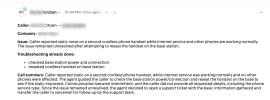
This is what we've done so far for another customer. This was just a dummy ticket I did for this example.
Call comes in AI Agent Answers
On Transfer it will open the ticket and scaffold the ticket with a summary until the full transcription is done.

1780980543001.png
 
  • Like
Reactions: nikolascx and N_G
If you have any active development, especially using traditional old fashioned integrations (CRM integrations, CFD) I suggest you pause on this, because when Phase 3 comes, it will outdate everything that is old fashioned.
Will the CRM integration engine change to adapt to all of this, like templates will become obsolete? We maintain dozens of integrations so any alpha testing we can do, I'm here for it.
 
Hi Dear Team

The current AI Agent (to this date - 9th June) can
  1. Answer, Greeting, Time and Date aware, Courtesy
  2. Check Extensions / users / Presence
  3. Check Departments / Users
  4. Transfer to users
  5. Take message and send to chat
  6. Take message and send to email
  7. Transfer fo Voicemail
  8. Spam Detection
  9. route to X when caller is non colab
  10. Route to X when Caller is Hostile
  11. Routing features based on detected in call keywords
  12. Vector storage
  13. Voices
  14. Multi Language switching
Phase 2 (Currently in active Development)
  1. More AI models
  2. More AI Labs
  3. MCP (PART 1: The Server side)
  4. AI Fallback - Fallback to x when AI is not answering
  5. .... Bunch of other things
We are working right now on this branch - hopefully to release this in the next month.

Phase 3 ***** This is what you guys need in this thread ******
  1. MCP Part 2: (The client side). This will allow the AI Agent to "talk" to any 3rd party that supports MCP (i.e. the USB connector of AI)
Bear with us until we pass Phase 2. Phase 2 is required because it is going to prepare the foundation for Phase 3.

If you have any active development, especially using traditional old fashioned integrations (CRM integrations, CFD) I suggest you pause on this, because when Phase 3 comes, it will outdate everything that is old fashioned.

Sometimes with this ultra fast AI, best to pause and wait. Because it's very easy now to vibecode something and have it working.
But the routine of shipping software has not changed. So what you ship, you need to maintain. What I am trying to say, is that if you ship now something using old fashioned development, this is very soon going to be outdated.

Have a great day ahead - God bless
Hi Nikolas,

I was unaware that the ability to send the transcription via email was available. Is that an option in the regular release or do we need to update to the beta release?

Thanks again for all your help!

Best,
Michael
 
  • Like
Reactions: nikolascx
Hi Nikolas,

I was unaware that the ability to send the transcription via email was available. Is that an option in the regular release or do we need to update to the beta release?

Thanks again for all your help!

Best,
Michael

HI Michael - Update to the latest and you will get it. You can also wait for the final Update 9.. Its right round the corner
 
  • Like
Reactions: accentlogic
This is what we've done so far for another customer. This was just a dummy ticket I did for this example.
Call comes in AI Agent Answers
On Transfer it will open the ticket and scaffold the ticket with a summary until the full transcription is done.

View attachment 51814

Yes precisely. You did the max you can. Well done.

Look at the way you described it - This is the exact problem the MCP Client will solve.
You said this "On Transfer it will open the ticket and scaffold the ticket with a summary until the full transcription is done."
***ON TRANSFER***

So this works, but the ticket needs to be opened on transfer. On Call Transfer. i.e after you launch a tool that transfers to the CFD so it can do the job in C#. Which means that the moment you transfered to invoke the CFD, you just lost the leg you had with the client caller and you cannot get back to the client. (think getting back to the client for feedback, a second turn etc)

This is where the MCP Client will precisely help. There will no longer be "transfer the call to do something".
The Agent will call tools/functions/skills MID CALL. It will be able to do what it needs to do whilst the Agent is on the call with the caller. This means that it can report back to the caller with feedback it got from the tool call.
 
I just want to give you an update.
We were successful and the AI now handles the users' technical problems for us and automatically creates a ticket in the ticketing system.
How? I can have the AI ask all the questions, etc. however where do the results go? There is no VM, no message, etc. How do you get the transcript of the conversation?
 
How? I can have the AI ask all the questions, etc. however where do the results go? There is no VM, no message, etc. How do you get the transcript of the conversation?

Hi @SoHoIntegration

https://www.3cx.com/docs/ai-agent-configuration/

Start by creating a receptionist first.
Call it and ask it a question. this is step 1.

Step 2 is to decide the questions it should answer, and write them down in a text file. (Markdown). Put this as a vector storage. Read this guide

Then repeat step 1 and this time ask it a question. Then it will answer.

When you do these 2, let us know.
 
  • Like
Reactions: Evolute IT

Members Online Now

Forum statistics

Threads
111,832
Messages
589,284
Members
164,662
Latest member
DejanMDS