AI Timeout

Cody C

Customer
Joined
Jan 25, 2023
Messages
3
Reaction score
0
I am trying to configure an AI receptionist to collect caller information about an occurrence report to send this to our team via chat/email. We need to collect a reasonable amount of detailed information which would likely take 3-5 minutes.

At approximately two minutes the AI receptionist announces it is having trouble. Shortly after it terminates the call and collected information is lost.

I note there is reference in guidance material to a 3 minute maximum call duration with AI receptionists. Within the receptionist settings there is a max call duration field which permits settings beyond 3 minutes.

Is it possible to permit calls to AI receptionists beyond 3 minutes or are there any plans in the pipeline to extend this time? The function works really well, I just need a little more time to achieve the outcome.
 
Hello,

1) Do the callers need the receptionist to guide them on how to leave this information? Perhaps it could simply give an overview of what they need to say, and then send them to a voicemail where they can just record all the info - that can then come as an email with transcription and analysis for your team to process?

2) A 3+ minute call should be perfectly fine, but perhaps you are overloading the specific AI with context? Are you using Knowledge Sources with it? Minimizing the prompt etc, should help keep the calls stable for longer. ( https://www.3cx.com/blog/docs/ai-agent-prompting-part1/ & https://www.3cx.com/blog/docs/ai-agent-prompting-part2/ ).

3) Are you on the latest 3CX PBX and AI update/version? If not, do update. And if you created this Receptionist before the latest update, you might wish to redo it - so it is based on the new, much more efficient base prompts.
 
Hello - Thank you for your response.

The suggested voicemail process defeats the purpose of deploying an AI receptionist with the intent to provide guided information collection and appropriate responses based on answers. This could otherwise be achieved without an AI receptionist all together.

There are no knowledge sources and we are just requesting basic information. It certainly seems to be a timeout issue as the error is announced at the same time during each call and the call is terminated around 3 minutes. This is regardless of where the caller is in supplying their information. We are using the most recent version and I have created a new agent which is having the same issue. Maximum call duration is set to 7 minutes.
 
Hi,

How/where is the PBX hosted? Perhaps a firewall or other intermediary network device is set to drop active connections at the 3 minute mark?
 
Hi KyriacosS_3CX,

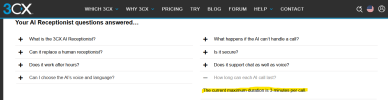
The 3CX website currently states a 3 minute maximum duration at the following link: https://www.3cx.com/phone-system/ai-receptionist/

This is despite the agent having a field for maximum call time which can be set beyond 3 minutes. Can you confirm that the system is definitely capable of calls >3 minutes prior to conducting further review.

3CX Website.png

Thank you!
 
Hello @Cody C , thank you for bringing that to our attention. I can confirm that the AI voice agent hard time limit is much greater. But we highly recommend you use the AI Agent configuration option to restrict it down to as little as possible, with 3 minutes being suitable for a receptionist role.
 
Yes you can increase to what you want.
We set it to 7 min actually for the receptionist. We think that 7 min is more than enough for a receptionist to check who is calling and route the call.

The new customer service agent which is coming soon in update 10, is set to 15 min.

But all these are fully configurable options.
 
  • Like
Reactions: KyriacosS_3CX

Members Online Now

Forum statistics

Threads
111,832
Messages
589,283
Members
164,662
Latest member
DejanMDS