Accept Multiple Calls

Jeanette

Platinum Partner
Joined
Apr 25, 2025
Messages
8
Reaction score
0
Hi,

New business customer has just started to use 3CX.

I've turned on Accept Multiple Calls for all staff.

Use case: They have one inbound ring group with 3 main people answering, then it flows to an overflow group with more staff.

Preference is for the first 3 to grab the call if possible.

Staff regularly need to phone other team members, but would like to know if an external call comes in so that they can hang up the internal call and answer their customer.

They are almost all using softphones, and when on a call, ring group calls aren't showing up, so the staff member doesn't know to hang up and answer the new call.

Have I missed something here, or does Accept Multiple Calls only work in queues?
 
You cant use RG's with the option for "Accept multiple calls" - you'll need to use queues with this enabled.
 
As @Alphabetic mentioned, the recommendation would be to use a Queue instead.

Unlike a Ring Group, calls routed to a Queue can remain waiting until an agent becomes available to answer them. With a Ring Group, if no user is available to receive the call, the call will follow the configured Destination if no answer instead.

Therefore, for this scenario, where users may already be on another call but still need to handle incoming customer calls when available, a Queue would be the more suitable option.

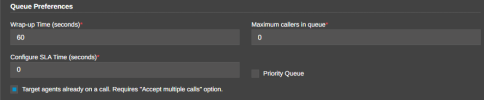
Additionally, when configuring the Queue, under Advanced > Queue Preferences, you need to enable the option 'Target agents already on a call' and save the changes for this behavior to apply to that queue:
 

Attachments

  • Screenshot 2026-07-07 123843.png
    Screenshot 2026-07-07 123843.png
    16.2 KB · Views: 3
Thanks folks. I figured this might be the case, but other questions I was seeing were asking about BLFs on handsets.

I've swapped out the RG for a queue straight away, as customer was already closed for the day!
 
Thanks folks. I figured this might be the case, but other questions I was seeing were asking about BLFs on handsets.

I've swapped out the RG for a queue straight away, as customer was already closed for the day!
@Jeanette , Can you clarify what you mean about the BLFs? Which handset/model are you using?
 
Hi Abdulla,

I just meant that other posts when I was searching were talking about using BLFs on the handset to pull through/answer the second call. -It's not relevant as this customer is using PC Softphones


Customer has confirmed this morning that switching to a Queue didn't seem to work - They made an internal call to a colleague, then made a test call into the Queue. The 2nd call didn't come through, although the Queue was set up to target agents already on a call, AND all users have 'Accept Multiple Calls"

Is there any way to achieve what the customer wants? -They need to be able to see that other calls are coming in, so that they can prioritise customer calls, despite having to make frequent calls down to the warehouse (internal)
 
I've just tested this internally and it works fine..

Double check you have the settings enabled on the queue and the extensions.
 
Hi Abdulla,

I just meant that other posts when I was searching were talking about using BLFs on the handset to pull through/answer the second call. -It's not relevant as this customer is using PC Softphones


Customer has confirmed this morning that switching to a Queue didn't seem to work - They made an internal call to a colleague, then made a test call into the Queue. The 2nd call didn't come through, although the Queue was set up to target agents already on a call, AND all users have 'Accept Multiple Calls"

Is there any way to achieve what the customer wants? -They need to be able to see that other calls are coming in, so that they can prioritise customer calls, despite having to make frequent calls down to the warehouse (internal)
@Jeanette
If the queue is configured to Allow queue calls to agents on a call and the agents have Accept Multiple Calls enabled, the queue call should be presented as a second (waiting) call. I just tested this on several supported IP phones and it worked as expected.


Do you see the same behavior if you assign a supported IP phone to the extension?


Also, which softphone are you using, and what version?
 

Members Online Now

No members online now.

Forum statistics

Threads
111,832
Messages
589,284
Members
164,662
Latest member
DejanMDS