3cx update started on schedule and took the system down

rayno_b

Gold Partner
Joined
Apr 6, 2017
Messages
9
Reaction score
1
Our 3cx system is set to automatically run updates.

Our 3CX update (20.0.10.1785) also triggered a Debian OS update that included grub-pc. Because grub-pc.postinst spawned an interactive debconf frontend prompt asking which disk (/dev/nvme0n1) to install GRUB onto—and there was no interactive terminal attached to the background 3CX updater—dpkg and apt-get have been sitting frozen on that prompt, holding the package lock while 3cxpbx is half-upgraded.

This was quite frustrating, as the dependency on 3cx to manage these auto-updates, effectively failed half way, leaving the entire system inaccessible until we manually found the issue, got the grup-pc matter resolved and finalising the update.

My question is - is this a common issue, and why did the update trigger if it needed an interactive prompt on an administrator side to finalise the update? This caused quite a considerable amount of down time for the end users and was extremely difficult to figure out.
 
Solution
I can confirm the problem. this issue happened on 2 of my 3CX installations.
system was stuck with 60% cpu

# ps aux | grep -E "apt|dpkg"
root 135153 0.0 0.1 6340 2080 pts/1 S+ 08:18 0:00 grep -E apt|dpkg
root 1179160 0.3 0.5 19372 12028 ? S 05:24 0:34 apt-get -y --allow-downgrades install 3cxpbx=20.0.10.1785
root 1179274 0.0 0.3 10536 6060 pts/0 Ss+ 05:24 0:00 /usr/bin/dpkg --status-fd 17 --configure --pending
root 1179275 8.0 1.0 25512 20316 pts/0 R+ 05:24 14:04 /usr/bin/perl -w /usr/share/debconf/frontend /var/lib/dpkg/info/grub-pc.postinst configure 2.06-13+deb12u1
root 1179308 7.6 0.1 7336 3716 pts/0 S+ 05:24 13:24 /bin/bash...
@rayno_b can you please open a ticket to your Support portal to check it out further ?
 
You may want to troubleshoot this with 3CX Support AI as it's very good at this sort of stuff.

I wonder if you experienced the same issue I had because of how I installed 3CX (GRUB loader installed on incorrect drive).

Check out my first post and go to the end where I mention caveats.

may be good for you to run through your other systems to check grub is correct or you'll encounter the same problems when doing debian updates.
 
  • Like
Reactions: rayno_b
Hi NikosT, I absolutely can yes, but the issue is already resolved?
 
I can confirm the problem. this issue happened on 2 of my 3CX installations.
system was stuck with 60% cpu

# ps aux | grep -E "apt|dpkg"
root 135153 0.0 0.1 6340 2080 pts/1 S+ 08:18 0:00 grep -E apt|dpkg
root 1179160 0.3 0.5 19372 12028 ? S 05:24 0:34 apt-get -y --allow-downgrades install 3cxpbx=20.0.10.1785
root 1179274 0.0 0.3 10536 6060 pts/0 Ss+ 05:24 0:00 /usr/bin/dpkg --status-fd 17 --configure --pending
root 1179275 8.0 1.0 25512 20316 pts/0 R+ 05:24 14:04 /usr/bin/perl -w /usr/share/debconf/frontend /var/lib/dpkg/info/grub-pc.postinst configure 2.06-13+deb12u1
root 1179308 7.6 0.1 7336 3716 pts/0 S+ 05:24 13:24 /bin/bash /var/lib/dpkg/info/grub-pc.postinst configure 2.06-13+deb12u1

to resolv this issue I had to
kill -9 1179160 1179274 1179275 1179308

then continue the update with
dpkg --configure -a
this will show the grub installation dialog and allow it to be completed interactively

if the 3CX update is not automatically triggered you need to do
apt-get -y --allow-downgrades install 3cxpbx=20.0.10.1785
 
Solution
We have multiple systems with the same problem after the automatic update. So it seems to be a commen problem with the update process.
 
We have the same problem. It affects only systems that were originally installed before v20 and later upgraded. Systems that were installed fresh on v20 are not affected.
 
Hi NikosT, I absolutely can yes, but the issue is already resolved?
Our 3cx system is set to automatically run updates.

Our 3CX update (20.0.10.1785) also triggered a Debian OS update that included grub-pc. Because grub-pc.postinst spawned an interactive debconf frontend prompt asking which disk (/dev/nvme0n1) to install GRUB onto—and there was no interactive terminal attached to the background 3CX updater—dpkg and apt-get have been sitting frozen on that prompt, holding the package lock while 3cxpbx is half-upgraded.

This was quite frustrating, as the dependency on 3cx to manage these auto-updates, effectively failed half way, leaving the entire system inaccessible until we manually found the issue, got the grup-pc matter resolved and finalising the update.

My question is - is this a common issue, and why did the update trigger if it needed an interactive prompt on an administrator side to finalise the update? This caused quite a considerable amount of down time for the end users and was extremely difficult to figure out.
How did you resolve this one please?
 
We have over 10 instances affected also. AWS Lightsail shows "status check failed" for all affected instances.
 
  • Like
Reactions: etelecom
As a temporary workaround, you can boot into kernel 6.1.0-54-cloud-amd64

Run:
sudo grub-reboot 'Advanced options for Debian GNU/Linux>Debian GNU/Linux, with Linux 6.1.0-54-cloud-amd64'
sudo grub-editenv - list


The output should contain: next_entry=Advanced options for Debian GNU/Linux>Debian GNU/Linux, with Linux 6.1.0-54-cloud-amd64

If this line appears, reboot the server: sudo reboot

After reconnecting via SSH, check the running kernel: uname -r

The expected result is: 6.1.0-54-cloud-amd64

This selects the previous kernel for one boot only. It will remain active until the server is restarted again.
 
  • Like
Reactions: krisd
We have over 10 instances affected also. AWS Lightsail shows "status check failed" for all affected instances.
Same issue here, all seem to be with the "2 GB RAM, 2 vCPUs, 60 GB SSD"!
 
  • Like
Reactions: etelecom
This resolves the issues on our servers:

1. Reboot server (to kill the grub-pc and apt processes)
2. Check your disk name first with lsblk -ndo NAME,TYPE (usually sda on Proxmox/SCSI, or vda on VirtIO).
echo "grub-pc grub-pc/install_devices multiselect /dev/sda" | debconf-set-selections
DEBIAN_FRONTEND=noninteractive dpkg --configure -a --force-confdef --force-confold
 
We have 3CX instances with larger spec that are also affected. This issue is also preventing us from connnecting via SSH onto the server so we are unable to try the fix.
 
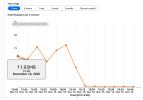
10 server down with same issue, upgraded hardware to 4GB 4 CPU, it worked for 2 hours and then down again , i have attached SS of network, license is 8 SC, no huge load .

sudden increase in ingress bandwidth is due to some Ddos / brute force on debian ? IDK
 

Attachments

  • Screenshot 2026-11-16 at 4.44.19 PM.png
    Screenshot 2026-11-16 at 4.44.19 PM.png
    154.9 KB · Views: 6
I thought I had remediated all GRUB installs on my VPS but apparently I missed one..

Code:
PRETTY_NAME="Debian GNU/Linux 12 (bookworm)"
NAME="Debian GNU/Linux"
VERSION_ID="12"
VERSION="12 (bookworm)"
VERSION_CODENAME=bookworm
ID=debian
HOME_URL="https://www.debian.org/"
SUPPORT_URL="https://www.debian.org/support"
BUG_REPORT_URL="https://bugs.debian.org/"
  UNIT LOAD ACTIVE SUB DESCRIPTION
0 loaded units listed.
Nov 16 11:52:10 <CustomerName> kernel:  #2
Nov 16 11:52:10 <CustomerName> kernel:  #3
Nov 16 11:52:10 <CustomerName> kernel: acpi PNP0A03:00: fail to add MMCONFIG information, can't access extended PCI configuration space under this bridge.
Nov 16 11:52:10 <CustomerName> kernel: sd 0:0:0:0: Power-on or device reset occurred
Nov 16 11:52:10 <CustomerName> kernel: device-mapper: core: CONFIG_IMA_DISABLE_HTABLE is disabled. Duplicate IMA measurements will not be recorded in the IMA log.
Nov 16 11:52:10 <CustomerName> systemd-journald[255]: File /var/log/journal/aa044f6fd8b1442a804cec0f40ccc085/system.journal corrupted or uncleanly shut down, renaming and replacing.
Nov 16 11:52:10 f kernel: cirrus 0000:00:02.0: [drm] drm_plane_enable_fb_damage_clips() not called
The following packages have been unpacked but not yet configured.
They must be configured using dpkg --configure or the configure
menu option in dselect for them to work:
 3cxpbx               3CX PBX

The following packages are only half configured, probably due to problems
configuring them the first time.  The configuration should be retried using
dpkg --configure <package> or the configure menu option in dselect:
 grub-pc              GRand Unified Bootloader, version 2 (PC/BIOS version)

The following packages have been triggered, but the trigger processing
has not yet been done.  Trigger processing can be requested using
dselect or dpkg --configure --pending (or dpkg --triggers-only):
 postgresql-common    PostgreSQL database-cluster manager

If you're unsure which drive is designated as boot drive by your BIOS, it is
often a good idea to install GRUB to all of them.

Note: it is possible to install GRUB to partition boot records as well, and some
appropriate partitions are offered here. However, this forces GRUB to use the
blocklist mechanism, which makes it less reliable, and therefore is not
recommended.

  1. /dev/sda (80530 MB; QEMU_HARDDISK)  2. - /dev/sda1 (79505 MB; /)

(Enter the items or ranges you want to select, separated by spaces.)

GRUB install devices:
Use of uninitialized value $_[1] in join or string at /usr/share/perl5/Debconf/DbDriver/Stack.pm line 111.
grub-pc: Running grub-install ...
You chose not to install GRUB to any devices. If you continue, the boot loader
may not be properly configured, and when this computer next starts up it will
use whatever was previously in the boot sector. If there is an earlier version
of GRUB 2 in the boot sector, it may be unable to load modules or handle the
current configuration file.

If you are already using a different boot loader and want to carry on doing so,
or if this is a special environment where you do not need a boot loader, then
you should continue anyway. Otherwise, you should install GRUB somewhere.

Continue without installing GRUB? [yes/no]
Use of uninitialized value $_[1] in join or string at /usr/share/perl5/Debconf/DbDriver/Stack.pm line 111.
The GRUB boot loader was previously installed to a disk that is no longer
present, or whose unique identifier has changed for some reason. It is important
to make sure that the installed GRUB core image stays in sync with GRUB modules
and grub.cfg. Please check again to make sure that GRUB is written to the
appropriate boot devices.

If you're unsure which drive is designated as boot drive by your BIOS, it is
often a good idea to install GRUB to all of them.

Note: it is possible to install GRUB to partition boot records as well, and some
appropriate partitions are offered here. However, this forces GRUB to use the
blocklist mechanism, which makes it less reliable, and therefore is not
recommended.

  1. /dev/sda (80530 MB; QEMU_HARDDISK)  2. - /dev/sda1 (79505 MB; /)

(Enter the items or ranges you want to select, separated by spaces.)

GRUB install devices:
Use of uninitialized value $_[1] in join or string at /usr/share/perl5/Debconf/DbDriver/Stack.pm line 111.
grub-pc: Running grub-install ...
You chose not to install GRUB to any devices. If you continue, the boot loader
may not be properly configured, and when this computer next starts up it will
use whatever was previously in the boot sector. If there is an earlier version
of GRUB 2 in the boot sector, it may be unable to load modules or handle the
current configuration file.

If you are already using a different boot loader and want to carry on doing so,
or if this is a special environment where you do not need a boot loader, then
you should continue anyway. Otherwise, you should install GRUB somewhere.

Continue without installing GRUB? [yes/no]
Use of uninitialized value $_[1] in join or string at /usr/share/perl5/Debconf/DbDriver/Stack.pm line 111.

@Sonal-MA sorted me out.

 
  • Like
Reactions: Sonal-MA
I can confirm the problem. this issue happened on 2 of my 3CX installations.
system was stuck with 60% cpu

# ps aux | grep -E "apt|dpkg"
root 135153 0.0 0.1 6340 2080 pts/1 S+ 08:18 0:00 grep -E apt|dpkg
root 1179160 0.3 0.5 19372 12028 ? S 05:24 0:34 apt-get -y --allow-downgrades install 3cxpbx=20.0.10.1785
root 1179274 0.0 0.3 10536 6060 pts/0 Ss+ 05:24 0:00 /usr/bin/dpkg --status-fd 17 --configure --pending
root 1179275 8.0 1.0 25512 20316 pts/0 R+ 05:24 14:04 /usr/bin/perl -w /usr/share/debconf/frontend /var/lib/dpkg/info/grub-pc.postinst configure 2.06-13+deb12u1
root 1179308 7.6 0.1 7336 3716 pts/0 S+ 05:24 13:24 /bin/bash /var/lib/dpkg/info/grub-pc.postinst configure 2.06-13+deb12u1

to resolv this issue I had to
kill -9 1179160 1179274 1179275 1179308

then continue the update with
dpkg --configure -a
this will show the grub installation dialog and allow it to be completed interactively

if the 3CX update is not automatically triggered you need to do
apt-get -y --allow-downgrades install 3cxpbx=20.0.10.1785
You'll need to fix the grub installer issue or you'll encounter this again.

Code:
debconf-show grub-pc | grep install_devices

check this is your disk
 

Forum statistics

Threads
112,503
Messages
592,885
Members
165,721
Latest member
LeeonLau