1-3 second delay on most inbound calls

IraHall

Bronze Partner
Joined
Apr 20, 2024
Messages
23
Reaction score
3
Most (not all) inbound calls have a 1-3 second delay after answering the call. Neither party can hear the other for the first few seconds. When testing 8 of 10 calls exhibit the issue.

Setup:
- Newly deployed in Jan. 2026
- 3cx hosted 20.7.1080
- using preferred SIP provider
- 11 physical Fanvil v64 phones (I set them all up as router phones in this small deployment)
- main inbound lines hit call queue and all 11 phones are part of the queue
- most calls are answered by a couple of users but all have had the issue
- 2gb fiber internet connection
- 1gb internal POE switch

tried the basic reboots of all on premise devices and internet router, different inbound callers, inbound calls from "land lines", cell (different carriers), voip

any ideas of what may be the issue or what else i can do to narrow this down?
 
Regarding your question, enable the call quality monitor and see if you spot any issues. Also, try internal calls to check if they present the same problem. Additionally, try using the WebClient and mobile app to narrow down whether the issue is VoIP provider or network related.
 
thank you for the quick response and ideas. I have asked the customer to test internal calls and let me know.

I have enabled call quality on the main two call answerers phones. i need to do some testing now to validate. the few that have come in have shown "excellent", but I have not verified if they experienced the issue or not,

I found this post
wondering if this is what is going on. Wondering if I should try a firmware newer than the 2.12.20, which is not officially supported by 3cx.
 
thank you for the quick response and ideas. I have asked the customer to test internal calls and let me know.

I have enabled call quality on the main two call answerers phones. i need to do some testing now to validate. the few that have come in have shown "excellent", but I have not verified if they experienced the issue or not,

I found this post
wondering if this is what is going on. Wondering if I should try a firmware newer than the 2.12.20, which is not officially supported by 3cx.
Other than our general recommendation to keep on the supported firmware, beware the SBC might not be available on alternative ones.
Have you tried restarting the phones and seen the issue resolve for a period? If it does not then that post would not be relevant.
 
  • Like
Reactions: paulodagraca
I have restarted the POE switch and the end users felt like the issue was better the day I did that, but the problem came back. I am going to restart the switch again tomorrow morning and see if tomorrow is better.

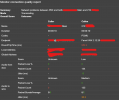
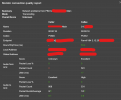
I am seeing some call quality issues, see below, but I am not sure how to interpret this. First image is "bad call" and second image is "good call"
The round trip time on the callee side is high and jitter is not great, but I am not getting much information from the caller side.
1770650318117.png
1770650918302.png
 
I just had a user tell me that they could not hear audio on 3 calls straight. The call quality all show this error
No valid RTCP report from ###########
No RTCP from ########### (audio from PBX can't get through?).
 
I just had a user tell me that they could not hear audio on 3 calls straight. The call quality all show this error
No valid RTCP report from ###########
No RTCP from ########### (audio from PBX can't get through?).
After reviewing the event log further, all calls have this error. Seems to have to do with call recording, but not sure.
 
Hello,

This might not be relevant or a solution, but update 8 is out with many improvements and also the SIP Trunk checker function, that will allow you to check if there seems to be any issue on the Trunk side of things.

Also - on the premises, is there some firewall device that might be messing things up somehow?
 
Hello,

This might not be relevant or a solution, but update 8 is out with many improvements and also the SIP Trunk checker function, that will allow you to check if there seems to be any issue on the Trunk side of things.

Also - on the premises, is there some firewall device that might be messing things up somehow?
thanks for the suggestion. I will update to 8 after hours tonight.

the only device between the phones and the internet is the default internet router from the local provider. If the problem was consistent I would lean towards this, but it is not every time that the delay occurs.
 
I didn’t see above, does the 3CX firewall test pass? Note it restarts services.

Same issue on a software client?

Re updates, there have been a few Debian updates this year for/after u8 so enable auto updates to get those.
 
I didn’t see above, does the 3CX firewall test pass? Note it restarts services.

Same issue on a software client?

Re updates, there have been a few Debian updates this year for/after u8 so enable auto updates to get those.
The firewall test is "pass", but this is hosted by 3cx so I don't think that helps much. Let me know if I am thinking wrong on this one.

They do not have a way of testing software at the location. I will see if someone can setup a mobile app and get it going.

auto updates are on since it is hosted on the 3cx cloud. I am planning to manually update to 8 tonight since the auto update runs on Sunday.

Thanks for the ideas.
 
Ah, I missed they were hosting it, while on my phone earlier.

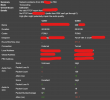
The 950ms RTT is a second right there. Their Internet sounds fast but I'd still prioritize voice/UDP to/from the 3CX server IP. 50 to 950 is a big difference.
 
Ah, I missed they were hosting it, while on my phone earlier.

The 950ms RTT is a second right there. Their Internet sounds fast but I'd still prioritize voice/UDP to/from the 3CX server IP. 50 to 950 is a big difference.
 
I have updated the system to version 8. power cycled all phones once a day for the last few days and still experiencing similar issues.
1770829913568.png

I have not been able to look at the Internet vendor provided router yet to see if I can set priorities on traffic.

Any other thoughts?
 
I went over today and did some more troubleshooting on site. I found that the 2 phones setup on wifi that were using one of the other phones as an SBC were working better and did not exhibit the problem. I moved all of the phones (I did a factory reset and readded them as standard phones) that were regularly used to answer inbound calls from being their own SBC to using either another phone as the SBC or a windows SBC that I setup for testing. after almost a full day of testing the problem does not seem to be occurring any more.

I tried to upgrade one of the v64 phones to the latest firmware on fanvil's site, but it kept erroring out and I gave up on that route because of the other potential issues of running on a unsupported firmware.

If this works through tomorrow I am assuming that using v64 as router phones is not an ideal situation until they come out with newer firmware. I have v64 in other locations with similar setups and have not had complaints like this, so I am not sure what is different about this one.
 
Just to close this out. moving the phones from being their own SBC/router phones to "standard" phones fixed the issue. Hopefully fanvil will fix this in future firmware that is approved by 3cx
 
  • Like
Reactions: KyriacosS_3CX

Forum statistics

Threads
111,953
Messages
589,913
Members
164,848
Latest member
latoya@bautistafamilycare