Solved 365 Sync

Status
Not open for further replies.

Alphabetic

3CX MVP
Silver Partner
Advanced Certified
Joined
Jul 1, 2016
Messages
6,642
Reaction score
2,645
Version 20.0 Update 7 (Build 1080 Release)

Morning all

I have an issue with 365 user sync.

So far i've restarted OS and re-done the 365 set up wizard.

Problem 1
When we've decommissioned the user in 365 (license removal, block sign in) the user disappears from 3CX 365 user selection, but is still in the sync. (i've sorted this but worth noting)

Problem 2
I have 26 "users" in my 365 tenancy with 11 of them having a license.
3CX 365 user list is showing me 15 users to select.
The one that I actually want to sync in to 3CX is not showing in this list

Weirdly enough I cant select the system from the "System" drop down when trying to make this post.
 
@Alphabetic
1) the synch is 1 way not 2 ways, so when you want to do something on 365 side and lets say disable a user,
go on the PBX side and also delete the extension or disable it if you want and Reset the credentials.

2) these users or the user you want, have First Name, Last Name, Display Name and are " User type : Member " ?
 
@Alphabetic
1) the synch is 1 way not 2 ways, so when you want to do something on 365 side and lets say disable a user,
go on the PBX side and also delete the extension or disable it if you want and Reset the credentials.

2) these users or the user you want, have First Name, Last Name, Display Name and are " User type : Member " ?
Hi Nikos,

I re-tasked the extension on 3CX thinking that since the user wasnt visible in the selection to sync, it was gone. This wasnt the case. If the sync is 1 way (365 to 3CX) then Id have thought 3CX would have disassociated with the extension (it did disable the extension). If I just deleted the extension in 3CX as you suggested, it would have synced back down.

Just had a look and there was no first name or last name - populated these fields has brought it in to the selection :)
 
  • Like
Reactions: NikosT_3CX
@Alphabetic if you disable the user on 365, on the next trigger the PBX will do and try to pull the users from 365 in order to update or not, this user would not have been updated on the PBX side.
 
@Alphabetic if you disable the user on 365, on the next trigger the PBX will do and try to pull the users from 365 in order to update or not, this user would not have been updated on the PBX side.
Hi Nikos,

with the user unlicensed and disabled in 365, the extension was still being updated in 3CX despite not being visible in the list of users to select for the 365 sync.
 
  • Like
Reactions: Evolute IT
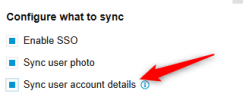
@Alphabetic out of quriocity, the PBX is on U7 or U8 ?
Also the option below is enabled or not ?


1770207388324.png
 
  • Like
Reactions: Evolute IT
its u7
yes, this is enabled.
 
@Alphabetic so on the disabled user on 365 side, if you go and change lets say First Name and Last Name to something else ( for a test ) does this get udated also on the PBX side ?
Restart system service to force this.
 
@Alphabetic so on the disabled user on 365 side, if you go and change lets say First Name and Last Name to something else ( for a test ) does this get udated also on the PBX side ?
Restart system service to force this.
Hi Nikos,

I didnt make that test. But, what I did do, was overwrite the firstname/lastname/email in 3CX and the sync overwrote it with the 365 details all while this user wasnt selectable from the list of 365 users to pick from.
I did restarting of PBX at the time to solve the other issue with the other user not showing.

I had to license the account back up and enable it in 365 to be able to see it in the list and uncheck it from being in the sync.
 
@Alphabetic thanks for the feedback !! :)
The main point here is that the PBX has no idea the user is disabled on 365 side and by the time the synch is enabled and the user is in the synch, the PBX makes the GET request in order to update or not the extension. The point here is what 365 side provides.
So when a user is disabled on 365 side, remove from the integration, disable / reset / delete the extension on the PBX side.
 
  • Like
Reactions: AbdullaR_3CX
Hi Nikos,

3CX does know the user is disabled because it disabled the 3CX extension.

It just stumped me because during the process of decommission in 365, it removed it from being visible in the 3CX/365 user picker. But, it was still synchronising the user extension.
 
  • Like
Reactions: Evolute IT
@Alphabetic - if you try the following sequence:
  • start with ENABLED user in M365 that is visible from 3CX as expected
  • make sure it imports into 3CX as expected
  • disable the user from M365 - NOT just remove the license, but disable the user
  • wait say 30 mins to avoid caching inconsistencies M365-side
  • delete the user from 3CX - NOT rename or change in some other way, just plain delete
...does the user get reimported at the next sync cycle?
 
  • Like
Reactions: AbdullaR_3CX
@Alphabetic - if you try the following sequence:
  • start with ENABLED user in M365 that is visible from 3CX as expected
  • make sure it imports into 3CX as expected
  • disable the user from M365 - NOT just remove the license, but disable the user
  • wait say 30 mins to avoid caching inconsistencies M365-side
  • delete the user from 3CX - NOT rename or change in some other way, just plain delete
...does the user get reimported at the next sync cycle?
Hi Kevin,

no it does not.

However, the 365 user select says I still have x amount of users selected which includes the test user I just made.

I'll just know now that If I want to reuse the extension, I need to break the sync in 3CX first.
 
Ok, that is indeed the way, thanks for following through.
 
1770296622121.png
 
  • Like
Reactions: Evolute IT
Status
Not open for further replies.