


- Joined
- Sep 14, 2020
- Messages
- 9
- Reaction score
- 0
Hi,
I have 3CX version 16.0.5.619 and somehow I can't update it.
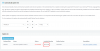
If click "Download Selected" and it won't do anything.
If I leave "Automatically update 3CX" > Weekly at Friday (or any day) -- I have same issue, it's just stuck at 16.0.5.619.
I also have restarted all Services from Dashboard > Services
I read this forum : https://www.3cx.com/community/threads/update-to-v16-update-5-hotfix-2-failed.75423/ and it looks like has similar issue. I wonder, how to get to Linux / Unix command prompt from 3CX console ?
Any help would be appreciated.
Thank you
I have 3CX version 16.0.5.619 and somehow I can't update it.
If click "Download Selected" and it won't do anything.
If I leave "Automatically update 3CX" > Weekly at Friday (or any day) -- I have same issue, it's just stuck at 16.0.5.619.
I also have restarted all Services from Dashboard > Services
I read this forum : https://www.3cx.com/community/threads/update-to-v16-update-5-hotfix-2-failed.75423/ and it looks like has similar issue. I wonder, how to get to Linux / Unix command prompt from 3CX console ?
Any help would be appreciated.
Thank you


