- Joined
- Nov 2, 2019
- Messages
- 16
- Reaction score
- 1
Hi,
1. While generating "Abandoned Queue Calls report" it is giving me the queue polling attempt over agents who are in "logged out" status. Why it is coming as such?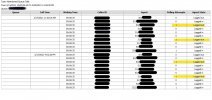
2. If any one the agent will taken initiate to respond back to the abandoned call by selecting Dealing or Dealt, in which report this action got generate ?
3. Is there any way 3cx can offer the report listed only with Abandoned Queue Calls numbers?
Product: Enterprise Annual
Version Number: 16.0.1078
Number of Simultaneous Calls : 32
Queue configuration : multiple agents in queue with Polling Strategy: Round Robin | Ring Time : 13 seconds /agent | Maximum Queue Wait Time: 35 seconds | Destination if no answer : connect to extension
1. While generating "Abandoned Queue Calls report" it is giving me the queue polling attempt over agents who are in "logged out" status. Why it is coming as such?
2. If any one the agent will taken initiate to respond back to the abandoned call by selecting Dealing or Dealt,
in which report this action got generate ?3. Is there any way 3cx can offer the report listed only with Abandoned Queue Calls numbers?
Product: Enterprise Annual
Version Number: 16.0.1078
Number of Simultaneous Calls : 32
Queue configuration : multiple agents in queue with Polling Strategy: Round Robin | Ring Time : 13 seconds /agent | Maximum Queue Wait Time: 35 seconds | Destination if no answer : connect to extension