3CX and Office 365 integration

Status
Not open for further replies.

Gazza1004

Free User
Joined
Nov 10, 2020
Messages
8
Reaction score
2
Hi all,

I am in need to some technical help/advice. Today I set up 3CX and Office 365 integration for outlook click to call. Everything was configured and met the necessary requirements.

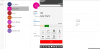
The problem I am having is that when I test the Click to Call feature in outlook, it places 2 simultaneous calls. Line 1 and Line 2 are used. The one call is put on hold and the MOH is played or it goes to voicemail and only once I end Line 2 in the 3CX for windows does actual voice audio start to work.

I have attached an image where i tested the click to call and it places 2 calls to the same number, this is when one is put on hold.

This is on outbound calls only.

Please could someone assist me.

Thank you
 

Attachments

  • 3CX problems.PNG
    3CX problems.PNG
    68.6 KB · Views: 14
Hello @Gazza1004 ,

You are using Outlook Client or Outlook Web?
 
Hello Constantinos,

I am using my Office Apps that come with my Microsoft Business Standard license, which is Outlook for windows.

If you could please assist/help me find and fix the problem that would be great
 
Hello @Gazza1004,

So you're using the Outlook Windows application, correct? Not on the web. And you right click a contact and use the Call with 3CX option, correct?

Did you install 3CXPlugins and also provisioned the Outlook integration from the 3CX console by any chance? Because in that case you would have the Outlook integration running twice...
 
  • Like
Reactions: Evolute IT
Hello @esdossantos,

Yes I am indeed using the Outlook Windows application. Yes I use click to call on a contact in Outlook.

I installed the 3CX plugin for Outlook and also provisioned the Outlook integration from the Windows 3CX console on my desktop(as instructed in the configuration material issued by 3CX). I understand now thank you so much!

Now what would be the best thing to do to get rid of this issue? Uninstall the 3CX Plugin in Outlook or?

Thank you.
 
Now what would be the best thing to do to get rid of this issue? Uninstall the 3CX Plugin in Outlook or?
Yes, uninstall 3CXPlugins. If you have a PRO license you can provision the integration from the console, which is much easier. The 3CXPlugins should be installed only if you have a STD license.
 
Hi Edossantos,

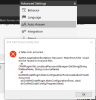
I uninstalled the 3CX plugins exe, and now I got the following issues that I have attached.

I tried testing click to call in Outlook but there was no option "Call with 3CX"

I attached the license that I am currently using. Is it the correct one?

How can I fix the fatal Error message/integration.

Thank you.
 

Attachments

  • 3CX integration issues.PNG
    3CX integration issues.PNG
    95.9 KB · Views: 8
  • 3CX license.PNG
    3CX license.PNG
    3.3 KB · Views: 8
The license is correct.

About the error you're getting, that's due to a missing translations file. Maybe when you uninstalled 3CXPlugins it got removed. Please try reinstalling 3CXPhone for Windows, so you get the file back.

Regarding not having the click to call option in Outlook, can you see the add-in running? Go to File > Options > Addins > COM Addins, and check if the 3CX addin is running.
 
Hi Edossantos,

Thank you so much for the advice, click to call is now working and only placing 1 call on line 1 as it should.

I appreciate all the help.

Have a great day further!
 
Status
Not open for further replies.

Forum statistics

Threads
112,349
Messages
592,026
Members
165,512
Latest member
gmacinit