3cx and vtiger Integration - Redirecting to contact page Not working

Status
Not open for further replies.

itj-CRM

Free User
Joined
Oct 5, 2021
Messages
33
Reaction score
4
Hi All, we configured the 3cx template and vtiger CRM details, it was good and was woring fine,
but suddenly it stop working the redirecting to contact page,
we just tried to change the other vtiger CRM instance details and that was also working good. and we back to configure other CRM details which we were working before then its not trigger the pop-up (redirect to CRM).

how can we check the cause of this? and any debugging methods please suggest?
 
If you changed your CRM details, you should go to the 3CX Console > Advanced > Contacts > Bulk delete > CRM Contacts. This way you delete all the CRM contacts that have been synchronized from the CRM. Old CRM contacts will still point to the old CRM URL, so that could be the issue.
 
  • Like
Reactions: Evolute IT
Hi @edossantos i did the above step then also same issue redirecting is not working but call journal is creating in background.

is something cache issue in 3cx? i am not sure just guessing? what might be the possibilities for this? or

do we need to make new instance and check or is there any way to make 3cx cache free something?

Please guide
 
and is there any browser dependency on this? even i tried to update google chrome to latest version.

Please suggest any tips on this to fix the same. thanks in advance.
 
No, there is no cache, if you don't have the contact in 3CX Contacts, the popup URL should be fine.

Do you see the correct contact name when you receive the call? How are you configuring the Web Client > Settings > Integration? Please ensure that you don't have a static URL there.
 
  • Like
Reactions: Evolute IT
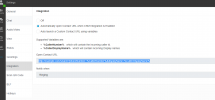
My webclient the following option selected

Automatically open Contact URL when CRM Integration is Enabled


find the attachment for the same.
 

Attachments

  • 3cx_capture.png
    3cx_capture.png
    29.7 KB · Views: 29
That's the correct option. Do you see the contact name and card in the toaster when you receive the inbound call?
 
Yes it's showing as
New 3cx followed by phone number.

Eg : 3CX Contact +31××××××××
 
Yes it's showing as
New 3cx followed by phone number.

Eg : 3CX Contact +31××××××××
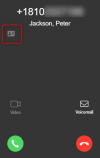
Do you see the contact card icon?
1639488045616.png

What happens if you click that button? The correct page is launched?
 
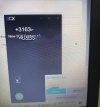
No Iam unable see the Contact card icon myside, i am able to see as attached picture, for
security reason i masked the number here
WhatsApp Image 2021-12-14 at 6.58.18 PM.jpeg
 
Last edited:
No Iam unable see the Contact card icon myside, i am able to see as attached picture, for
security reason i masked the number here
View attachment 26589
Looks like you're using multiple clients, I can see the Desktop App and also the Windows client ringing. Can you describe your scenario?

Also, please ensure that you're not calling from a number which is set as the mobile number of an existing extension. For example, if you call from your mobile for testing, and you have this number set for an extension. Because in that case the extension takes precedence, and you will not see the contact card or the popup.
 
Hi @edossantos we are new to this, we downloaded the desktop 3cx and also configured Webclient. and our extension(10) having the same mobile number which we are trying to call from same number.

can you please suggest what should be do next?

we will try to call from another number and check now?

Thanks a lot for your kind support on this.
 
Call from another number, or remove your mobile from your extension's configuration. This way the contact popup should work. Please note that the popup is triggered by the Web Client and the Desktop App. If you're using both, you will get 2 popups. The Windows client will not launch the popup, so if you're just using it, you will not get it.
 
Status
Not open for further replies.

Latest Posts

Forum statistics

Threads
112,323
Messages
591,896
Members
165,473
Latest member
NathanMitchell