3CX and Yealink RPS

Status
Not open for further replies.

dkdocks

Free User
Basic Certified
Joined
Jun 2, 2021
Messages
41
Reaction score
11
So having armed myself with my own Yealink RPS account so I can drop-ship phones to people with only known the phones mac address,
I need some help understanding this thread -> https://www.3cx.com/community/threads/yealink-rps.70886/

So a yealink phone on boot does not try to speak to some master URL at yealink, to get the https provision data from Yealink into say a 3CX url,
where it could collect SIP config details, please enlighten me with a clue. In that thread it speaks of 3cx talking back to Yealink not the other way around.
If that is true, who's RPS are my two current phones registered with - like a Null/Default Dealer/Null Default Reseller?
How is this possible? - I will have a setup soon where I need to drop ship phones all over the globe, and the recipients are not that willing to find the ip and log in as admin:admin to stick the 3cx provisioning URL nor the credentials into the device - any and all clarity would be helpful.
 
Hi @dkdocks

This account might not be necessary at all, because the way 3CX uses does the following

1. You add the phone in 3CX as STUN
2. 3CX informs Yealink RPS automatically about where the phone belongs
3. You ship the phone and the user plugs it in
4. The phone contacts Yealink RPS, and it informs it to go to your FQDN
5. The phone contacts your PBX now, but the user must enter credentials so the config is at least secured behind an extension,password AND mac address of the specific phone you added.
6. If they enter the correct details, it will be given the config file and get provisioned, all automatic

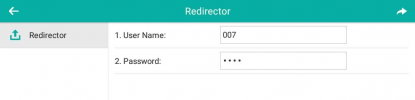
Note that the user does NOT need to login to the phone IP or anything like that. They only get a simple screen
1623750731706.png
Very user friendly: just type your extension, and voicemail pin (both included in 3CX welcome email)
 
Wow thank you - this is very good insight - question about 2.
2. 3CX informs Yealink RPS automatically about where the phone belongs
How is that relationship established between my 3cx instance and dm.yealink.com RPS server, how do I connect the two - so 3cx can do the telling?
 
You don't need to have a Yealink RPS account for this at all, because we do it automatically for you via our own cloud servers. The PBX talks to the 3CX cloud servers (where we have accounts with all manufacturers) and we relay the RPS request for you automatically.

This means that the phones administrator (you) will not need to create a separate RPS account with Yealink, Snom, Fanvil , Grandstream etc.

PS: You can create your own accounts if you wish to, but you cannot connect them with 3CX. You manage those entirely by yourself, but why bother if 3CX already includes the functionality for free in your existing license
 
Oh okay - so it's kinda like 3cx's own RPS account that the MAC ends up in.. instead of me getting my own and punching them in. Got it. and yet again thank you again.
 
Also another daft question, are there any brands of phones that are 3cx SBC/3cx app like that can auto-tunnel in?
 
Unfortunately not at the moment. Meanwhile, I would encourage you to follow our guides and try to setup a STUN phone to see what the procedure looks like on the phone screen (and to make it easier to explain to a user later on)
For confirmation purposes the 3CX event log will show that the RPS was sent/re-sent whenever you make changes to the extension and press OK.
https://www.3cx.com/sip-phones/


Your only restriction to keep in mind is that the RPS entry cannot be removed manually. It is deleted automatically though from 3CX after 14 days of not editing the extension (in case you want to assign the phone to another PBX).
 
  • Like
Reactions: accentlogic
Unfortunately not at the moment. Meanwhile, I would encourage you to follow our guides and try to setup a STUN phone to see what the procedure looks like on the phone screen (and to make it easier to explain to a user later on)
For confirmation purposes the 3CX event log will show that the RPS was sent/re-sent whenever you make changes to the extension and press OK.
https://www.3cx.com/sip-phones/


Your only restriction to keep in mind is that the RPS entry cannot be removed manually. It is deleted automatically though from 3CX after 14 days of not editing the extension (in case you want to assign the phone to another PBX).
I will definitely try - I have some Yealink phones arriving on the 16th-17th - they're brand new so I'll just punch in the MAC address printed on the box into 3cx and test what happens.
 
  • Like
Reactions: JohnS_3CX
JohnS_3CX
Wow, punched in a T42S mac address on the cardboard box on the phone into 3cx, 5 mins later took phone out of said box and booted the phone for its 1st time... It came up with "redirector" prompt - punched in extension and pin and it was online via STUN immediately to 3cx - updated firmware and etc... absolutely "automagically". it's a thing to behold. Absolute magic. :) This means my biggest problem is to get said swath of remote end-users to have a power supply or a long enough ethernet cord, and not have them turn the phone on before I have the mac registered. amazing stuff here.
 
Glad you enjoyed the experience! Even if they do turn it on, no worries: simply add it to the PBX and have them power-cycle the phone. The prompt will pop up upon reboot.

And if you have any issues, long-pressing the middle OK button will reset the phone (but you might not want to liberally share that with the end-users, they might reset it in an attempt to self-diagnose problems and might cause more harm than good)
 
  • Haha
Reactions: dkdocks
I just hope none of them have some crazy setup where Option 66 is given out on DHCP where they had old equipment, or ALG or similar enabled as well.
 
If you are talking single phone drops, then chances are there won't be any DHCP options.

If you are talking about offices where there are more than a couple of phones, it might indeed be an issue. But in this case we would recommend to move away from STUN - it can work generally, but if you want it to work reliably you need to do a bit of legwork, and this multiplies the with the more phones you add.

SBC is the best solution for environments with multiple remote phones per-site, and it will save you a lot of angry calls and extra work, while keep the customer happy with reliable service. It can be deployed on a PC, a Raspberry Pi, or even a local VM. It can keep local traffic on the network, and can encrypt remote traffic while bypassing network restrictions. I think you will be very pleased with it especially for customers who complain that their stun phones miss calls, don't register, or have one-way audio.
 
Last edited by a moderator:
I am going to politely disagree here. The maximum number of supported phones on an SBC is limited. Also the SBC is a single-point of failure. We DO deploy SBC's but basically only if we need hotdesking. Otherwise we just remotely connect the phones through the corporate firewall. Never had any real troubles that way.
 
I am going to politely disagree here. The maximum number of supported phones on an SBC is limited. Also the SBC is a single-point of failure. We DO deploy SBC's but basically only if we need hotdesking. Otherwise we just remotely connect the phones through the corporate firewall. Never had any real troubles that way.
Yes, there is a limit of 25 to 100 desk phones per SBC (hardware/OS dependent) but you can have SBC redundancy using the new Cluster mode for Debian/Raspberry SBC units. It works great. We used to keep an extra SBC at critical sites and split the load between the two - or keep a hot spare so we could manually move phones if need be.

Your fortunate to not have any audio issues using STUN with multiple phones. Too often we see the firewalls mangling the traffic, causing issues like no audio on intercom calls, so we require an SBC when there is more than one phone at the site. Granted, if we had control of the firewall we may have been able to resolve it, but I much prefer the "guaranteed" plug and play of using an SBC, even if it requires two or more clusters to handle the number of desk phones. One huge bonus is we can re-provision desk phones on different extensions without having a user key in the credentials on the desk phone.
 
My 2 cents, if you own the firewall and it's configs and don't want any on-prem 3cx equipment in a small office, setup STUN can be done with success as long as you're mindful of ports and ALG or whatever the firewall calls it.

If you have a facility where there are 30+ phone in the same place and you're not central IT or ISP 'owns' the router, where you're just the VAR for the phone system, then 3cxSBC makes total sense, Raspberry Pi 3 and 4 I have some issues with though I've not had one fail yet as a ubiquity controller - just due to how they're powered android power connector brick that is easy to kick into off-mode in a wiring closet and how they take ethernet as a USB side-chain so a Mini i5-i7 Dell that runs Debian Linux or etc would be a safer bet.
 
Guys,
The SBC just makes things a breeze. We have dozens of them deployed and have had 0 issues "so far". Though I am very comfortable with firewalls (been installing/configuring them for almost 20 years) I don't see the point in managing all the NATs when a simple $100 device can do the trick with literally 0 firewall config needed.
 
  • Like
Reactions: JohnS_3CX
Status
Not open for further replies.

Members Online Now

No members online now.

Forum statistics

Threads
111,831
Messages
589,277
Members
164,660
Latest member
RJenkinsROCK