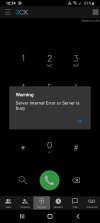
3cx android app not working after V18 update

Status
Not open for further replies.

Kelvin Njoroge

Customer
Joined
Feb 7, 2023
Messages
5
Reaction score
1
WhatsApp Image 2023-02-06 at 10.25.41.jpeg

Hey Guys i have been experiencing this issues with all my app users after the latest update. All SiP phones are working well though
 
@Kelvin Njoroge
Thanks for your feedback.
Might I ask you what version of the app you are using?
Android App Settings (top left hamburger menu) > About

We require client logs as well as the PBX logs to review this issue.

Client Logs
  1. Enable Verbose Logs: “Android App Settings (top left hamburger menu) > Settings > Advanced > Troubleshooting > Enable verbose logging”.
  2. Reproduce the issue and “Send log report”: Android App Settings (top left hamburger menu) > Settings > Advanced > Troubleshooting > Send Log Report

PBX Logs
Follow these steps in the following URL
https://www.3cx.com/docs/collecting-logs-for-3cx-support/

Please send both logs via Personal Message. Do not attach files in this forum thread.

Thanks
 
Hey

Thanks or the reply i am using Adroid version 18.13.130

Please find attached
 
  • Like
Reactions: dmlk
Latest log report
 
@Kelvin Njoroge
Thanks for that.

Again DO NOT attach logs to this thread. This is to protect yourself and your information online.
Please provide them via Private Message

Reminder: We also need the PBX logs
 
Last edited:
Chiming in that we had this exact Android app issue after the last update - amongst many other bugs. Additionally, the PWA (Edge) and normal web UI for users was erroring out and inaccessible. SIP phones were connecting and dialing fine. Management console was also OK.

We spent all day attempting to resolve, but eventually opted to restore from backup. That fixed our issues, obviously, but this is not a one-off error.

Unfortunately, I don't think I can share any useful logs from this side since we've fully rolled back, but happy to share any more details on what we tried/what didn't work if it helps in the debugging process.
 
I also think its abug with there latest update. Please share the steps taken to roll back. You rolled back to version 16?
 
Please share the steps taken to roll back. You rolled back to version 16?
We are currently back on 18.0 (Build 418) which restored app & web functionality.

Roll back was completed via an image restore through our BCDR provider. Unfortunately, I am not aware of any other way to downgrade beyond that. To preserve recordings and other critical information, we took a partial backup of the broken server (within 3CX management console), then manually restored that zip on the recovered VM.

I'd also like to express our general distaste for the way this update was handled. Between the critical SMS issues, broken web/mobile apps, glitches in the management UI, etc... this truly does not feel like a production-ready release. We tried opening a ticket once we had a good understanding of the scope of issues, but we are not going to pay an additional $75 (on top of our enterprise license) for the privilege of giving 3CX an understanding of issues that they directly caused.
 
Status
Not open for further replies.

Members Online Now

No members online now.

Forum statistics

Threads
111,831
Messages
589,277
Members
164,660
Latest member
RJenkinsROCK