3cx android app's QR code Doesent work correct

Status
Not open for further replies.

alireza_frn

Joined
May 9, 2018
Messages
6
Reaction score
0
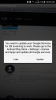
when i want to scan a QR code with my android app, i recieve a popup that tells me "You need to update your google services for QR scanning to work. please go to the android play store > setting> games and apps and update all google services". this is while my phone is up to date. is this new bug in 3cx android app latest release?
 
Hello @alireza_frn

Please note that QR provisioning works as i have tried it on 2 different devices. What version android client are you running and what is the model of the phone you are using?
Have you tried a different device?
 
hi
yes i tried it on 2 devices
first : samsung galaxy j5 pro with android 7
second: nokia TA-1021 with android 8.1.0
and i have same problem.
Of course, ios app working correct and i dont have any problem with my apple devices.
 
Last edited:
What is the the version of the Android client and what is the version of the PBX you are using?
 
Hi,
i experienced the same but then updated 3cx to latest version. only after then will the web client be able to read QR code.
 
What is the the version of the Android client and what is the version of the PBX you are using?
i dont have any problem with pbx ,
i have latest version of android client installed on my phone.
whenever i open my 3cx app and touch scan QR button, i recieve the message that u can see in picture attached in this replay.
so i even cant scan the QR. and befor i scan any QR this message shown to me.
 

Attachments

  • Screenshot_20180516-100042.png
    Screenshot_20180516-100042.png
    423 KB · Views: 32
Last edited:
I did see it aswell on a device, just clicked "later" and then could scan the QR to get the app to work.

Probably a service on your phone not up to date
 
  • Like
Reactions: alireza_frn
Sorry to point the obvious, but have you tried following the instructions in the pop up message? :D

If this message pops up on your device, it indicates that your device's Google services are YEARS old. You'll need these updated if you wanna QR scan. You can either click the "Update" button or follow this guide on how to do that: https://support.google.com/googleplay/answer/113412

Try this, restart the app and check if it starts working.
 
I did see it aswell on a device, just clicked "later" and then could scan the QR to get the app to work.

Probably a service on your phone not up to date
when i click on later, QR provision closing and dont let me to scan QR.
 
Sorry to point the obvious, but have you tried following the instructions in the pop up message? :D

If this message pops up on your device, it indicates that your device's Google services are YEARS old. You'll need these updated if you wanna QR scan. You can either click the "Update" button or follow this guide on how to do that: https://support.google.com/googleplay/answer/113412

Try this, restart the app and check if it starts working.
im IT Man And I know How to Update My Devices. :))
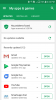
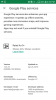
My Device Is Up to Date And I checked the Auto Update Checkbox in Google Play.
IDK Realy why This app Asking About Google Services Update.
 

Attachments

  • Screenshot_20180516-152616.png
    Screenshot_20180516-152616.png
    103.9 KB · Views: 13
Last edited:
Interesting. We'll check into it.
 

Attachments

  • Screenshot_20180516-163256.png
    Screenshot_20180516-163256.png
    89.2 KB · Views: 22
Last edited:
Just checked this out.

Can you do the following and let me know if it works out?
1) After updating restart your device?
2) If the above doesn't work, go to the App Store and search for "Google", update this.

Let me know what happens.


For me after i follow the instructions and update the "Google" service, QR starts working just fine.
 
Last edited:
Do you have problems scanning other QR codes?
 
We are facing the same issue, Huawei nova e3 android 8.0
Didn't try with another phone..
Everything is up to date, and when selecting later, the app is closing.
 
I know that you're trying to use the QR code, but just to tell all of you that with the newest update on samsung Galaxy mail client, the provisionning file now open properly on 3CX apps for Android.
 
Indeed mail will work, some users just hate to setup mail app on thier mobile phones..so we thought this feature is going to be helpful. It's not a deal breaker, but we thought we should point it out for the developing team to improve it.
Thanks for responding .
 
Indeed mail will work, some users just hate to setup mail app on thier mobile phones..so we thought this feature is going to be helpful. It's not a deal breaker, but we thought we should point it out for the developing team to improve it.
Thanks for responding .
We appreciate you reporting the issues you are facing as we are constantly trying to improve user experience (that is why QR provisioning was introduced). We are trying to replicate this and find out why some phones are affected and others are not.
 
I can replicate this problem on Xiaomi Mi A1 phone which has Android One 8.1 OS. It's nearly impossible that this "pure google" phone is shipped with non-latest software components.

Why don't you just grab a QR scanner code and compile it into your own app and skip the google services dependency? Some people don't want to have the "Google app" installed.
 
Same here with a Honor 6X, Android 7.0, updated to the latest vendor patch.
Using an external QR code scanner I opened the URL and with the download file I correctly configured the app ... I bit cumbersome to tell the truth, I second Zvjer suggestion.
 
Status
Not open for further replies.

Forum statistics

Threads
112,349
Messages
592,026
Members
165,512
Latest member
gmacinit