Solved 3CX app doesnt show receiving call but can make calls

Status
Not open for further replies.

Alphabetic

3CX MVP
Silver Partner
Advanced Certified
Joined
Jul 1, 2016
Messages
6,533
Reaction score
2,558
  • 3CX Version, Enterprise Annual 16.0.676
  • Server OS, Debian 9.11
  • Is the 3CX Server Hosted and where? No, Local
  • IP Phone Make/Model/Firmware Samsung S8
  • Provisioning Method: Local / VPN / STUN / SBC
  • Trunk Provider or Gateway Make/Model
  • Has the Firewall Checker passed: YES
  • Are custom Phone Templates being used: YES

Im having an issue receiving calls to our android apps. We're running the latest version 16.0.1.41 and we're on update 3.

This is not an issue for iOS app.

I have deleted and installed the app to no avail.

We use our own firebase account.

any ideas?
 
Ok, I changed PUSH account in the MGMT to 3CX and it works fine now.

Does this mean I dont need to use my own account or do I need to remake it?
 
Hi @kieferschild

So the only thing you changed was stop using your own Firebase?
 
In this case, either keep 3CX PUSH or put the firebase credentials in your MC again (but ensure the FB project is active in google).
 
In this case, either keep 3CX PUSH or put the firebase credentials in your MC again (but ensure the FB project is active in google).

Hi John,

I created a new project and tried with that and it still wont work when using my own PUSH settings.
 
Hi John,

I created a new project and tried with that and it still wont work when using my own PUSH settings.

I just created a new project, and used that - push worked..
Your details were awesome and a pleasure to support and help you. You just forgot the most important 2 things..
I need to know your phone model
And your android os

Maybe you pasted server key wrong? i can guarantee that if you followed this link https://www.3cx.com/docs/ and you put server key and sender id's and reprovision the phone again with QR, pbx without any restart, will spit out push using that custom firebase account.

I think you have a mistake in the portal. If you say that 3CX Push accounts work and yours dont, then the problem is somewhere in your fbase account. I would rule out a problem with the android phones you have. Yet send me the models because I have collected a list of hidden bugs in some phones.. So maybe I can guide you better.
 
I just created a new project, and used that - push worked..
Your details were awesome and a pleasure to support and help you. You just forgot the most important 2 things..
I need to know your phone model
And your android os

Maybe you pasted server key wrong? i can guarantee that if you followed this link https://www.3cx.com/docs/ and you put server key and sender id's and reprovision the phone again with QR, pbx without any restart, will spit out push using that custom firebase account.

I think you have a mistake in the portal. If you say that 3CX Push accounts work and yours dont, then the problem is somewhere in your fbase account. I would rule out a problem with the android phones you have. Yet send me the models because I have collected a list of hidden bugs in some phones.. So maybe I can guide you better.
Also we can offer that you create 2 extensions for us and send the details to [email protected]. We will connect and check. Then you can delete them. Like this we can help you rule out network, wifi 3g and android devices because if we get it and you don't then the angle of how this problem should be tackled changes.
 
No idea why that would happen, I'm tempted to say it may be related to your google account but I have no way of determining that to be absolutely fair.

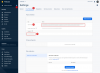
I created a new firebase project just now from scratch, tested it on my local PBX (16U3) and it seems to work ok. Just copied the 3 and 4 points to my PBX. If you enter those wrong in the PBX you will not know it, but the PUSH will fail. Use the "copy button" that appears when you hover over the key to ensure it is copied correctly
12600

Do not use the legacy key please

12599
 
  • Like
Reactions: nb
I just created a new project, and used that - push worked..
Your details were awesome and a pleasure to support and help you. You just forgot the most important 2 things..
I need to know your phone model
And your android os

Maybe you pasted server key wrong? i can guarantee that if you followed this link https://www.3cx.com/docs/ and you put server key and sender id's and reprovision the phone again with QR, pbx without any restart, will spit out push using that custom firebase account.

I think you have a mistake in the portal. If you say that 3CX Push accounts work and yours dont, then the problem is somewhere in your fbase account. I would rule out a problem with the android phones you have. Yet send me the models because I have collected a list of hidden bugs in some phones.. So maybe I can guide you better.

Hi

I did specify phone IP Phone Make/Model/Firmware Samsung S8

The re-provision of 3CX app is what I didnt do (I did do this using my old project and it didnt fix it). Now i've done that is it working as expected on the new project I made.

thanks all for the help.
 
  • Like
Reactions: JohnS_3CX
Hi

I did specify phone IP Phone Make/Model/Firmware Samsung S8

The re-provision of 3CX app is what I didnt do (I did do this using my old project and it didnt fix it). Now i've done that is it working as expected on the new project I made.

thanks all for the help.

AAA perfect - You should re provision always after a change like this - otherwise how is the app going to get the new sender id and which server key will it use? :P
So this info will be pushed and the app will subscribe with new push settings.

Happy that we have been of assistance. Mark this as solved
 
Status
Not open for further replies.

Members Online Now

No members online now.

Forum statistics

Threads
111,831
Messages
589,277
Members
164,660
Latest member
RJenkinsROCK