3CX App - multiple IP phones message

Status
Not open for further replies.

jakthree

Free User
Joined
Feb 8, 2019
Messages
124
Reaction score
18
Windows 10 Enterprise LTSC
3CX Client for 3CX Phone System: Version 16.03.0.220

Extension 2052 has a Yealink SIP-T27G desk phone, 3CX windows client and Android 3CX app. I use the Yealink desk phone to intercom/dial/answer when at my desk. I only use the 3CX windows client to see who is on their phone while at my desk. I don't use the client to intercom/dial/answer. I use the Android app to intercom/dial/answer anytime I am not at my desk.

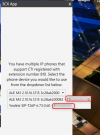
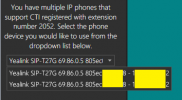
After a recent update, I see this message each time I start the 3CX client.
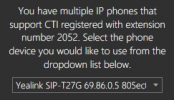
1626884688774.png

The dropdown shows two entries of the same exact phone. I select the default entry and click on the OK. The client starts without a problem.

In 3CX phones, 2052 has two entries

1626884978510.png

I only have one CTI (desktop???) phone.
Why is the 3CX windows client offering two CTI phones of the same choice?
How do I make the 3CX windows client stop offering me a choice?

Thank you,
 
Hi Jak,

I believe you would have already configured your extension on some other IP phones before which is may Inactive right now. This is what showing "Multiple IP phones" when you try CTI mode. (3CX will show the current Active devices in the Phones Page)

I am facing the same like yours and the solution is just go and find the Inactive IP phones that where your extension configured earlier and do the factory reset if you dont want to use that phone.

1626924655796.png

And finally after you all did, just come back to the Windows client and "Re-register". Please make sure if you are moving forward to use any new IP phone then kindly unregister your extension on your existing phone to avoid this confusion.

Thanks,
RA.
 
Cal4Care,
Thank you for your time posting your answer.
I have confirmed that my desk phone is the only phone that has ever been registered as 2052. No other phone, online or offline, has been registered as 2052.

Your screenshot shows two different phones in the dropdown. My problem is that the same phone is shown twice in the client dropdown.

1627061380674.png

Clicking Re-Register in the client does not solve the problem. Exiting and re-starting the client does not fix the problem. I have uninstalled the Windows client, reinstalled and re-registered the client with the server. That did not fix the problem.

The problem does not stop the client from working. It is only a nusiance each time the client starts (which is only once a day when I login to my computer in the morning). No one else (25+ extension) complains because I am the only user using the windows client.

Any other suggestions?

Thank you,
 
Please try the following and let me know if anything changes:

Pick a time when downtime is tolerable, like for instance during out of office hours, and restart the 3CX Management Console. You can do this in "Management Console >> Dashboard >> Services". Highlight the 3CX Management Console only, and click on restart.

Note: Do bear in mind that you will temporarily lose access to it and all 3CX clients will be affected as well.
 
ChrisC_3CX,
Sorry for the delayed response.
I had not got a chance to restart the Management Console. However I can report that the windows client problem has gone away. I last noticed the problem Friday morning when I logged into computer. The problem was gone Monday. Our inhouse Linux 3CX server did not re-boot, no updates occurred, no services started/restarted and nightly backups run. A normal weekend for the server.
The client computer was restarted, but restarting the client computer is part of my daily go home routine.
I don't know of anything server, client computer and Yealink phone that was any different than a typical weekend.
I will keep an eye on the problem, but for now, the problem is gone.
Thank you,
 
As long as it seems to have been resolved!

Please do let us know if it re-occurs!
 
Status
Not open for further replies.

Forum statistics

Threads
112,349
Messages
592,027
Members
165,513
Latest member
megalmazan