3CX App now missing Car/Bluetooth option

Status
Not open for further replies.

FabscoGroup

Customer
Joined
Aug 11, 2021
Messages
6
Reaction score
2
Hi all,

Since my app updated, (now 18.1.3.132) it is now missing the Car/Bluetooth tick box option and as a result, I cannot click my headset to answer calls. Anyone know if there is a way to get this functionality back?
 
Last edited:
Hi @FabscoGroup

Can we have your phone brand/model? As well as your Android OS version.

Thanks
 
Hi Thom - thanks for the reply.

Oppo A54 5g model CPH2195. ColorOS 13 (Android 13, 5 Dec 2022 Security update)
 
@FabscoGroup thanks for your reply.

Unfortunately this is an issue from their side [ Oppo / Oneplus ]. We will try to work on a workaround and issue a fix
 
Hi Thom,
Thanks for the reply - yes just checked on a Samsung A12 (running 18.1.3.130) and it still has the option - is there any way to go back to an earlier version?
 
Hi @FabscoGroup,
Unfortunately we don't provide APKs to install. With your test on the Samsung device running 18.1.3.130, you will still encounter the same problem. As this has been suspended since version 18.1.2.

If you could wait another few days, we're updating the app with a beta fix on Monday which should fix your issue and enable you to answer calls via your headset
 
Hi @FabscoGroup

We have released V18.1.3.134 Beta of the Android client today which should fix this issue:
https://www.3cx.com/blog/change-log/3cxphone-android-build-history/
Please update to this version from the Playstore app.

You might need to enable Car/Bluetooth setting: "Android App Settings (top left hamburger menu) > Settings > Advanced > Enable Car/Bluetooth support (Telecom API)"

Note: Since you were already on 18.1.3.132, I am assuming that you are already in the Beta program so you can ignore the below steps.
If not, you also need to follow these steps.

You'd have to join the BETA program to get this update. Just launch the Play Store, search for 3CX, and while in the Apps information page (where you see Uninstall & Open) scroll down to where it reads "Join the Beta" and press "Join".

It may take a few minutes but once complete you will see the Update button available for you to install the latest Beta app.

At any time, you may leave the Beta program by following the same steps to where the app information page reads 'You're a beta tester' and tap on 'Leave'
 
Last edited:
Hi @FabscoGroup

Have you tried the new Beta app? Feedback would be appreciated

Thanks
 
@FabscoGroup

Just a small update from our end. 18.1.3.135 has been published to production. So no need to go through the Beta app procedure to check if the issue was fixed.
Please install the latest update and let us know if issue was fixed

Thanks
 
I'm running 18.1.3.135 and having a similar problem. it seems to have made an existing problem worse. In the car (a Ford Focus) if an incoming 3CX call appears, it's detected and the car speakers sound. I've not ever been able to answer by pressing the steering wheel button, but I have by pressing the "answer" symbol on the car's display. No longer able to do this, though, as pressing the symbol doesn't answer the call now, but instead brings up a car system message saying that the car is trying to answer, but the phone (Samsung S9+) is not responding. Non-3CX calls to the mobile are answered correctly.
 
Hi @JimB

Thanks for your feedback.

Did you perhaps try with Non-GSM calls? GSM calls work differently, Such as calls coming from Telegram, Messenger or Whatsapp?
Also could you try with both Car/Bluetooth support (Telecom API) enabled and also disabled and give us your findings?

Thanks
 
Hi Thom, I'll give it a go with something non-GSM - whatsapp I think. Already tried with the Telecom enabled (the usual way I've used it..) and disabled. With it disabled it still rings through the car audio, but the only way to answer would be on the phone. I kinda think that the problem got worse 2-3 releases ago. Prior to that I was able to answer by unplugging the USB cable. That would make the car system exit Android Auto, and the answer or reject buttons would appear, and touching "answer" would work. We are at the same position now, except that "answer" no longer answers the call, but generates the system message that I mention above. I'll let you know how it goes with Whatsapp.
 
Hi @ThomB_3CX, same issue on our end.
Following devices DO NOT allow taking on calls with the multifunction button on our Shokz OpenRun headsets. These devices also DO NOT show "Bluetooth/Telecom" toggle in the Advanced menu.

- Samsung Galaxy Tab A8, OneUI 5.0 (Android 13), 3cx 18.1.3.135
- Nothing Phone 1, Nothing OS 1.5.2 (Android 13), 3cx 18.1.3.135

Following device does work correctly, also showing the "Bluetooth/Telecom" toggle.

- Samsung S21, OneUI 5.1 (Android 13), 3cx 18.1.3.135

We have a few more Samsung and Lenovo tablets but haven't tested on those (yet).

Symptoms vary by device.
- The Galaxy Tabs do initiate bluetooth bidirectional when ringing starts, but pushing the button stops bluetooth bidirectionaloutput and 3CX audio output is set to tablet speakers.
- The Nothing Phone doesn't initiate bluetooth bidirectional at all. (Unsurprising, this OS is very similar to Oppo/OnePlus)
- The Samsung S21 can accept calls with the button, but ending the call with button DOES NOT work.


The workaround is answering the call on the device itself, followed by toggling the speaker icon to "Bluetooth".
Eventually a minor manual operation, but very annoying to do for every call.
 
@BertProesmans
Thanks for you feedback.

When Car/Bluetooth setting is not visible in the Advanced Setting, this means that the device is reporting that it is not supporting Telecom API.
We checked with out Samsung Tab A7 running Android 13. It is infact reporting Telecom not supported

With regards to the multifunction buttons and audio direction, the android OS decides where to route audio to a specific device.

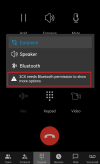
Note: Please make sure that you have given the device the necessary permissions for bluetooth.
You can do this whilst you're in a call, and tapping on the Earpeice button.
If you see the text '3CX needs Bluetooth permission to show more options', tap on this text and allow bluetooth permissions.
1677233748051.png

To confirm routing issue, please share us verbose logging in Personal Message for the mentioned devices for us to confirm the behaviour.
  1. Enable Verbose Logs: “Android App Settings (top left hamburger menu) > Settings > Advanced > Troubleshooting > Enable verbose logging”.
  2. Reproduce the issue and “Send log report”: Android App Settings (top left hamburger menu) > Settings > Advanced > Troubleshooting > Send Log Report
Thanks
 
Last edited:
Hi Thom,

I've done some more work on this.

Phone is a Samsung S9+ on Android 10 and wired Android Auto (Coolwalk)
Car 1 - Ford Focus RS Mk3 running Sync 3.4
Car 2 - Toyota GR Yaris


Whatsapp calls, first of all. Doesn't answer them at all, but thinks it has (!) in the Toyota. Seems common enough for it not to work though. This may be relevant :

"WhatsApp Calling via Android Auto and other useful features announced at CES 2023
Google has confirmed that users who have Samsung and Pixel phones will be able to attend or make WhatsApp calls directly via Android Auto."

So, in the Toyota, all works fine with an incoming 3CX call, steering wheel button answers the call. NB: This even works in Android Auto!

In the Focus, having played around with settings on the phone I've got things back to how they were:

In Android Auto, phone rings, and the audio is on the car system, but the steering wheel button does not answer the call. Pressing it goes to the Sync 3.4 phone section, where it tries to call out to the phone calling in (which is obviously engaged). To answer the call in the Focus, it's necessary to unplug the USB cable from the phone, so that the head unit drops out of Android Auto. The connection to the car is now only Bluetooth of course. The brings up the two buttons on the touch screen of the car for answer or reject. Touching Answer answers the call and it uses the car audio and microphone. The steering wheel button still does not answer though.

So why there is a difference between the two cars, is a mystery, and it would appear that the problem is the interaction between Ford's system and 3CX. I don't know if this is going to help you work out how to fix it on a Ford, or even whether it would be OK on the Ford if the phone was Android 12 or 13, rather than 10, but I hope the information is of some use. As the Focus is my daily driver, I'd love for it to work properly!

Jim
 
Last edited:
[..]

Note: Please make sure that you have given the device the necessary permissions for bluetooth.
You can do this whilst you're in a call, and tapping on the Earpeice button.
If you see the text '3CX needs Bluetooth permission to show more options', tap on this text and allow bluetooth permissions.
[..]
To confirm routing issue, please share us verbose logging in Personal Message for the mentioned devices for us to confirm the behaviour.
  1. Enable Verbose Logs: “Android App Settings (top left hamburger menu) > Settings > Advanced > Troubleshooting > Enable verbose logging”.
  2. Reproduce the issue and “Send log report”: Android App Settings (top left hamburger menu) > Settings > Advanced > Troubleshooting > Send Log Report
I did verify permissions, Android 13 has "Nearby devices" which I manually allowed for 3CX on all our devices.

I sent you a message using the button "Start conversation", couldn't find out how to upload attachments though.
 
@JimB
Thanks for your feedback. Highly appreciate the amount of information provided.

Whatsapp should stricly speaking still work as a normal bluetooth device and not via android auto.

With regards to the 3CX App, this seems to be a a car vendor specific issue since this works on the Toyota GR Yaris as you said. We have also tested this with other car manufacturers and got positive results.
On another note, we did infact test with one of our colleagues Ford Focus and we experienced your issue. But this again is a vendor issue. It was tested using a Samsung Android 13 device in fact.
So until the vendor provides a fix themselves, it is out of the control of 3CX
 
  • Like
Reactions: OlegR_3CX
Thanks Thom, pretty much what I anticipated, and glad you confirmed it with your colleagues Focus too. I very much appreciate you having investigated so thoroughly - excellent service.
 
I'm experiencing this issue on a Lenovo Thinkphone by Motorola, no Telecom api option showing. Everything was working fine on the same car (Audi MMI) with OnePlus nord. As a result, I can't answer the call from the car but I need to answer on the phone instead. Also, incoming call show "1000000" as caller ID.
Android OS version is 13, 3CX app version is 18.1.4 beta
 
Last edited:
Status
Not open for further replies.

Forum statistics

Threads
112,147
Messages
590,959
Members
165,167
Latest member
Finatra.us