3CX Assitant VLAN Network Help

Status
Not open for further replies.

turnkey

Joined
May 9, 2009
Messages
64
Reaction score
0
Hello,

I'm about to embark on setting up a 25 user 3CX system.

Our VoIP & PC network will be connected together, however, I need some advice on how to ensure all computer traffic/internet traffic goes through the Active Directory Server and that router. But, I need all Phone traffic to go through the phone PBX and phone's router connection.

I had originally considered setting upa VLAN, to keep the two networks separated. But then, we will not be able to access the 3CX PC assistant, right?

Appreciate any help,

Many thanks,

Mike
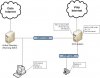
 
3CX Assistant will work find with VLANS if you multi-home the 3CX box. 1 NIC for Phone VLAN and 1 for DATA. But, if your PBX is set to always deliver audio for your voip provider you should not need to worry about phones not using the right internet connection as all they need to talk to is the PBX. Let the PBX worry about routing to your provider.
 
Hi Danny,

Thanks for your reply.

Could you let me know what you mean by "Multi-Home the 3CX box" ?

The plan is, to setup 2 separate VLANS. My concern is how does the 3CX assitant talk to the 3CX PBX, if its on a separate VLAN?
 
Just a thought, but does the 3CX PBX Server need to be the DHCP server?

If it doesn't, then I think the problem is solved, as I simply set the Gateway/DNS of the phones to the 3CX server?

And ensure the phones gateway/dns is to their active directory server?

It's rather messy though..

I hope someone can provide some advice on what to do?
 
turnkey said:
Hi Danny,

Thanks for your reply.

Could you let me know what you mean by "Multi-Home the 3CX box" ?

The plan is, to setup 2 separate VLANS. My concern is how does the 3CX assitant talk to the 3CX PBX, if its on a separate VLAN?

Sorry, by Multi-Home I mean to use Multiple NICs in the 3CX system. Here is a VERY basic drawing of what I mean. Adjust for your environment.
 

Attachments

  • 3cxVlans.jpg
    3cxVlans.jpg
    37.8 KB · Views: 1,156
Hi Danny,

Thanks, that's a great help.

Do you have any recomendations in terms of a network switch?

As I'm struggling to find a suitable one.

Many thanks,

Mike
 
Mike,
I have been using HP Procurves for awhile and they work great. They also have a life time warranty.

Jay
 
Hi Jay,

Thanks for your help.

Can you clarify, whether I would need an additional router to do the routing, or will the network switch "route" the phones/PC's to the correct server?
 
Mike,
I think this might be a little more then a forum can help you with. Now your getting into routing and all the good things it can do. But it would take hours of forum time just to explain to how to do it for you. If this is a hobby for you , well google is your friend, if it's for your business I would suggest that your hire a network person to work out the things you want to do. This stuff can get complicated fast.

Jay
 
Thanks for your support Jay.

I've looked into this today and spoken to a couple of other people.

Just wondered what you thought..

How about, we mix the two networks together, and simply set the phones gateway as the PBX IP. We can setup SBS 2008 (DHCP server) to hand out a different gateway to the IP phones?

We could also set the access list on the Phones Router to prevent any PC's accessing it.

This seems like the best option at the moment.
 
Status
Not open for further replies.

Latest Posts

Forum statistics

Threads
111,884
Messages
589,542
Members
164,741
Latest member
Carsonix