- Joined
- Feb 13, 2024
- Messages
- 36
- Reaction score
- 10
I've got a little on-premises virtualised 3CX system which I use for testing things like new updates before I roll them out to production systems.
Today I was getting ready to perform a backup in readiness for upgrading from V20 U6 to U7, but as I was doing that the system decided to go ahead and update automatically. It didn't come back up again.
I gave it an hour or more and still it was just saying that it was trying to reconnect. I refreshed the page and it took me to the login page ok, but when I try to log in it says "3CX Admin Console is not responding. Please refresh and try again". I did this several times but I get the same result.
In the console I ran the command "service 3CX* status", but nothing at all was returned.
I then ran "3CXStopServices" followed by "3CXStartServices" which eventually returned the following:
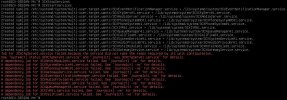
I must confess I am not very familiar with Debian or just Linux in general. From the above though, I'm guessing the 3CXCfgServ01 service failed to start for whatever reason, and then all the other services subsequently failed to start because they were dependant on that one starting up first?
What I'm currently trying to do is view those log files it mentions to see if I can figure out why it failed. But is this a common thing? Am I the only one with this issue? I can't see any other threads about it so far. Luckily it's a virtual machine and I've got snapshots of it so I have been able to roll it back to a state prior to it breaking. I have attempted the same procedure 3 times now, just going to updates within the 3CX management console and choosing the new release, and it fails in the same way every time.
Is there something obvious that i might be doing wrong? I don't want to update and production systems and end up with them broken in the same way.
Thanks!
Today I was getting ready to perform a backup in readiness for upgrading from V20 U6 to U7, but as I was doing that the system decided to go ahead and update automatically. It didn't come back up again.
I gave it an hour or more and still it was just saying that it was trying to reconnect. I refreshed the page and it took me to the login page ok, but when I try to log in it says "3CX Admin Console is not responding. Please refresh and try again". I did this several times but I get the same result.
In the console I ran the command "service 3CX* status", but nothing at all was returned.
I then ran "3CXStopServices" followed by "3CXStartServices" which eventually returned the following:
I must confess I am not very familiar with Debian or just Linux in general. From the above though, I'm guessing the 3CXCfgServ01 service failed to start for whatever reason, and then all the other services subsequently failed to start because they were dependant on that one starting up first?
What I'm currently trying to do is view those log files it mentions to see if I can figure out why it failed. But is this a common thing? Am I the only one with this issue? I can't see any other threads about it so far. Luckily it's a virtual machine and I've got snapshots of it so I have been able to roll it back to a state prior to it breaking. I have attempted the same procedure 3 times now, just going to updates within the 3CX management console and choosing the new release, and it fails in the same way every time.
Is there something obvious that i might be doing wrong? I don't want to update and production systems and end up with them broken in the same way.
Thanks!