3CX Call Popup not working

Status
Not open for further replies.

abhishek.kumar5@awcsoftwa

New User
Joined
Mar 13, 2023
Messages
3
Reaction score
0
Hi,

I'm not getting call popup window when receiving an inbound call and also record is not getting created in Salesforce for inbound call. For outbound call it is working fine, As if we call from our end Contact record is getting created in Salesforce.

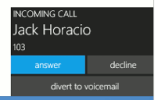
And also when a call comes into 3CX I'm not getting call alert which should be visible on top right corner which includes come buttons including Answer, Decline and Divert to Voicemail.
 

Attachments

  • Screenshot 2023-03-13 105640.png
    Screenshot 2023-03-13 105640.png
    8.3 KB · Views: 14
In order to investigate the issue, please enable verbose logs from the 3CX Console > Dashboard > Activity Log > Settings. Then make a test call where you reproduce the issue, and check the 3cxSystemService.log file that you can download from the 3CX Console > Dashboard > Activity Log > Logs button > Instance folder.
 
I've followed the steps you provided and downloaded 3cxSystemService.log file and attaching the file. Please have a look into it and let me know further steps to debug it.

And also for an inbound call there's some character is getting attached with contact number like this:

918709678961 mod_sofia03/13/2023 6:10 PM
 

Attachments

It seems that your SIP Trunk is sending "mod_sofia" as caller's number. Or your SIP Trunk configuration is incorrect, and 3CX is reading the caller's number from a wrong field.
2023/03/13 05:41:51.106|17082|0055|Info|CRM: making request to CRM. Number=mod_sofia
2023/03/13 05:41:51.106|17082|0055|Verb|CRM: Number includes invalid characters: 'mod_sofia'. Lookup will not be performed.
 
Hi Ernesto,

Can you please guide me with the steps so that I can troubleshoot the issue with SIP Trunk setting? And also regarding call alert thing what configuration steps I need to follow, As of now call alert is not visible.
 
You need to go to the Management Console > SIP Trunks > edit your SIP Trunk > and check the Inbound Parameters tab. You're probably using an unsupported SIP Trunk. You will need to play with these parameters until you get the caller's number in the phone's display. The easiest way is checking the SIP message using a Wireshark capture, so you can see in which field the caller's number is coming. Then you can adjust the parameters to read the number from that field.
 
  • Like
Reactions: Evolute IT
Status
Not open for further replies.

Forum statistics

Threads
112,148
Messages
590,962
Members
165,168
Latest member
Stephan Eusebe
