Solved 3cx calling internal DID's

Status
Not open for further replies.

RuntyCardinal

Free User
Joined
Mar 18, 2019
Messages
26
Reaction score
5
Good morning,

I am running 3cx version 16.0.6.584. I found that we cannot call our internal DID's. Is there any setting inside 3cx that would prevent this?

I tested on another client I have, using version 16.0.5.619, and found that they can call the internal DID's with out issue.
 
Hi,

DIDs are meant to be called externally.

Do you perhaps mean that you cannot call your internal extensions?
 
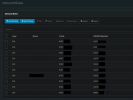
No, when I try to call any of the numbers listed in the "Inbound Rules" the call will not connect. I can call other extensions directly with out issue.
 

Attachments

  • Capture.PNG
    Capture.PNG
    27.9 KB · Views: 31
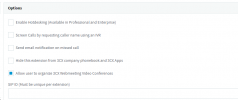
Have you tried to add the DDI number for the extension, in the SIP ID field under Options.

1613402698137.png
 
Ok, if other 3rd parties can call your numbers and they work fine, you can at least rest assured that the trunk works as intended. Confirm this first please.

Now as for your own extensions not being able to call your DIDs, you will need to first look at your your outbound rules.

You need at least one outbound rule to match in order for the extensions to be able to call the DIDs.
 
Calling your own number (like a DID) not only requires that your outbound rules support this, but it will also use two of your concurrent conversation licences per call. You can confirm your outbound rules in the Activity Log. When you create one for the specific DIDs, place it above the "general" catch-all rule normally used.

This can work in one of 3 ways...using your provider out, and back in, using a loop trunk (avoiding your provider), out and back in, or making use of the SIP ID (as mentioned by Saqqara). The last solution only uses one concurrent licence per call, but can only be done if the SIP ID is not already used for other purposes. This does not require outbound rules, and should override any in place.
 
I created an outbound rule for the DID and placed it at the top. In "calls to number starting with prefix" I placed the DID's number. Once doing a test call it just never connected, it would ring endlessly.
I have an outbound rule for local calls, 10 digit, and 11 digit. The 3cx server has been up and running for a few years without issue.

Outside callers are able to call the DID and get through, and I can call the extension directly via its extension number.

I placed the DID number under "SIP ID" and the calls still failed as well. Activity log is showing "603 Decline; from IP 192.1xx.x.x:5060
 
Once doing a test call it just never connected, it would ring endlessly.
It must have gone somewhere if it was ringing. Did you check the Activity Log to see if it did come back to 3CX?

I placed the DID number under "SIP ID" and the calls still failed as well. Activity log is showing "603 Decline; from IP 192.1xx.x.x:5060
...and the SIP ID was exactly as a user dials the number (including any prefixes)? What IP declined the call, 3CX, or the end user? (there is no security issue showing private IPs)
 
Try updating your PBX first so we can all be on the same page, the latest update as of now it 16.0.8.9 and you still on update 6


[EDIT]
I placed the DID number under "SIP ID" and the calls still failed as well. Activity log is showing "603 Decline; from IP 192.1xx.x.x:5060
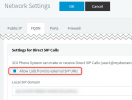
The is one more thing you need to do to allow calling to numbers you have set as SIP IDs.
Go to Settings --> Network --> FQDN tab, and here check the option "Allow calls from/to external SIP URIs".
1614596644578.png
 
Last edited by a moderator:
Good afternoon,

JohnS_3cx resolved the issue. Thanks everyone!
 
Status
Not open for further replies.

Forum statistics

Threads
111,974
Messages
590,081
Members
164,899
Latest member
mazet